The Infinite Content Machine™

One notebook in.
Five content formats out.

I rebuilt the NotebookLM section of my Agent OS around a simple idea: every content format gets its own tab, its own generator, and its own gallery of everything ever made. Drop sources into one notebook — get shorts, podcasts, infographics, slide decks and reports out. Here's the whole machine, with real screenshots.

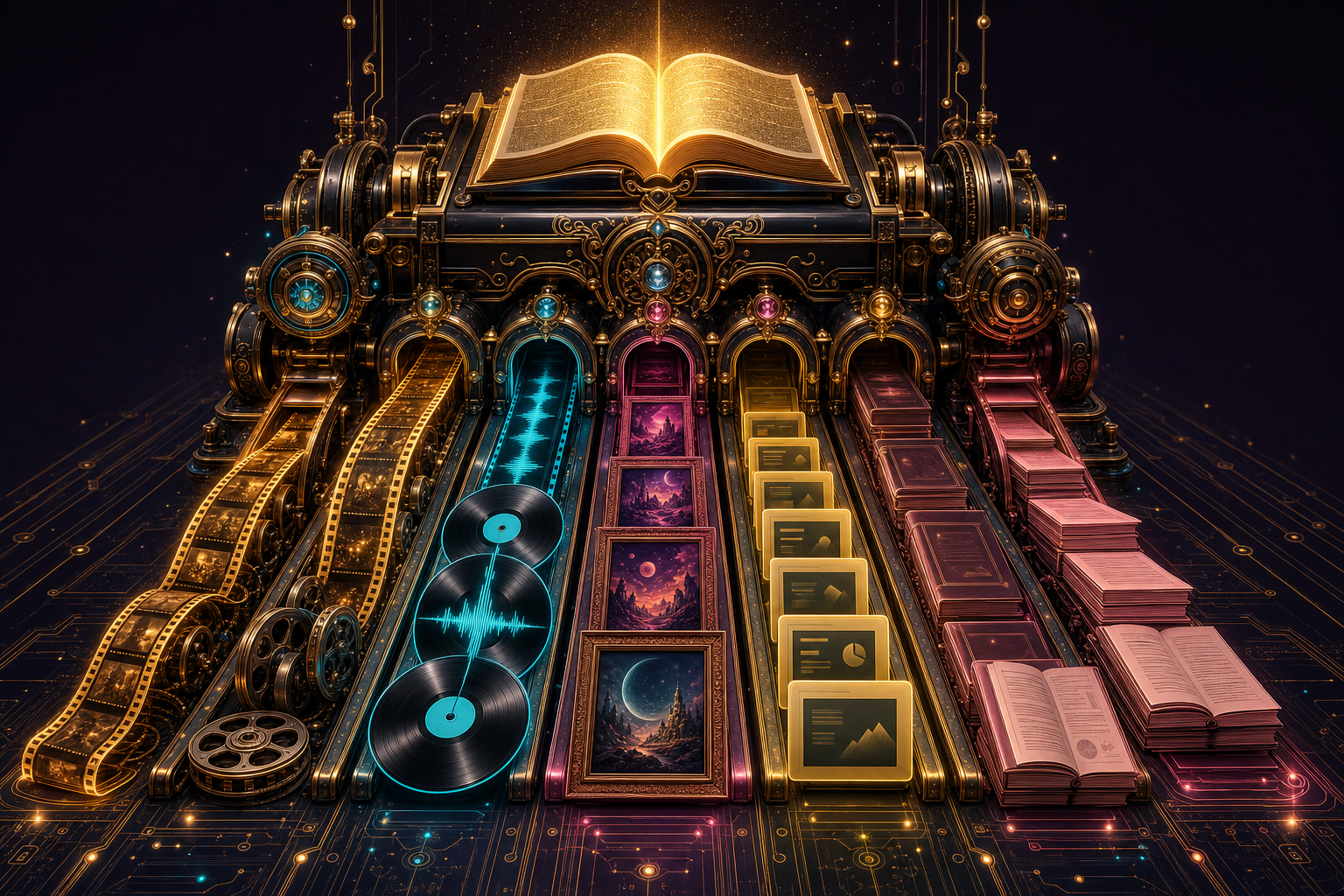
An ornate machine in a dark studio: one glowing book feeds in, and five colour-lit chutes flow out with film strips, records, posters, slides and reports
5 content formats 1 pile of sources 26 assets in my galleries ~10 min per new piece $0 — NotebookLM is free
✦ ✦ ✦
I · THE PROBLEM

The Content Treadmill Problem.

Imagine spending a whole day researching a topic you know cold.

You turn it into one video.

The video does fine. Then it's gone.

Next week, the treadmill resets.

New post needed. New research. New script. New editing session.

The podcast people want a podcast. LinkedIn wants an infographic. A client wants a deck.

Each one is a separate project, built from scratch, in a different tool.

So you pick one format, ship one piece, and let the other four die in your head.

That's the treadmill — running all week and staying in the same place.

The Infinite Content Machine™ breaks that cycle for good.

THINKING IT? "This sounds like another complicated AI workflow to learn."

It's one free Google tool with tabs on top.

If you can drop links into a folder and click one Generate button, you can run the whole machine.

Research once. Publish five times. That's the whole trade.
II · THE IDEA

What the machine actually is

NotebookLM's superpower is that it works from your sources — you load a notebook with articles, PDFs and videos on a topic, and everything it makes is grounded in that pile.

Most people use it once, make one audio overview, and forget it. The unlock is treating one well-fed notebook as a content factory: the same ten sources that made a podcast can also make a short video, an infographic, a slide deck and a written report. Five pieces of publishable content from one research session.

So I rebuilt the Notebook section of my Agent OS to match: one tab per format, each with a generator at the top and a gallery underneath showing everything that's ever come off that production line.

Your sources articles · PDFs · videos One notebook NotebookLM · grounded on your sources only 🎬 Shorts — Reels/TikTok ready 🎙 Podcasts — two AI hosts 🖼 Infographics — one shareable image 📊 Decks — full slide presentations 📄 Reports — written strategic briefs
Sources in → one grounded notebook → five publishable formats out
III · THE LOOP

How one piece of content gets made

Every format follows the same five-step loop. Once you've done it twice it's muscle memory.

Research agent finds sources Import into the notebook Generate pick a format tab Pull into the gallery Publish or repurpose
Research → import → generate → pull → publish — same loop for every format
IV · THE SOURCES

The pieces this is built on

V · THE TOUR

A tab for every format, a gallery in every tab

This is the rebuilt Notebook section of my Agent OS. Same yellow accent, ten tabs across the top — five format tabs each holding a generator plus a gallery, a Studio tab that can generate any of the nine formats in one click, and an Assets tab showing everything ever saved in one grid.

🎬 Shorts — vertical video for Reels, Shorts & TikTok

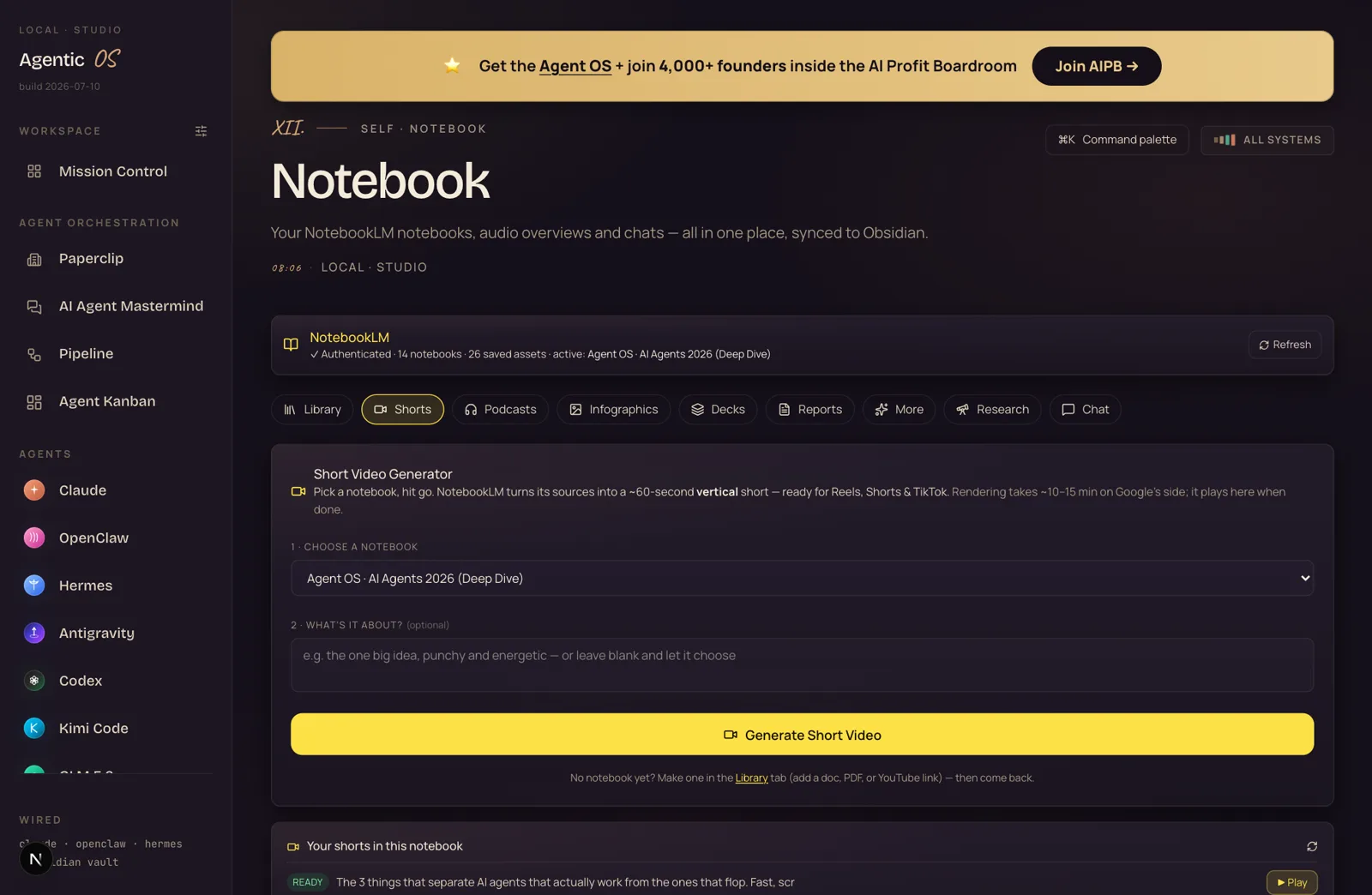
The Shorts tab: pick a notebook, optional focus, Generate Short Video button, and a list of rendered shorts below
Pick a notebook, one optional line of focus, hit Generate — a ~60-second vertical short renders in 10–15 minutes.

NotebookLM turns the notebook's sources into a script and renders a finished vertical video. You can see one sitting READY in the list — "The 3 things that separate AI agents that actually work from the ones that flop". Every video ever pulled lives in the gallery below the generator.

🎙 Podcasts — two AI hosts, ready-to-publish episodes

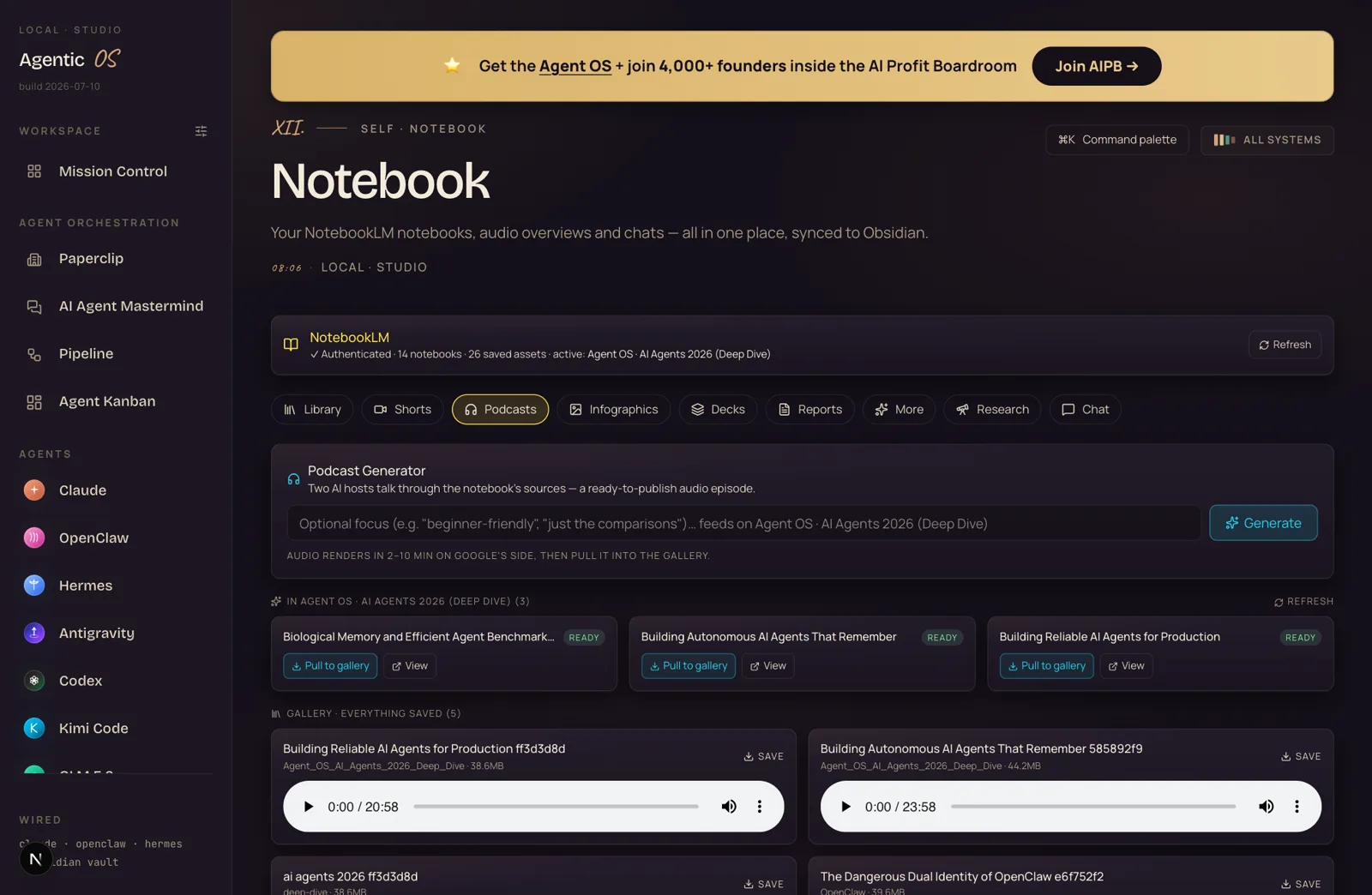
The Podcasts tab: generator on top, three READY episodes in the notebook, and a gallery with playable 20-minute audio players
Three READY episodes up top — the gallery below has playable 20–24 minute episodes, stored on my disk.

This is NotebookLM's most famous trick and it fits the machine perfectly: two hosts discuss your exact sources for twenty minutes. The middle one — "Biological Memory and Efficient Agent Benchmarks" — I generated while writing this guide with a one-line focus prompt. Every episode is playable right in the gallery.

🖼 Infographics — one shareable image per idea

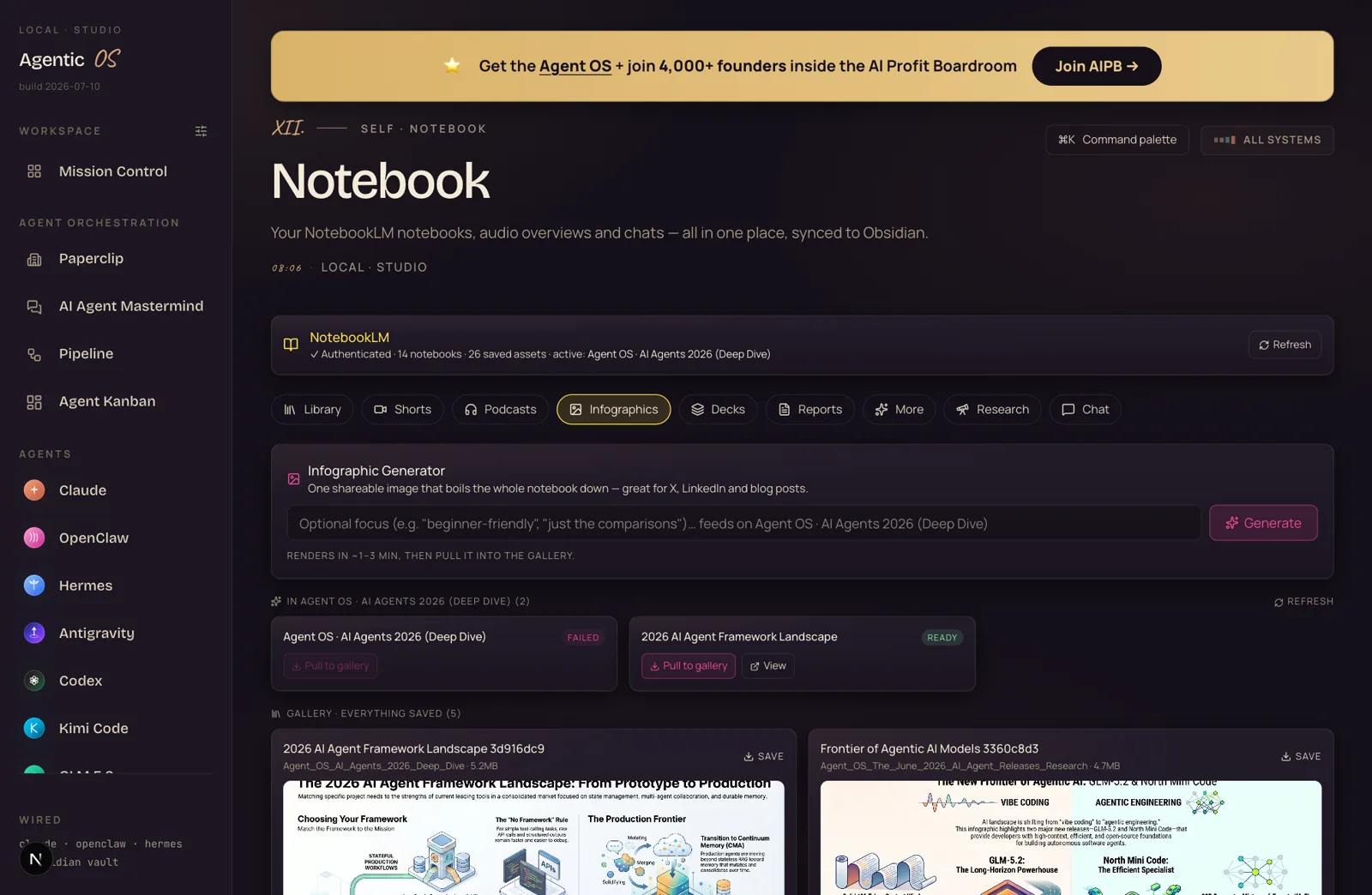
The Infographics tab: pink-accented generator, live artifacts with READY and FAILED badges, and a gallery of full infographic images
The gallery holds five full infographics across my notebooks — and yes, that FAILED badge is real; Google-side renders occasionally flop and you just re-run them.

One image that compresses the whole notebook — "The 2026 AI Agent Framework Landscape" came out clean enough to post straight to X. Notice the honest FAILED badge on one attempt: the machine shows you everything, and a retry is one click.

📊 Decks — full presentations, pulled as PDFs

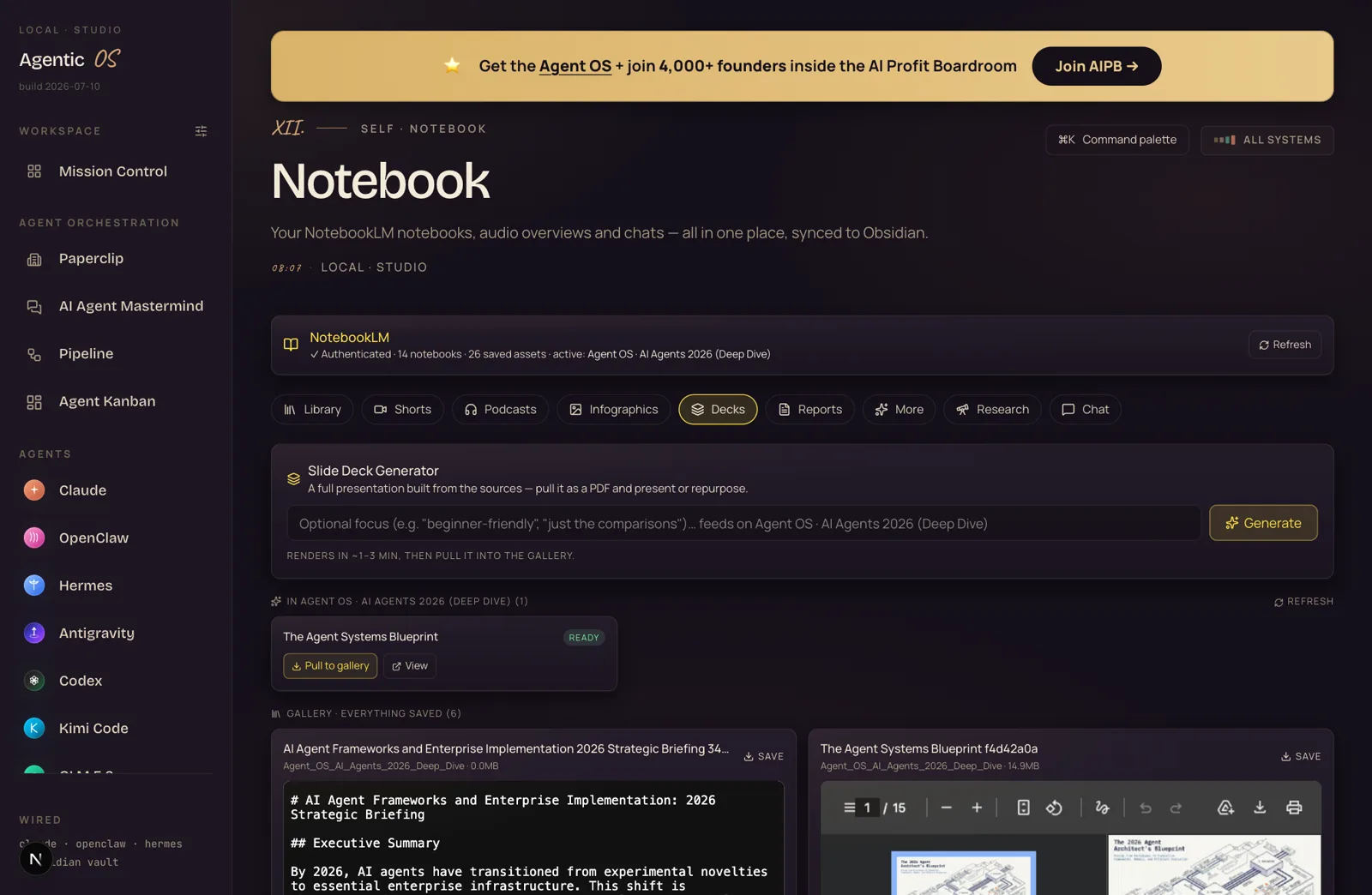
The Decks tab: slide deck generator and a gallery with an inline 15-page PDF viewer showing The Agent Systems Blueprint
"The Agent Systems Blueprint" — a 15-page deck NotebookLM built from the notebook, viewable page by page right in the gallery.

The deck generator produces a real presentation — title slides, diagrams, structured sections. The gallery embeds a PDF viewer, so you flip through the pages without leaving the dashboard. Pull the file and it's ready for clients, webinars or repurposing into carousel posts.

📄 Reports — written strategic briefs

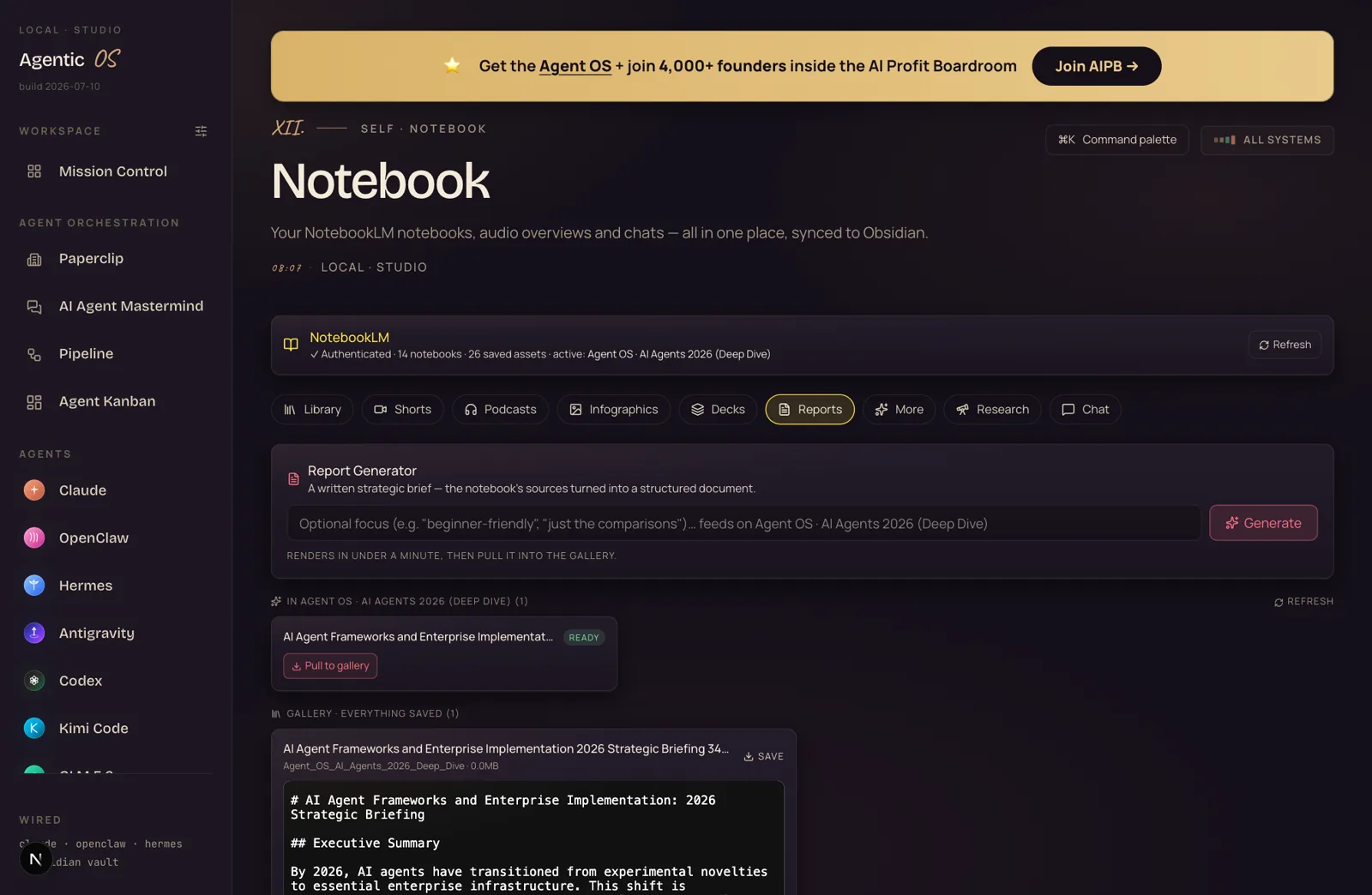
The Reports tab: report generator and a gallery showing a markdown strategic briefing with executive summary
A written brief with an executive summary — renders in under a minute, lands as markdown you can publish or feed to other agents.

The fastest format: a structured document with an executive summary, built from the same sources. These are gold as blog-post drafts, client briefings — or as input for the next agent in a pipeline.

And because everything pulls to disk, the galleries double as an archive: the header on my install reads 26 saved assets across 14 notebooks — every one of them is a piece of content that took minutes, not days.

THINKING IT? "Where do the files actually live?"

On your machine — every Pull saves into your vault (Agentic OS/Notebooks/_assets/ in my Obsidian).

The galleries read from disk, so they survive NotebookLM sessions, work offline, and the files are right there to upload wherever you publish.
VI · BEFORE AND AFTER

What changes when content becomes a machine

CONTENT, THE MANUAL WAY ~2 days per piece
  • Research again from scratch for every format
  • Write the script, record, edit, export
  • Design the infographic in a design tool
  • Build the deck slide by slide
  • Each format is its own separate project
  • Old work scattered across drives and tools
WITH THE INFINITE CONTENT MACHINE™ ~10 min per piece
  • Research once — the notebook holds it forever
  • Five formats generate from the same sources
  • One optional focus line steers each piece
  • Everything renders on Google's side, free
  • One click pulls it into a gallery on your disk
  • Every piece ever made, browsable in its tab
VII · BEFORE YOU BUILD

Three doubts you might have

"AI-generated content is generic slop."
Generic inputs make generic outputs. NotebookLM only works from the sources you load — so a notebook full of your niche's best articles, your own transcripts and your research produces content grounded in exactly that. The focus prompt steers each piece further. Curate the notebook well and the output sounds like your corner of the internet, not the average of it.
"Another dashboard to maintain — I'll just use notebooklm.google.com."
The Google site works fine for making one thing. What it doesn't give you is the production-line view: per-format tabs, galleries of everything ever made, files saved to your own disk, and the same place your other agents live. The dashboard turns a toy you visit into a machine you run.
"The renders probably fail half the time."
Occasionally one flops — there's a real FAILED badge in my infographics screenshot above because I don't hide that. The retry is one click and the second attempt usually lands. Across my galleries: 26 assets saved, and the only failures were image renders that re-ran fine.

Members inside the Boardroom post what happens when doubts like these get retired — content pipelines shipped, hours reclaimed, first agents live. It's all in one doc, in their own words.

Read the member wins doc (158 pages) →
✦ ✦ ✦
VIII · THE SYSTEM

The Infinite Content Machine™: four parts

i.

The Source Pile

One notebook per topic, fed by the built-in research agent. Ten good sources beat a hundred random ones.

ii.

The Format Tabs

Shorts, Podcasts, Infographics, Decks, Reports — each with a one-line generator wired to that format.

iii.

The Galleries

Everything ever pulled, browsable per format — video players, audio players, image grids, PDF viewers.

iv.

The Vault

Every file lands on your disk, synced into Obsidian — an archive your other agents can read and reuse.

Skip the setup

Get the Infinite Content Machine™ built for you.

You can wire this together yourself with the steps above. Or get the whole thing done, inside the Agent Operating System — the format tabs, the galleries and the vault wiring pre-connected.

The full Agent OS — the Infinite Content Machine™ already wired, tabs, galleries and all
The notebook playbooks — what to feed it so the output sounds like you, not the internet average
Coaching calls where I set up your content machine with you — five a week
A room of 3,900+ operators running this exact stack on real businesses
The prompts, SOPs and agent library — 1,000+ prebuilt agents ready to run
Get the Agent OS → Inside the AI Profit Boardroom · aiprofitboardroom.com
One good research session should feed your feed for a month.
IX · WHAT MEMBERS ARE DOING

The results people are getting

The Boardroom is 3,900+ founders and operators — agency owners, ecom founders, course creators — running systems like this on real businesses. So far, 258 wins have been documented across 38 countries.

3,900+ members inside AIPB
258 documented wins
38 countries
400K YouTube subscribers
163K X followers
29K+ Udemy students

Members post their wins as they happen — content pipelines shipped, hours saved, client work automated. They're all collected in one doc you can read right now.

Read the member wins doc (158 pages) →
The bottleneck was never ideas. It was production. Production is solved.
X · THE RECAP

The short version

i.

Research once

One notebook holds the sources. The research agent fills it in minutes.

ii.

Generate five ways

Shorts, podcasts, infographics, decks, reports — same sources, five formats, free renders.

iii.

Gallery everything

Every piece pulls to a per-format gallery on your own disk. Nothing gets lost again.

iv.

Publish on repeat

Ten minutes a piece. The bottleneck stops being production and becomes deciding what to say.

✦ ✦ ✦
One more thing

Get the Infinite Content Machine™ — and the OS around it.

"I don't have time for content" stops being true when one research session becomes five publishable pieces. And the machine is one section of a bigger system — the same dashboard runs the agents, the SEO pipeline and the models behind everything on this site.

The Infinite Content Machine™ pre-wired — notebooks, format tabs, galleries
The complete Agent OS — agents, SEO pipeline and models on one screen
Five live calls a week — never stuck for more than a day
258 documented member wins across 38 countries — read them before you decide
The new-tool briefings — tested takes like this one, as tools ship
Get the Agent OS → Inside the AI Profit Boardroom · aiprofitboardroom.com