
I ────── The Apollo Voice Command Engine™
Hermes Apollo · realtime voice · runs your Mac

The Apollo Voice Command Engine™.

Meet Apollo — a butler that lives in your Agent OS and runs your Mac by voice. You talk, it acts: opens any app, pulls up any website, and builds a working app or game while you watch — hands-free, in real time, no clicks, no lag. Here's exactly how it works, and how to switch it on.

A refined English butler woven from cyan light, standing in a warm study, conjuring glowing voice-waveform ribbons and floating app windows from his hand toward a screen, a laptop on the desk beside him

Most AI assistants type back at you. Apollo is different: it's a live spoken conversation — you say "open Notes" and it opens; you say "build me a neon snake game" and a real, playable game appears in the panel about a minute later. It talks in a calm butler's voice, it knows who you are (it reads your own notes), and it never has to be clicked awake. This guide breaks the whole thing down in plain words.

0 clicksrun your Mac hands-free, just talk
Realtimeit replies + acts the instant you stop talking
~90sfrom spoken idea to a working app in the panel
Always onlistens, acts, and reconnects itself
II ────── The problem
The Keyboard Problem

You run your whole day through a keyboard and a hundred clicks.

Think about the last hour at your desk. You wanted one thing — check a number, open a tool, spin up a quick page — and to get it you typed a search, clicked a tab, hunted a menu, copied, pasted, switched apps, and lost your train of thought three times on the way.

That's the tax nobody talks about. Not the big tasks — the thousand tiny ones. Every "just open…", every "let me quickly…", every "where's that thing…" costs a few seconds and a scrap of focus. Do it four hundred times a day and it's the whole day.

And when you actually want to make something — a little tool, a demo, a game to show someone — you're staring at a blank editor, hands on the keyboard, doing it all yourself.

Your hands are the bottleneck. The ideas are instant; the doing is slow, manual, and click-by-click.

The Apollo Voice Command Engine breaks that cycle — you say what you want, and it does it.

Thinking it?

"I don't want to talk to my computer like it's a gimmick." — fair. This isn't dictation or a party trick. It's the difference between describing what you want and doing it by hand. You already tell a person "open that up for me" and it happens. Apollo makes your Mac work the same way.

III ────── How it works, in simple words

A voice, a fast brain, and a pair of hands.

Three pieces. That's all Apollo is.

1. Your voice — the input. You just talk, out loud, like you'd talk to an assistant in the room. No wake word to remember, no button to hold. Apollo is always listening while its panel is open.

2. A realtime brain — the middle. "Realtime" means there's no awkward pause. With most AI you type, wait, and read a reply. Apollo is a live phone-call-style conversation: the moment you stop talking, it's already answering in a natural butler's voice. Under the hood it's OpenAI's newest live-voice model — but you never touch any of that; you just speak.

3. A pair of hands — the output. This is the part that makes it more than a chatbot. Apollo can actually do things on your Mac. Say "open Notes" and Notes opens. Say "pull up YouTube" and the browser goes there. Say "build a landing page for my course" and it writes the whole thing and shows it to you, live, in the panel. It doesn't just talk about doing it — it does it.

YOUR VOICE just talk · no button REALTIME BRAIN no pause · butler voice hears you + decides THE HANDS opens apps · builds apps it acts
The whole engine — you talk, the realtime brain hears and decides, the hands act on your Mac. No typing anywhere in the loop.
What you say → what it does "open Calendar" Calendar opens on your Mac "pull up YouTube" the browser goes there "build a neon snake game" a playable game in ~90s Same pattern every time: plain words in, real action out.
You don't learn commands — you just say what you want in normal words, and Apollo maps it to a real action.
"Do I have to talk to it in some stiff robot way?"

No. You speak like you'd speak to an assistant in the room — "hey, open Notes for me," "can you pull up YouTube," "build me a quick landing page." There are no magic phrases to memorise; it understands plain, everyday language and works out what you mean.

IV ────── Exactly how it works, step by step

What happens between "hey" and "done" — no mystery.

You open the Apollo panel. It connects itself to the live-voice service in a second or two and starts listening — you'll see it say "Realtime · listening — just talk." No key to press.

You speak. Your microphone streams straight to the voice model as you talk. The instant you stop, it already knows what you said — there's no "sending…" step.

It decides: talk, or act. If you asked a question, it just answers out loud. If you asked it to do something, it quietly picks the right tool — "open this" or "build this" — instead of only replying.

It acts on your Mac. For "open" requests it runs the Mac's own open command (the same thing that happens when you double-click an app), so Notes, Safari, or any website you name just opens. For "build" requests it writes a complete, self-contained app on your machine.

It shows you the result + confirms in character. A build appears live in the panel in about ninety seconds; an app or site opens in front of you. Apollo says something short and butler-ish — "Opening Google now, sir" — so you always know it acted.

It stays live, and heals itself. Look away to another tab and it politely stops the mic; come back and it reconnects on its own, so it's always ready in real time — you never have to restart it.

So the honest one-line answer to "what IS it?": it's a live spoken conversation wired to your Mac, so the words you say turn straight into actions and finished apps — no keyboard in the middle.

1 · you speak "open Calendar" 2 · it hears live no pause · no typing 3 · picks a tool open · or build 4 · it acts app opens / builds 5 · confirms "done, sir"
One command's journey — spoken word to finished action in seconds, with no keyboard anywhere in the chain.
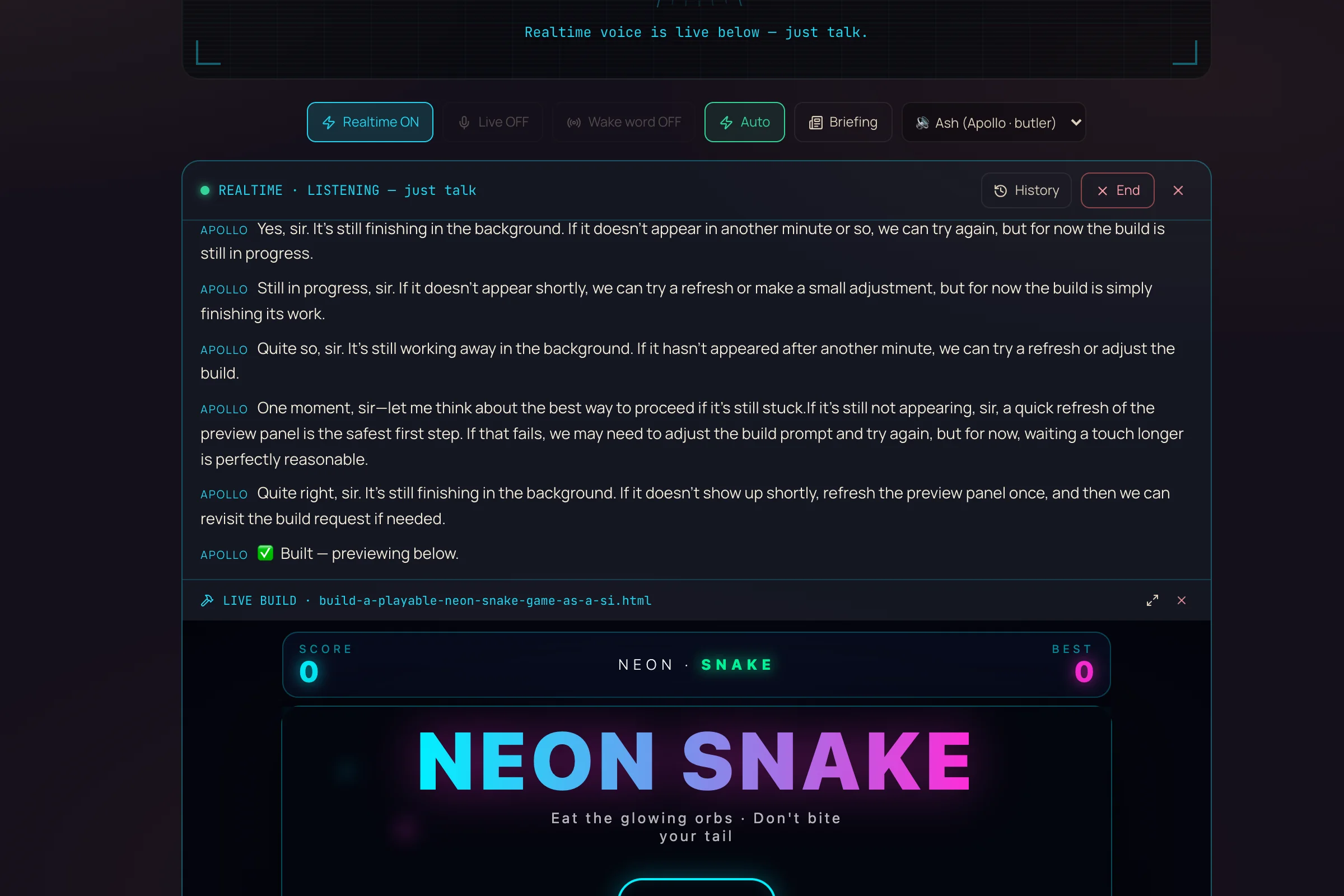
Apollo's panel after a build command: the control bar with Realtime ON and the Ash butler voice, a live transcript of Apollo confirming in character, and a LIVE BUILD preview of a playable NEON SNAKE game it just built

This is Apollo actually building. One spoken request — "build a playable neon snake game" — and here's the result: the butler narrates in character in the transcript (ending "✅ Built — previewing below"), and the finished, playable NEON SNAKE game renders live in the panel underneath. No editor, no code, no keyboard — just the sentence.

You don't type the command any more. You just say it — and the machine does the rest.
V ────── Where it lives

It's already in your Agent OS.

Apollo isn't a separate app to install — it's a tab inside the Hermes section of the Agent Operating System. Open the dashboard, go to Hermes, click Apollo, and the panel connects itself. Everything it opens and builds happens on your own Mac; nothing leaves your machine except the voice link.

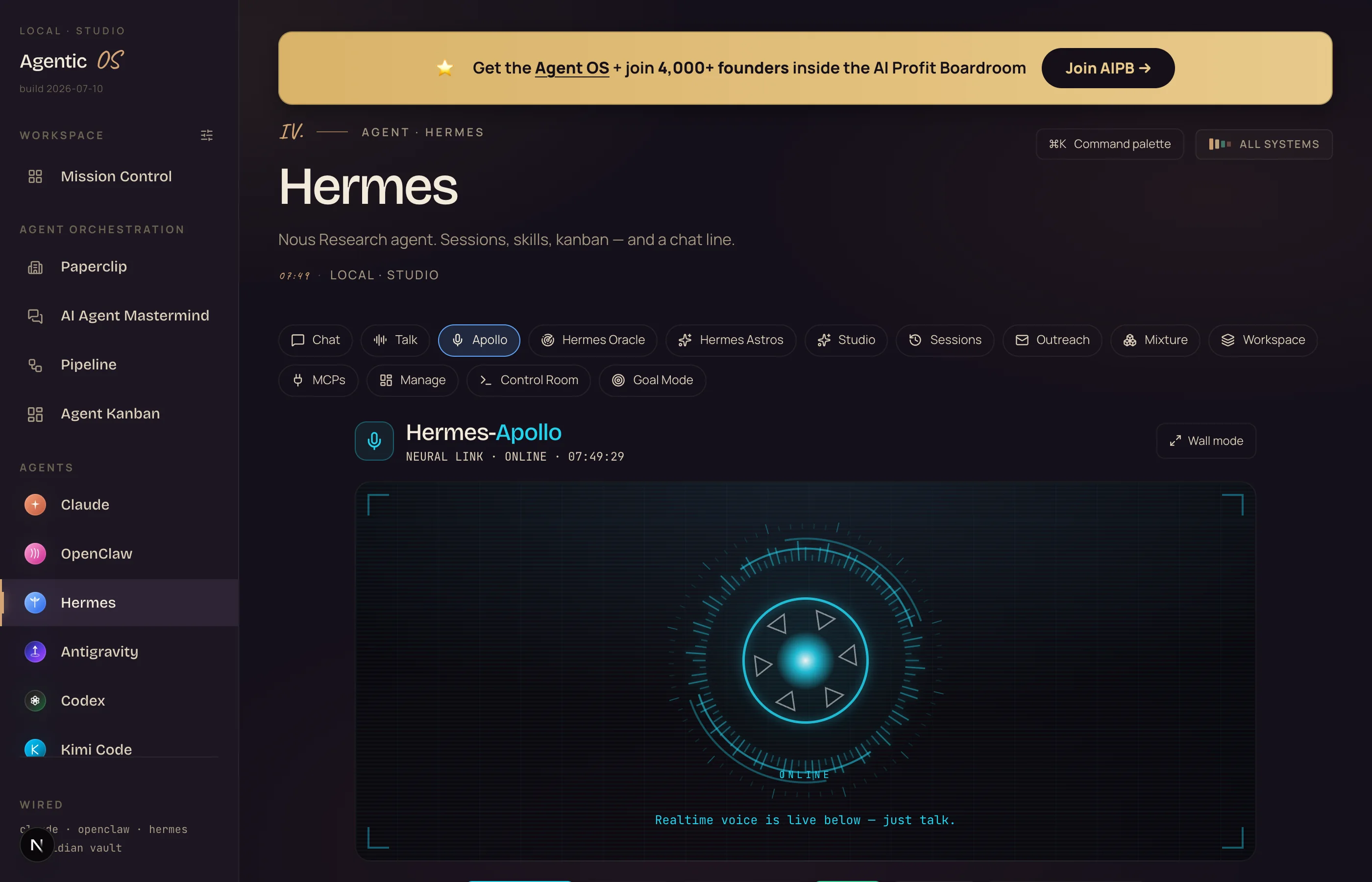
The Agent OS dashboard on the Hermes page: the left sidebar with Hermes selected, a row of tabs with Apollo active, and the Apollo panel showing a glowing cyan voice orb labelled NEURAL LINK ONLINE with the line Realtime voice is live below — just talk

This is the real thing. The Hermes page in your Agent OS — Apollo is the highlighted tab. The glowing orb is the live voice link, already connected (NEURAL LINK · ONLINE), and the line underneath — "Realtime voice is live below — just talk" — means it's listening right now. No install, no setup screen: you clicked the tab and it came online.

The pieces behind Apollo ↓
"Is it secretly listening to me all day?"

No. Apollo only listens while its panel is open and you're actually talking to it — the moment you switch to another tab or app, it politely stops the microphone. Everything it opens and builds happens on your own Mac; the only thing that ever leaves your machine is the live voice link while you're mid-conversation. Close the panel and it's fully off.

VI ────── My story · why this matters

I was you. Then I stopped touching the keyboard for the small stuff.

Before

My day was a thousand tiny clicks — open this, search that, switch to the other thing.

Every quick idea meant stopping, typing, hunting a menu, losing my thread.

When I wanted to whip up a quick demo, I was back in a blank editor doing it by hand.

The ideas were instant. My hands were the slow part.

Then I wired Apollo into my Agent OS — and started just saying what I wanted.

After

Now I say "open my calendar" and it's up before I've finished the sentence.

I say "build me a quick landing page" and it's on screen a minute later, no typing.

My hands stay off the keyboard for the small stuff — I talk, it does.

The tax of a thousand little clicks is just… gone.

You can have this too. Same butler. Same voice. Same Mac.

VII ────── The receipts

Real people. Real wins. Inside the Boardroom right now.

3,600+ Founders inside AIPB
400k YouTube subscribers
38 Countries · live members
163k X / Twitter followers
29k+ Udemy students

Agency owners, ecom founders, course creators, solo operators across 38 countries — running this stack and posting, in their own words, exactly what it changed for them.

Read the 158-page wins doc →
Before you scroll on —

Commit to talking to your Mac today. Not someday.

You've seen the shape of it. Now decide to actually try it.

The next few minutes show the exact setup and the exact things to say.

So here's the deal.

If you're reading this — promise yourself one thing right now. Before you sleep tonight, you'll open Apollo and say one command out loud — "open YouTube," "build me a snake game," anything. Just one. Because the first time your Mac does what you said without you touching a key, the way you work changes for good.

The people sitting still keep clicking through their whole day. The people who try it once stop reaching for the keyboard.

Be one of those people.

Commit to the transition. Commit to taking action today. This changes everything about your workflow.

The ideas were always instant. Now the doing is too.
IX ────── The framework

The Apollo Voice Command Engine™.

Four parts turn your voice into a machine that runs your Mac. Each removes a click, a wait, or a keyboard.

i.

The Voice

You stop typing and clicking — you just talk, hands-free, no wake word, no button. Speaking is the fastest input you own, and now it drives the machine.

ii.

The Realtime Core

You stop waiting — there's no "sending…" pause. It hears you and answers the instant you stop, in a natural voice, like a call with an assistant who's already on it.

iii.

The Hands

You stop doing it yourself — it opens the apps and sites you name and builds the apps you describe, live on your Mac. It acts, it doesn't just answer.

iv.

The Memory

You stop re-explaining yourself — it reads your own notes so it knows who you are and what you're working on, and speaks to you like it already knows you.

"Doesn't running Agent OS burn a fortune in tokens?"

No — that's the biggest myth about it. Agent OS runs the everyday 90% on free local models, plugs in free windows and free mirrors whenever they open, and drives the paid brains only on the hardest work. Add the Caveman token-diet and even the paid replies shrink 60–75%. Apollo's voice link is a small, per-minute cost only while you're actually talking to it — and inside the AI Profit Boardroom there are full token-optimisation tutorials so you never think about the bill again.

X ────── Old way vs new way

Old way vs new way.

Old way type, click, hunt, repeat
  • Every small task = a search, a tab, a menu, a switch
  • A thousand tiny clicks quietly eat the whole day
  • Type a request, wait, read the reply, do it yourself
  • Want a quick tool? Back to a blank editor, by hand
  • Hands glued to the keyboard the entire time
  • Lose your train of thought on every context switch
New way say it, it's done
  • Say "open that" and it opens — no clicks
  • The tiny-task tax disappears; you just talk
  • It hears and acts the instant you stop speaking
  • Say "build me X" and a working app appears in ~90s
  • Hands free — keep your coffee, keep your flow
  • Stay in your thought; the butler does the doing
"Is it actually realtime, or does it lag like Siri?"

It's genuinely realtime — a live spoken link, not type-and-wait. The moment you stop talking it's already replying; there's no "thinking…" spinner between you and it. And it now heals itself: if you switch tabs it pauses the mic to be polite, then reconnects the instant you come back, so it's always live when you need it — no restarting, no re-clicking.

Type-and-wait vs realtime — the same request, start to finish Old way: type it → wait → read → do it yourself seconds + clicks Apollo: say it → it's already doing it instant · hands-free
No "sending…", no reading, no doing it yourself — the words become the action while you're still holding your coffee.
"I'm not technical — can I actually set this up?"

Yes — there's nothing to install and nothing to configure. Apollo is one tab inside the Agent OS; you click it and it connects itself, then you just talk. The only optional step is dropping a short "About Me" note in your vault so it knows you. And if you're inside the AI Profit Boardroom, the whole Agent OS ships pre-wired — you open it and start speaking.

"The keyboard was always the bottleneck. Take it out of the loop — say it, and it's done."
Skip the setup

Get the Apollo Voice Command Engine built for you.

You can wire this in yourself with the steps above. Or get it done for you — inside the Agent Operating System, with Apollo and the whole machine room already running the moment you open it.

The full Agent OS zip — Apollo + every tool pre-wired, ready to talk to
Coaching calls where we set up your voice butler together, step by step
Free local models + the Caveman engine — so the token bill stays tiny
A room of 3,600+ operators running this exact stack
Daily tutorials, a 30-day roadmap, and a member map for your city
Get the Agent OS →
Inside the AI Profit Boardroom · skool.com/ai-profit-lab
Set up in an afternoon · used in 38 countries · new tools added every week
XI ────── Three beliefs to drop

What's holding you back.

Wrong: "Talking to my computer is a gimmick — typing is faster."

Right: Typing is faster than clicking through menus, sure — but talking is faster than both, and it keeps your hands and eyes free. For the thousand small "just open / just pull up / just build" jobs, saying it beats doing it every time.

Wrong: "Voice assistants are dumb — they mishear and lag."

Right: That was the old generation. Apollo runs on a live-voice model that hears you in real time, in a natural conversation, and actually acts — it opens apps and builds working software, not just sets timers. It's a different class of thing.

Wrong: "Building an app means sitting down and coding it."

Right: Not any more. You describe it out loud — "a neon snake game with a score" — and Apollo writes the whole thing and shows it to you, playable, in about a minute. The keyboard was never the point; the finished thing was.

Don't take my word for it

158 pages of members who already broke through these exact beliefs. Their stories — real businesses, real wins — are documented here.

Read the 158-page testimonials doc →
XII ────── The SOP

Switch Apollo on — an 8-step plan.

Open your Agent OS dashboard. Go to the Hermes section and click the Apollo tab. The panel connects itself in a second or two.

Let it start listening. When it shows "Realtime · listening — just talk," you're live. No button to press.

Say hello. Talk to it like a person: "Good morning, Apollo." It'll answer in a calm butler's voice. This confirms the whole chain works.

Give it an "open" command. "Open Notes." "Pull up YouTube." "Open Calendar." Watch it actually open on your Mac. (Name a real app or a website; if it's not an installed app, Apollo pulls up a search for it instead of dead-ending.)

Give it a "build" command. "Build me a neon snake game with a score counter." A working version appears in the panel in about ninety seconds.

Tell it who you are. Add a short "About Me" note to your vault. Apollo reads it, so it greets you by name and knows what you're working on — no re-explaining.

Use it hands-free during real work. Keep the panel open while you work and just talk when you need something. Let the small tasks leave your hands.

Trust it to stay live. Switch tabs and it politely pauses; come back and it reconnects itself. You never have to restart it — it's always ready.

XIII ────── Recap

What you gain.

You run your Mac by voice. Open any app or site just by saying it — no clicks, hands-free.
You build by talking. Describe an app or game out loud and watch it appear, working, in about ninety seconds.
It's genuinely realtime. A live spoken conversation — it answers and acts the instant you stop talking, no lag.
It knows you. It reads your own notes, so it greets you by name and understands what you're working on.
It never dies on you. Look away and it pauses; come back and it reconnects itself, always ready.
The tiny-task tax is gone. The thousand small clicks that ate your day become one spoken sentence each.
It lives in your Agent OS. No separate app — one tab in Hermes, running on your own machine.
You keep your flow. Hands off the keyboard, eyes on your work, the butler does the doing.
"You stopped clicking your way through the day. Now you just say it — and the machine does it."
Your move

Stop clicking. Start talking.

A thousand tiny clicks quietly eat your focus every day. The people with the Agent OS don't click their way through it — they talk. Get the Apollo Voice Command Engine and the whole machine room, done for you:

Apollo — say it, and your Mac opens it or builds it, hands-free
Free local models handle the everyday 90% at $0
The Caveman engine shrinks every paid reply 60–75%
Coaching calls, daily tutorials, and a 30-day roadmap
3,600+ founders across 38 countries — someone online when you're stuck
Join the AI Profit Boardroom →
Inside the AI Profit Boardroom · skool.com/ai-profit-lab
Keep every file if you leave · 7-day refund · the only way you lose is by not trying

Say the word. I'll see you in the next one.