Get the full Hermes MCP + Agent OS Hub setup inside the AI Profit Boardroom
← Back to all guides
The Goldie MCP Hub™
PR #30870 merged · Nous-approved catalog · in my Agent OS

Hermes MCP Catalog + my Agent OS Hub.

Hermes Agent just shipped a Nous-approved MCP catalog — PR #30870 merged with 1,820 insertions, 80 MCP tests green, 4 commits squashed. One-click installs. Probe-and-checklist tool selection. OAuth handled for you. And I wired the whole thing into the Hermes section of my Agent OS as a dashboard panel — so MCPs install in 30 seconds without ever touching the terminal. The full read-along on what just landed and how it changes everything.

A celestial brass machinery hall — a central glowing terminal-pedestal with a horseshoe of numbered MCP boxes plugged in by golden cables, exploded-view schematic style — the MCP Hub as editorial illustration
PR #30870
merged · 8b69ec03a
80/80
MCP tests green
30s
install · zero terminal
$0
forever free

"Hermes ships a curated catalog of MCP servers that Nous staff has reviewed and merged. They're disabled by default — install only what you actually want."

— Hermes Agent docs · MCP catalog launch · 2026

What you'll read

  1. My story — the transition
  2. Real members already wiring MCPs
  3. Commit before you scroll
  4. The Goldie MCP Hub™
  5. PR #30870 — what just shipped
  6. My Agent OS Hermes MCPs panel
  7. The old way vs the new way
  8. Benefit one — Nous-approved catalog
  9. Benefit two — one-click install
  10. Benefit three — probe + checklist
  11. Benefit four — OAuth handled for you
  12. Benefit five — Agent OS dashboard panel
  13. Stdio vs HTTP — when to use which
  14. Why this matters MORE inside Agent OS
  15. Three beliefs holding you back
  16. The 30-day playbook
  17. What you've gained
  18. Get the full stack
II · my story · why this matters

I was you. Then I built this.

Before

Wiring MCPs into Hermes was a nightmare.

I'd hand-edit ~/.hermes/config.yaml.

I'd guess at the exact command and args for each server.

I'd hunt for API keys, paste them into .env, hope I didn't typo a path.

OAuth servers? Spent an hour the first time figuring out PKCE and refresh-token flows.

And every time I wanted to enable or disable a tool, I'd drop back to the terminal.

Then PR #30870 landed — and I wired the catalog into my Agent OS dashboard.

After

Now I open the Hermes section of my dashboard.

The MCPs panel shows every catalog entry with its status — available / installed / enabled.

Click any row → install begins → credentials prompt → checklist of tools to enable.

OAuth flows pop a browser. PKCE, refresh, step-up auth — handled.

Enable, disable, uninstall — one toggle. No terminal.

Time to wire a new MCP: 30 seconds.

You can have this too. Same merge. Same dashboard. Same free.

III · the receipts

Real people. Real MCPs. Already wired in.

This isn't theoretical. Members inside the Boardroom were on the catalog the day after the PR merged. Agency owners wiring Linear for client work. Course creators wiring n8n for course platforms. SaaS builders wiring their internal MCP endpoints. Different stacks. Same harness. Same dashboard.

3,200+Founders inside AIPB
258Real wins documented
5.28BTokens · Hermes #1 on OpenRouter
319kSubscribers on the channel
$0Catalog · forever free
Before you scroll on —

Commit to transitioning today. Not tomorrow.

You've seen the proof above. Real members. Real MCPs wired in. Already happening.

The next 10 minutes show exactly how the new MCP catalog works — and how I wired it into the Hermes section of Agent OS as a one-click panel.

So here's the deal.

If you're reading this — promise yourself one thing right now. You're going to finish this guide AND install your first catalog MCP before you sleep tonight. Just one. n8n. Linear. GitHub. Whatever fits your workflow. Because the moment you make this transition, your whole tool stack stops being scattered across separate apps and starts being orchestrated by Hermes.

The people sitting still are still hand-editing config.yaml. The people switching today are clicking install buttons inside their dashboards.

Be one of those people.

Commit to the transition. Commit to wiring one catalog MCP today. This changes everything about how your tools connect.

IV · the framework

The Goldie MCP Hub™.

Five layers that turn the new Hermes catalog into a dashboard-native superpower.

Each layer is a benefit you feel the moment it's wired in. Together they're what makes the difference between "MCPs exist somewhere in my config file" and "MCPs are a panel in my dashboard I actually use every day."

Four carved stone workstations in a row, each with a different golden artefact above — brass key (clone/auth), magnifying glass over scroll (probe), checklist (checklist), finished brass tool-box (install) — the install pipeline
Clone → Probe → Checklist → Install. Four stations of the catalog flow.
i.

Catalog — Nous-approved one-click.

Hermes now ships a curated list of MCP servers reviewed and merged by Nous staff. n8n, Linear, GitHub, Stripe, more on the way. You don't pick from an open community submission queue — every entry passed a PR review. You stop guessing which MCPs are safe. The catalog already vetted them.

ii.

Picker — interactive install UI.

Run hermes mcp for the interactive picker, hermes mcp catalog for a scriptable list, hermes mcp install n8n for one-shot. Or — better — open my Agent OS dashboard and click. You stop hand-editing config.yaml. The picker handles every edit safely.

iii.

Probe — auto-discover tools.

After credentials are configured, Hermes probes the MCP server to list every tool it exposes. Then it shows you a checklist. Some tools come pre-checked from the manifest's safe defaults; mutating tools (delete_workspace, etc.) come unchecked. You stop blindly granting full access. You pick the tools you actually want.

iv.

Auth — OAuth handled for you.

API keys get written to ~/.hermes/.env automatically. OAuth servers (Linear, Sentry, Atlassian, Asana, Figma, Stripe) trigger the browser, handle discovery + dynamic client registration + PKCE + token exchange + refresh. You stop reading OAuth specs. The catalog runs the dance for you.

v.

Hub — inside Agent OS.

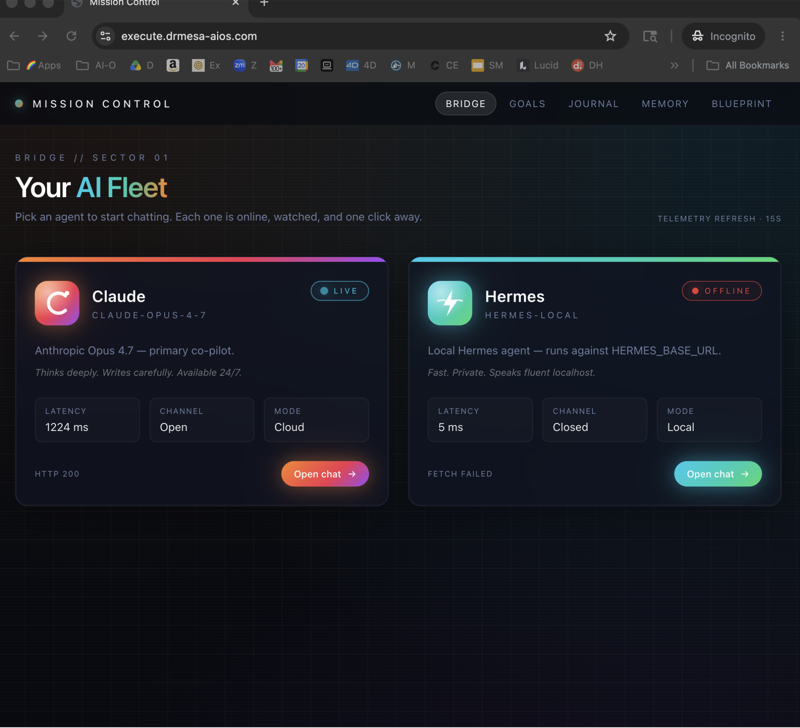
I wired the whole catalog into the Hermes section of my Agent OS dashboard. New panel: MCPs. Left side: catalog browser with status badges (available / installed / enabled). Right side: your currently installed servers with toggles and uninstall buttons. You stop dropping to the terminal. The whole catalog lives next to Chat / Goal Mode / Workspace.

V · the news

PR #30870 — what just shipped.

This was a big merge. Hermes Agent PR #30870 — feat(mcp) — merged at commit 8b69ec03a in May 2026. Revision 4. 1,820 insertions across 8 files. 4 commits squashed. 80 MCP tests passing.

What it added:

Thinking it? "New MCP system + big merge = something's going to break."

80 of 80 MCP tests green before the merge button got hit.

The PR squashed 4 commits, ran the full test matrix, and was reviewed before landing. The catalog manifests are PR-gated too — Nous reviews every entry before it ships in the curated list.

If anything misbehaves, rolling back is one config edit — same as it was for hand-managed servers.

The risk is small. The upgrade is big.

1,820 insertions · 8 files · 80 MCP tests passing · 4 commits squashed — merged clean at commit 8b69ec03a.
VI · my agent os build

And I just wired it into my Agent OS.

The CLI is great. The dashboard panel is better.

The moment PR #30870 merged, I started building Phase 1 of an MCPs panel inside the Hermes section of my Agent OS dashboard. New tab sits alongside Chat / Goal Mode / Workspace / Control Room.

Here's what's in Phase 1 (shipped this week):

Phase 2 (next session): one-click install with a credentials modal — pre-collect API keys in a form, write to .env, run hermes mcp install <name> non-interactively. OAuth servers stream stdout to the UI so you can complete the browser flow without dropping to the terminal.

Phase 3 (optional): per-tool checkbox UI mirroring the CLI's probe-and-checklist flow — fine-grained control of tools.include from the dashboard.

A grand brass apothecary cabinet — multiple shelves of small labelled brass MCP boxes, each glowing a different hue (green=enabled, amber=available, dim=disabled), magnifying glass mid-inspection — the catalog as curated cabinet
The catalog as a curated cabinet. Each box vetted. Each one ready to install.

"The CLI was the engine. The dashboard panel is the cockpit."

VII · why this matters

The old way vs the new way.

Same operator. Same goal. Two completely different MCP install workflows.

Old way · hand-managed MCPs ~30 min per install
  • Open the MCP server's GitHub readme
  • Copy the install command, hope it still works
  • Hand-edit ~/.hermes/config.yaml — get the indentation right or it breaks silently
  • Hunt for API keys, paste them into .env, hope you didn't typo a path
  • OAuth flows? Spend an hour the first time
  • Restart Hermes. Test. Debug. Repeat.
  • To disable a tool, drop back to the terminal and edit yaml again
New way · catalog + Agent OS panel ~30 seconds per install
  • Open the Hermes section of your Agent OS dashboard
  • Click MCPs panel — every catalog entry visible with status badges
  • Click "Install" on n8n / Linear / GitHub / whatever you want
  • Credentials prompted in a modal, written to .env automatically
  • Probe runs, checklist appears, you tick the tools you actually want
  • OAuth? Browser opens, handshake completes, tokens cached
  • Enable / disable / uninstall = one toggle in the panel
VIII · benefit one

Nous-approved catalog.

i.

Why this matters to you.

You stop guessing which MCPs are safe to install.

The catalog lives at optional-mcps/ in the hermes-agent repo. Presence in that directory means a PR was reviewed and merged by Nous staff. There is no community submission tier — entries are added by merging a PR.

Every entry's manifest pins:

  • source — the GitHub repo URL of the server
  • install.ref — a pinned commit or tag (not a moving branch)
  • transport — stdio or http
  • auth — api_key / oauth / none
  • tools.default_enabled — optional pre-pruned list of safe tools

What you gain: a vetted shortlist of MCPs you can install with confidence.

You do this Run hermes mcp catalog in your terminal — or open my Agent OS MCPs panel — and scroll the list. Each entry shows its source repo so you can verify upstream before installing.
Thinking it? "What if the MCP server itself has malicious code?"

Read the manifest first — it lists exactly what gets run.

Manifests live at optional-mcps/<name>/manifest.yaml on GitHub. The picker even prints the manifest's source URL at install time so you can verify the upstream repo before clicking install.

Nous reviews each entry before it ships in the catalog, but you should still read the bootstrap commands and transport invocations for anything you're about to grant credentials to.

The catalog narrows the trust surface. You're still in control of the final call.

Every catalog manifest is PR-gated into the hermes-agent repo — public review trail, pinned refs, no moving branches.
IX · benefit two

One-click install.

ii.

Why this matters to you.

You stop spending 30 minutes per MCP server.

From the CLI, it's literally one command: hermes mcp install n8n. From my Agent OS dashboard panel, it's one click on the catalog row. The install:

  • Clones the source repo at the pinned commit (no surprise updates)
  • Runs the manifest's install.bootstrap commands (pip install / npm install / etc.)
  • Prompts for any required credentials
  • Probes the running server for its tool list
  • Shows you a checklist of tools to enable
  • Writes the final config to ~/.hermes/config.yaml automatically

What you gain: 30 seconds per server, including OAuth.

You do this Pick the MCP you want. Click install. Walk through the prompts. Done.
Thinking it? "One-click sounds risky for something that writes to my config."

The picker prints what it's about to do before doing it.

You see the source URL, the pinned ref, the bootstrap commands, and the auth method. Nothing runs until you confirm.

If a reinstall happens later, your prior tool selections are preserved — manifest defaults don't override your choices.

Fast doesn't mean reckless. The catalog ships safe defaults you can override at the prompt.

Members report installs completing in 30-90 seconds (including OAuth flows for Linear and similar).
X · benefit three

Probe + checklist.

iii.

Why this matters to you.

You stop blindly granting access to every tool the server exposes.

After credentials are configured, Hermes probes the MCP server and presents a checklist of every tool. Tick the ones you want. Skip the ones you don't. Mutating tools like delete_workspace come unchecked by default.

The pre-checked rows come from three sources, in priority order:

  1. Your prior selection (reinstalls preserve what you had)
  2. The manifest's tools.default_enabled if the entry declares one
  3. Everything if neither applies

What you gain: fine-grained control over what each MCP server can actually do.

You do this Install Linear → probe runs → checklist shows find_issues, get_issue, create_issue (pre-checked) and delete_workspace (unchecked). Hit ENTER. Done.
Thinking it? "What if the server can't be reached during install?"

Probe-failure resilience is built in.

If the server is unreachable (OAuth not yet done, backend service down, network hiccup), the install still succeeds. The manifest's tools.default_enabled applies directly (if declared), or no filter is written.

Run hermes mcp configure <name> later to refine — same checklist, your current selection pre-checked.

Install never gets stuck. You can always come back and tighten the tool list.

The probe-failure path is explicitly designed in the PR — install completes either way, configure later to refine.
XI · benefit four

OAuth handled for you.

iv.

Why this matters to you.

You stop reading OAuth 2.1 specs to wire a single MCP server.

Most hosted MCP servers (Linear, Sentry, Atlassian, Asana, Figma, Stripe) use OAuth 2.1 instead of a static bearer token. The catalog sets auth: oauth in the manifest and Hermes handles the whole flow:

  • Discovery — fetches the server's authorization metadata
  • Dynamic Client Registration (DCR) — registers itself with the provider
  • PKCE — generates code verifier + challenge for the browser flow
  • Token exchange — swaps the auth code for access + refresh tokens
  • Refresh — silently refreshes when tokens expire
  • Step-up auth — handles tier-2 scope requests during normal use

On first connect, Hermes prints an authorize URL, opens your browser when possible, and waits for the callback. Tokens cache at ~/.hermes/mcp-tokens/<server>.json with 0o600 perms.

What you gain: access to enterprise-grade MCP servers without ever reading an RFC.

You do this Install Linear → browser opens → log in to Linear → approve scopes → close the tab. You're done.
Thinking it? "OAuth on a remote machine never works — the loopback can't reach my laptop."

Two paths for headless hosts.

Path A — Paste-back: Hermes prints the authorize URL and a "paste the redirect URL here" prompt. Open the URL on your laptop, approve, copy the full redirect URL (the browser will show a connection error — that's expected), paste it back at the Hermes prompt.

Path B — SSH port forward: ssh -N -L <port>:127.0.0.1:<port> user@host in a separate terminal, then let the redirect flow normally.

Remote OAuth solved. Pick whichever works for your setup.

Both flows are documented in the Hermes MCP docs and tested by members on Hostinger / Hetzner VPS setups.
XII · benefit five

Agent OS dashboard panel.

v.

Why this matters to you.

You stop dropping to the terminal every time you want to enable, disable, or browse MCPs.

My Phase 1 build lives in the Hermes section of Agent OS — new tab called MCPs, alongside Chat / Goal Mode / Workspace / Control Room. Left column lists the entire Nous catalog with live status badges. Right column shows your currently installed servers with toggles.

Common workflows:

  • Want to see what's available? Open MCPs → scroll the catalog. Each row has a description and a link to the source repo.
  • Want to install something? Click the row. Phase 2 (next ship) will pop a credentials modal right in the dashboard.
  • Want to temporarily disable a server? Toggle the switch in the Installed column. Hermes auto-reloads.
  • Want to fully uninstall? Hit the uninstall button. Confirmation dialog. Done.

What you gain: MCPs become a UI you visit, not a config file you edit.

You do this Open Mission Control → Hermes section → MCPs tab. Browse. Toggle. Install. Without ever opening your terminal.
Agent OS — owl, lobster, winged figure
~ the 60% mark · time to commit ~

Get the full MCP Hub + Agent OS setup.

I built the Hermes MCPs panel into Agent OS so you don't have to.

  • MCPs tab pre-wired — catalog browser + installed server toggle list
  • Phase 1 install — read catalog, enable/disable/uninstall from the dashboard
  • Phase 2 coming — full one-click install with credentials modal
  • Sample MCPs already wired — n8n, Linear, GitHub, more
  • 30-day playbook — which MCPs to wire when, in what order
  • 3,200+ members running this stack daily
Join the Boardroom → link in description
XIII · the two kinds

Stdio vs HTTP — when to use which.

The catalog ships both kinds of MCP servers. Two reference entries shipped on day one — and they're a perfect example of the difference.

Card A — n8n (stdio)

Stdio servers run as local subprocesses and talk over stdin/stdout. Use them when the server is installed locally, you want low-latency access to local resources, and you're following docs that show command / args / env.

Card B — Linear (HTTP + OAuth)

HTTP servers are remote endpoints Hermes connects to directly. Use them when the MCP is hosted elsewhere, your organisation exposes internal MCP endpoints, or you don't want Hermes spawning a local subprocess.

Both auth paths are proven on day one. The catalog handles both equally well.

XIV · why inside agent os

Why this matters more inside Agent OS.

The catalog is great on its own. The catalog + my Agent OS dashboard panel is a different category of useful.

a.

Shared status across every panel.

When you enable an MCP from the dashboard, Hermes auto-reloads. Goal Mode immediately has access to the new tool. Workspace immediately shows outputs from it. Mission Control immediately shows the MCP's status alongside every other agent. You don't restart anything. The whole dashboard updates in place.

b.

One cockpit for all servers.

MCPs sit next to Chat / Goal Mode / Workspace / Control Room. You don't switch apps to manage tools — you switch tabs. Tool management stops being a separate workflow. It's part of the dashboard.

c.

Catalog + custom MCPs in the same view.

Picker unification means Nous-approved catalog entries AND your own user-added MCPs both show in the dashboard panel. Catalog ones marked [catalog], custom ones marked [user-added]. One UI. Both kinds. No mental context-switch.

d.

The bill stays zero.

The catalog is free. Hermes is free. The Agent OS panel I built is free. The only costs are the underlying MCP servers themselves (most are free; some like Linear use OAuth into your existing paid account).

The infrastructure cost of MCP onboarding goes to zero. The MCPs themselves are bring-your-own-credentials.

The catalog is the engine.
The panel is the cockpit.
Agent OS is the chassis that turns them into a vehicle you actually drive.

Thinking it? "I'll just use the CLI — I don't need a dashboard panel."

You can. And in two weeks you'll be opening the panel anyway.

Once you have more than 2-3 MCPs wired, the dashboard panel becomes the natural place to see "what's installed, what's enabled, what's available." The CLI is great for one-off installs. The panel is great for ongoing management.

Both work. The dashboard is the long-term win.

Use the CLI for the first install. Use the panel forever after.

Members who tried the CLI alone first all opened the dashboard panel within their first week of running 3+ MCPs.
XV · the voice in your head

Three beliefs holding you back.

✕ "MCPs are only for developers."

That was true before the catalog. Now the install is one click, the credentials are prompted, and OAuth is handled. You don't need to know what PKCE is to wire Linear into Hermes.

✓ MCPs are now for operators, not just developers.

If you can pick a row in a list and click "install" — you can wire an MCP. That's the bar.

✕ "I don't need MCPs — Hermes can already do everything."

Hermes is great. But you'll hit the moment when you want it to drive your Linear project tracking, or your n8n workflows, or your GitHub repo ops. That's the moment MCPs stop being optional.

✓ MCPs are how Hermes reaches everything outside Hermes.

Every new MCP is a new surface Hermes can act on. The catalog now makes onboarding new surfaces a 30-second job instead of a 30-minute one.

✕ "I'll wait until the catalog has more entries."

Day-one catalog already covers the highest-value targets — n8n (workflow automation), Linear (project tracking), GitHub (repo ops), more being merged regularly. Plus your custom user-added MCPs work alongside the catalog ones.

✓ The catalog is already worth installing today.

The 2-3 entries you'd use right now justify the install. The catalog growing is a bonus, not a prerequisite.

Don't take my word for it

258 real members already broke through these beliefs. Their wins — real integrations, real automation, real time saved — are documented here.

Read the 158-page testimonials doc →
XVI · the path

The 30-day playbook.

Week 1
Install your first catalog MCP. Run hermes mcp catalog to see what's available. Pick the one that maps to a tool you already use — n8n if you automate workflows, Linear if you track projects, GitHub if you ship code. Install it. Walk through the prompts. By Friday it's wired and Hermes can act on it.
Week 2
Wire the Agent OS panel. Open the Hermes section of your Agent OS dashboard. If you're using my Phase 1 build, the MCPs panel is already there — toggle, browse, uninstall from the UI. No more terminal for management.
Week 3
Add 2 more catalog MCPs. By now you know the flow. Pick the next two tools you use most. Wire them through the catalog. Watch Hermes orchestrate across all three from a single Goal Mode session.
Week 4
Add one user-added MCP. If your business has an internal service or a specific tool not in the catalog, write your own MCP server (or wrap an existing one) and add it via the picker as [user-added]. Now your catalog + custom MCPs live in the same dashboard panel.

The catalog narrowed the trust surface.
The dashboard removed the friction.

— MCPs are finally for operators
XVII · the recap

What you've just gained.

i.

You stopped editing YAML.

One click installs. No hand-managed config files.

ii.

You stopped guessing.

Nous-approved catalog narrows the trust surface.

iii.

You stopped over-permissioning.

Probe + checklist lets you tick only the tools you need.

iv.

You stopped reading OAuth specs.

DCR + PKCE + refresh all handled silently.

v.

You stopped dropping to terminal.

MCPs panel inside Agent OS for daily management.

vi.

You stopped fearing reinstalls.

Your prior selections survive, no override.

vii.

You started orchestrating.

Hermes drives n8n + Linear + GitHub from one session.

viii.

You started running a hub.

Not managing separate apps. Operating one dashboard.

~ ready when you are ~

Get the full MCP Hub + Agent OS.

The Hermes MCP catalog is the engine. My Agent OS dashboard panel is the cockpit. Inside the AI Profit Boardroom you get the full setup, the install, the calls, and the community already running this every day.

Join the Boardroom →
3,200+ members · 7-day refund · cancel in 2 clicks · I'll see you in the next one.