The Agent OS Blueprint™
How to build your own Agent OS.
Seven layers. Every mistake I made. Every lesson I had to pay for. The exact stack I run every day — Hermes, Claude, OpenClaw, Codex, Antigravity, Gemini, Free Claude Code, Obsidian, NotebookLM — all wired together. No paid SaaS. No vendor lock-in. Free forever. This is the ultimate read-along.
"I tried building this a dozen wrong ways before I figured out the right one. The first nine attempts were tools nailed to other tools. The tenth was an operating system. This guide is the tenth one — every mistake stripped out, every lesson kept."
— Julian, opening the read-along
I — How I got here
My story — and why I had to build this
In early 2024 I was the AI SEO guy on YouTube with a growing channel, a paid Ahrefs subscription, a Frase subscription, a Midjourney subscription, three contractors writing content, and a daily rhythm that involved opening 14 browser tabs to start work.
Every morning I'd switch between ChatGPT for outlines, Claude for drafts, Midjourney for cover images, Ahrefs for keywords, Notion for the brief, Google Docs for the draft, Substack for publishing, Twitter for promotion. Each tool was good. None of them talked to each other. None of them knew anything about me, my niche, my voice, my customers. Every prompt was a cold start.
I was paying about $420 a month in SaaS subscriptions and another $3,200 a month in contractors. My team was wide. My memory was nowhere. And my output, while it looked impressive on the channel, was buried under a pile of context-switching I didn't even know was killing me.
Then Claude Code launched. Then Hermes. Then the local-first wave. And I tried, like everyone else, to add AI to my existing stack.
"Adding AI to a broken workflow doesn't fix the workflow. It just makes the brokenness faster."
It took me nine attempts to figure out what to do instead. Nine half-built systems. Nine half-failed integrations. Nine times I thought "this is the one" and then watched it collapse two weeks later because I'd built another set of tools nailed to another set of tools — with no shared memory, no shared dashboard, and no way to actually orchestrate anything.
The tenth attempt was different. It started with a single question: what if AI agents had an operating system instead of a chat window? That question turned into this blueprint. And this blueprint runs my entire business now.
II — Mistakes
The 5 mistakes that cost me years
Every one of these I learned the painful way. If you skip them, you're already two months ahead of where I was.
Mistake I
Thinking AI was a tool, not a system
I treated each new model like a fancier hammer. ChatGPT was a writing hammer. Claude was a reasoning hammer. Midjourney was an image hammer. Every problem looked like a nail for the next hammer. I added new tools instead of asking what they should all live inside.
— The lesson
The unit of leverage isn't the model. It's the system around the model. Once I started designing for an operating system instead of a chat window, every model got 10× more useful without me upgrading anything.
Mistake II
Paying for everything before exploring free
$249/mo for Ahrefs. $45/mo for Frase. $30/mo for Midjourney. $20/mo for ChatGPT Plus. $20/mo for Claude Pro. $11/mo for ElevenLabs. ~$375/mo in tools before I'd produced a single dollar that month. Then Owl Alpha showed up free on OpenRouter, Hermes was open-source from day one, and Free Claude Code routed the same Claude harness through whatever model I wanted at zero per-token cost.
— The lesson
The free stack is now better than the paid stack. Owl Alpha has 1M tokens of context. Hermes ships features faster than commercial agents. Free Claude Code gives you Claude Code for nothing. Pay nothing first, prove the workflow, then upgrade only where the free option genuinely can't keep up.
Mistake III
No persistent memory across sessions
For a full year, every Claude conversation started from zero. I'd re-explain my business, my niche, my customers, my voice — every single chat. I told myself "it's fine, AI is just like that." It wasn't fine. I was re-typing my context twenty times a day.
— The lesson
Obsidian is the answer. Plain markdown, on your machine, queryable forever. Wire it to every agent via MCP and the context problem vanishes overnight. Full walkthrough: The Goldie Second Brain →
Mistake IV
Building automations in n8n before checking what the agents already do
I spent two weekends wiring a "content production pipeline" in n8n — Zapier-style boxes connecting OpenAI to Google Docs to Notion to Substack. It was a mess. Brittle. Slow. Every webhook had its own auth. Two weeks later I realised Hermes inside Agent OS could do the same pipeline natively, with proper agent reasoning at each step, in about 200 lines of total config.
— The lesson
Agentic systems aren't "automations with AI in them." They're a different category. n8n is great for plumbing between SaaS tools. Inside an Agent OS, you don't need plumbing — you have a shared workspace and agents that talk to each other directly.
Mistake V
Outputs landing in random folders nobody could find
Every image Midjourney made went to Downloads. Every video render went to Desktop. Every generated HTML page went to "Untitled.html" somewhere. Two weeks later I couldn't find any of it. I had 23 HTML apps I'd forgotten existed. I had voiceovers in three different folders. I had infographics with random filenames that meant nothing.
— The lesson
Every output needs a typed home that auto-collects it. That's what the Workspace tab in OpenClaw Agent OS → exists to solve — 13 buckets (Studio Images, Studio Videos, Apps, Skills, etc.), every artefact auto-saved, every file previewable inline. Don't lose your work. Curate it.
III — The contrast
The old way vs the new way
Same person. Same business. Two completely different operating models.
The Old Way — me before this blueprint
~ $3,600/mo · 60 hrs/wk · 1 page shipped
- $420/mo in SaaS subscriptions (Ahrefs, Frase, Midjourney, ChatGPT, Claude, ElevenLabs)
- $3,200/mo in contractors writing + designing
- 14 browser tabs open at all times — Ahrefs, Frase, Claude, ChatGPT, Notion, Docs, Substack, Twitter
- Every prompt is a cold start — I re-explain my business 20 times a day
- Generated assets land in Downloads, vanish within a week
- Manual indexing in Search Console, one URL at a time
- One published page per week if I'm lucky
- My system is "me" — when I take a day off, nothing ships
The New Way — Agent OS Blueprint
~ $0/mo · ~10 hrs/wk · 5–10 pages shipped
- $0 in subscriptions — Owl Alpha brain, Free Claude Code CLI, Obsidian vault, Hermes harness
- $0 in contractors — Hermes Goal Mode produces drafts, Studio produces visuals + voiceovers
- One tab at localhost:3737 — every agent in one sidebar, one dashboard, one shared context
- Every chat reads my Obsidian vault — context is automatic, every output is on-brand
- Every artefact auto-saves to a typed Workspace bucket — nothing is ever lost again
- Indexceptional pings indexing the moment a URL ships — same-week indexed
- 5–10 published pages per week through the Kanban pipeline
- System runs without me — Codex Goal Mode + Hermes /goal work while I sleep
"The Old Way bills you. The New Way pays for itself by the first page that ranks."
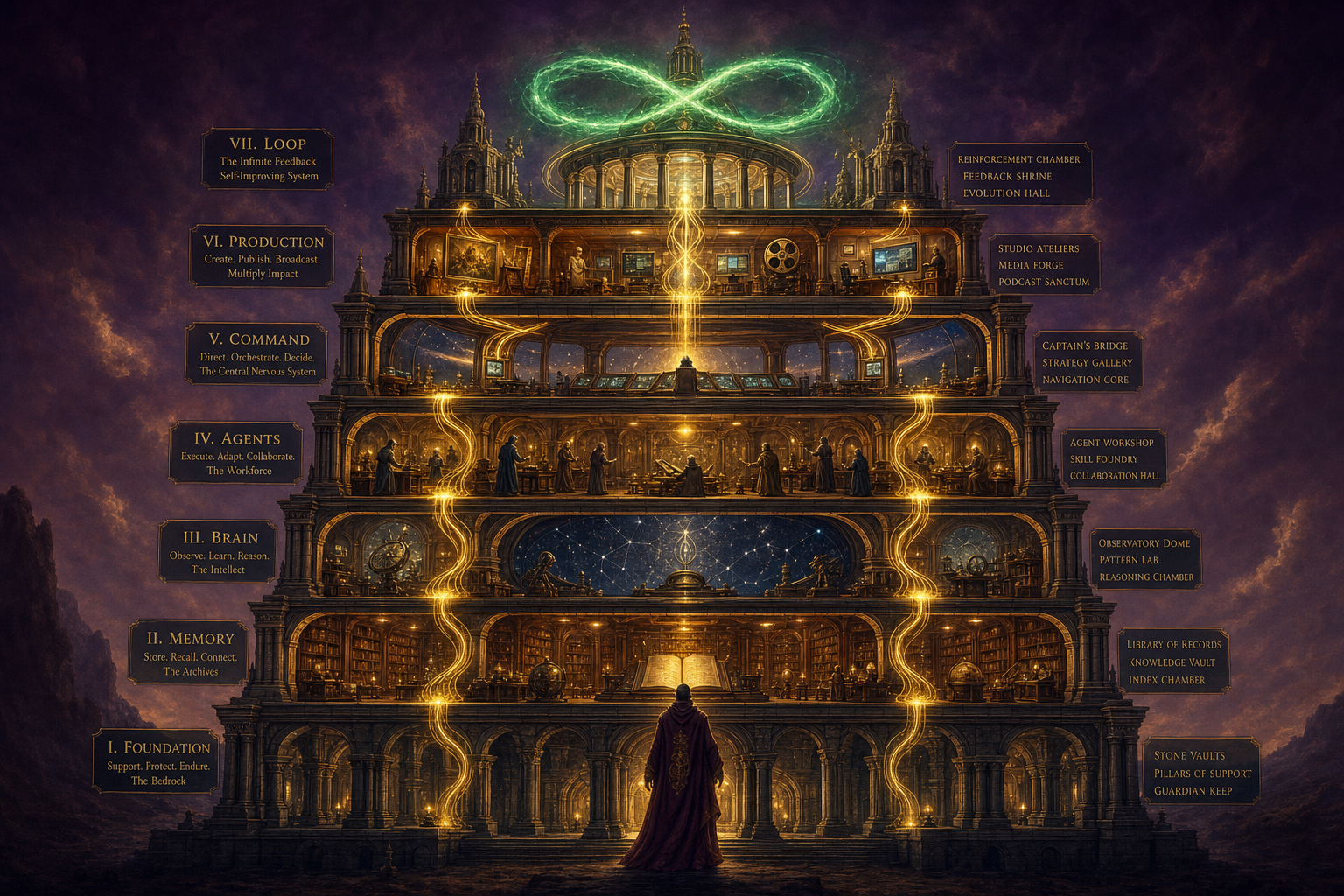
The 7-Layer Agent OS Blueprint
An Agent OS isn't a product. It's a stratified system you assemble. Seven layers, each one essential, each one feeding the next.
If you skip a layer, the layers above it collapse. Build them in order — bottom up — and every layer makes the next one easier.
- Layer I — Foundation. Hardware, OS, dev environment. The physical and software base.
- Layer II — Memory. Where your context lives. Obsidian + OMI.
- Layer III — Brain. The models you route to. Owl Alpha, Claude, Grok, Gemini.
- Layer IV — Agents. The harnesses that wrap the models. Hermes, OpenClaw, Codex, Antigravity, Free Claude Code.
- Layer V — Command. Mission Control — the one dashboard that holds all the agents.
- Layer VI — Production. Goals, Kanban, Studio, SEO, Notebook, Workspace — purpose-built surfaces.
- Layer VII — Loop. The feedback flywheel that makes the whole stack compound.
Now let's build each one.
Seven layers. Built in order.
— this is the blueprintLayer I — Foundation
Layer I · The base
Hardware, OS, and the dev environment
You don't need a Mac Studio. You don't need 64 GB of RAM. The whole Agent OS runs on a £400 Chromebook through Node.js because the heavy lifting happens in the cloud through APIs — your machine is the dashboard, not the compute.
That said, your machine becomes your second brain. Pick something you'll keep for years. Apple Silicon is the smoothest path because Hermes, OpenClaw, and Codex all ship native ARM binaries. Linux works too if you're a Linux person. Windows works via WSL2 — same dashboard, slightly more setup.
What you needAny modern laptop · Node.js 20+ · Git · A code editor (VS Code or Cursor) · Terminal · A spare Saturday for setup.
VI — Layer II
Layer II — Memory
Layer II · The vault
Obsidian (+ optionally OMI) — the second brain
This is the layer most people skip and it's the one that changes everything. Without a memory layer, every chat starts from zero. With a memory layer, every chat starts with full context on your business, your clients, your voice, your goals.
Obsidian is free, plain markdown, stored on your machine forever. You write notes (or OMI captures them passively from your conversations all day). The vault becomes your second brain — a queryable, versionable, exportable knowledge graph that every agent in Layer IV can read via MCP.
Structure matters less than you think. I use a flat PARA structure (Projects, Areas, Resources, Archive) with tags and links between notes. Claude organises it for me — see The Goldie Second Brain → for the full pattern.
What you needObsidian (free) · A vault folder · The obsidian-mcp server · 30–60 mins of seeding notes about you, your business, your customers, your voice. Optionally OMI for passive capture.
VII — Layer III
Layer III — Brain
Layer III · The intelligence
The models you route to — start with free
The model is the engine. The architecture around it is the vehicle. You can swap engines easily as new ones come out — what stays is your stack.
My current routing:
- Owl Alpha on OpenRouter — 1M context, agent-tuned, $0/token. Default for almost everything. The free brain that powers Hermes by default.
- Claude via subscription — reasoning-heavy work, long-form planning, code review. Routed through Free Claude Code so I get Claude's harness with whatever model I want.
- Grok 4.3 via xAI OAuth — powers OpenClaw Studio (image, video, voice, X-Search). Best multimodal model right now.
- Gemini for long-context jobs — when I'm feeding millions of tokens of code or transcripts.
What you needOpenRouter account (free) · Owl Alpha API key · Optionally Claude subscription · Optionally xAI OAuth for Grok 4.3 access. See
The Goldie Sovereign Stack → for the full free-routing setup.
VIII — Layer IV
Layer IV — Agents
Layer IV · The agents
The harnesses that wrap the models
Models alone are chat boxes. Agents are models with tools, memory, and the ability to act. Each agent below wraps the Brain in a different way for a different job.
My roster, in the order I'd install them:
- Hermes — Nous Research open-source agent. The conductor. Kanban, skills, plugins, tool calls. See Hermes Agent OS →.
- OpenClaw — local-first always-on AI assistant + the keeper of every creation. Workspace, Studio, Control Room. See OpenClaw Agent OS →.
- Codex — OpenAI's coding/automation agent with Goal Mode for hands-off long-horizon work. See The Goldie Goal Engine →.
- Antigravity — Google's agent platform with Gemini 3.5 Flash. See The Goldie Gravity Grid →.
- Free Claude Code — the OSS rewrite of Claude Code that routes to any model. Free. See The Goldie Sovereign Stack →.
You don't need all of them on day one. Pick Hermes + OpenClaw to start. Add the rest as you need their specific strengths.
What you needHermes CLI (open source) · OpenClaw CLI (open source) · Then incrementally: Codex CLI, Antigravity, Free Claude Code. Each installs with one terminal command.
IX — Layer V
Layer V — Command Centre
Layer V · Mission Control
One dashboard, every agent
This is the layer that turns "a bunch of CLIs in separate terminals" into "an operating system." Mission Control is a Next.js dashboard running at localhost:3737 on your machine. Sidebar of agents on the left. Workspace, kanban, studio, notebook tabs on the right. One memory layer feeding everything.
You build it once. From then on, every new agent that ships in the open-source world plugs into the same sidebar. Every workflow you design uses the same memory layer. Every output ends up in the same Workspace bucket system.
The full Mission Control source — including all the agent wirings, the design system, the workspace preview pane, the kanban orchestrator — is in the AIPB Agent OS pack. You can also build it yourself from this guide's pieces if you'd rather assemble it solo. Both paths work.
What you needNode.js · Next.js skeleton · A handful of API routes (one per agent) · The design system (Midnight Aubergine palette, Bricolage Grotesque + Manrope + Caveat fonts) · About a weekend to wire it from scratch, or about 30 minutes to drop in the AIPB pack.
X — Layer VI
Layer VI — Production Surfaces
Layer VI · Where work happens
Goals, Kanban, Studio, SEO, Notebook, Workspace
This is where Mission Control stops being a chat box and starts being a place where actual work ships. Each surface is a tab in your dashboard. Each one wraps a specific workflow.
- Goals — Codex Goal Mode + Hermes Goal Mode side by side. Standing objectives that run hands-off. See Hermes Goal Mode →.
- Kanban — multi-agent task board. Triage → Outline → Draft → Visuals → Review → Publish → Index → Repurpose. Multiple agents move cards through the columns in parallel.
- Studio — Grok 4.3 cockpit for images, videos, voice, X-search. Every output auto-saves to a Workspace bucket.
- SEO section — dedicated SEO panel: keyword tracker, schema generator, internal-link suggester, page-by-page rank monitor. Hermes reads from it, writes to it, deploys from it. See Hermes SEO Super-Agent →.
- Notebook — NotebookLM integrated for podcast + infographic repurposing. See The Goldie Infinite Knowledge Engine →.
- Workspace — 13 buckets covering every output any agent has ever produced. HTML apps render inline. Images preview. Videos scrub. PDFs embed.
What you needEach surface is a route in Mission Control + a sidebar entry + an API integration. All wired in the AIPB pack. Build them incrementally — one surface per week is fine.
— Skip the assembly
The full Agent OS install, ready-made
Inside AIPB: the full Mission Control source. Every agent already wired in. Design system applied. Workspace preview pane working. Studio configured with xAI OAuth. SEO + Notebook + Kanban surfaces ready. Drop into your machine, run one command, dashboard up at localhost:3737. Plus the prompts, the SOPs, the 30-day roadmap, and four weekly coaching calls where I demo the next agent going in.
Get Agent OS in AIPB →
XI — Layer VII
Layer VII — The Loop
Layer VII · The flywheel
The feedback loop that makes everything compound
This is the layer most people never build. Without it, your Agent OS is impressive on day one and exactly as impressive on day 100 — because nothing's compounding.
The Loop is simple to describe and easy to skip: every output your agents produce gets written back to the Memory layer. Every blog post, every kanban card, every Studio render, every Goal Mode completion — it all flows back to Obsidian as structured notes.
What this does:
- Every new chat starts smarter. The vault has yesterday's output indexed and available.
- Every new piece of content references prior content. Internal linking happens automatically because the agents can see what you've already published.
- Brand voice tightens. Claude reads your published pages and adapts the next draft to match what's working.
- The system gets smarter every day you use it. Not because the model changed — because the context around it deepened.
This is the flywheel. Day 1 vs day 100 isn't a small difference. It's the whole moat.
What you needA scheduled job or hook that writes every agent output back to the Obsidian vault. Hermes ships with skill hooks that do this. The AIPB pack has the full Loop wiring already configured.
"The system gets smarter every day you use it. That's the moat nobody else can copy."
The Build Journal — every iteration, every lesson
This is the part nobody tells you. The 7-Layer Blueprint reads cleanly because I rewrote it after the fact. The actual build was messier — fifteen weeks of "ship something, watch it break, fix the root cause, ship again." Here's the unedited chronology. Steal the lessons. Skip the pain.
Week 1 · The foundation moment
"I tried building this with chatbots only"
First "Mission Control" was just three browser tabs side-by-side — ChatGPT, Claude, Midjourney. I called it an Agent OS. It wasn't.
No shared memory. Every conversation cold-started. Output landed in random Downloads. I was running an SaaS bingo card, not a system.
An Agent OS isn't multiple tabs. It's a single workspace with shared state. Until you have that, you don't have an OS — you have a browser session.
Week 2 · Adding the memory layer
Obsidian + MCP changed everything
Installed Obsidian. Seeded 50 notes about my business, niche, voice. Wired obsidian-mcp to Claude.
The first MCP install was a mess of permissions and config files. Took half a Saturday to get right. I almost gave up around hour three.
Memory has to come first, not last. The moment Claude could read my vault, every prompt got 10× better without me changing the model. Memory layer is the highest-ROI build week of the whole stack.
Week 3 · First multi-agent
Hermes alongside Claude — first time agents shared context
Installed Hermes CLI. Pointed it at the same Obsidian vault. Suddenly two agents were reading from the same context. Hermes drafted, Claude reviewed.
No dashboard yet — I was juggling terminal windows. Lost track of which agent had which conversation. Useful but chaotic.
Multi-agent without a dashboard is worse than single-agent with one. Get the Command Centre up before you add the third agent.
Week 4 · Mission Control v1
Next.js dashboard at localhost:3737
Wrote the first Next.js dashboard. Sidebar of agents. Chat tab. Mission Control eyebrow with roman numerals.
Looked like a default Tailwind template. Generic. Nothing about it screamed "this is mine." Felt like a demo, not a tool.
A dashboard without a design system is just a wireframe. Your eye needs something distinctive — colour, typography, a wordmark — or you won't use it.
Week 5 · The Workspace tab
When outputs stopped vanishing into HOME
Built the first Workspace tab — three buckets: Apps, Images, Videos. Hermes wrote files, they showed up in the right bucket within 6 seconds.
Apps bucket pulled in every package.json and .mcp.json file. Useless noise. Had to add proper extension filtering.
Buckets need typed filtering, not just folder paths. The difference between "23 HTML apps I forgot I built" and "23 noise files" is 5 lines of config.
Week 6 · Studio integration
Grok 4.3 — image, video, voice, X-Search
Wired xAI OAuth. Built four sub-tabs in the Studio panel. Generated my first AI image inside the dashboard in 12 seconds.
X-Search returned 0 results — my parser didn't match Grok's response shape (markdown answer + citations array, not individual results).
Read the provider's actual response shape before parsing. Don't guess. console.log the raw response on the first call and structure your parser around what you actually receive.
Week 7 · Goal Mode
Agents that finish without me — Codex + Hermes /goal
Wired Codex Goal Mode and Hermes Goal Mode side-by-side. Set my first standing objective: "Build out a beautiful SEO website about OpenClaw." Walked away. Came back 3 minutes later to a finished Next.js site.
State file got wiped mid-run. My updateGoal() wasn't atomic — concurrent stdout chunks raced and clobbered each other. The goal "vanished" from the UI even though the work was on disk.
Atomic writes (writeFile to .tmp + rename) + an in-process mutex. Anything that mutates shared state under concurrent updates needs both. Burned this one in: every async write to a JSON state file must be atomic.
Week 8 · The orphan recovery moment
When agents finish but state forgets
Added orphan recovery: scan ~/.hermes/goals/ on every list-goals call, re-create entries automatically with prompt + status pulled from log files.
The SEO site goal had been completed for an hour before I noticed it wasn't in the UI. Lost an hour wondering if I'd dreamt the whole run.
Work on disk > state in a JSON. If the work is real and the state is gone, recover from the work, not the other way around. Every long-running system needs an orphan-recovery code path.
Week 9 · Kanban orchestration
One-liner in Triage → swarm builds the package
Eight-column Kanban (Triage → Outline → Draft → Visuals → Review → Publish → Index → Repurpose). Drop a keyword in Triage on Monday, the swarm has 10 pages in Done by Friday.
Without specialist agents on each column, the orchestrator default-routed everything to Hermes. Hermes was doing image briefs it should have handed to Studio.
Specialist routing matters. Each column has a default agent + a fallback. Drafting → Hermes. Visuals → Studio. Code → Codex. The orchestrator is a dispatcher, not a do-everything brain.
Week 10 · Live preview pipeline
Antigravity → Codex → Free Claude Code all rendering inline
Built a path-based preview endpoint. HTML files render in iframes. Images preview. Videos scrub. PDFs embed. Same pattern wired into Antigravity, Codex, and Free Claude Code workspaces.
First version used file:// URLs in iframes — browsers block them from web contexts. Spent a frustrating evening before I realised the fix was a proper API route.
If your dashboard runs in a browser, every asset path must be HTTP. file:// seems convenient. It will fail you the moment iframes get involved.
Week 11 · Studio history with sidecars
Coming back tomorrow and still seeing what I made yesterday
Every generated artefact now drops a .meta.json sidecar with the original prompt, model, provider, aspect ratio, voice, dimensions, timestamp. Studio history grid shows 12 visible by default, expandable to "Show all N."
Before sidecars: 50 generated images, zero memory of what prompt produced which one. After sidecars: click any image → repopulates the prompt textarea + settings so I can riff on a previous prompt.
Persistent history beats infinite generation. The unlock isn't producing more — it's coming back to what you produced. Sidecars are the smallest possible metadata pattern that solves it.
Week 12 · The Midnight Aubergine reskin
From "demo dashboard" to "this is mine"
Full reskin. Tokens (--gold, --cream, --emerald, --plum). Paper-grain noise overlay. Warm ambient radial gradients. Bricolage Grotesque + Manrope + Caveat fonts. Roman-numeral eyebrows on every page.
First reskin attempt broke half the components because I'd renamed classes Tailwind was relying on.
Reskin by replacing values inside existing class names, not by renaming the classes themselves. Same name, new tokens. Components stay intact, the look changes everywhere.
Week 13 · Distribution layer
Sales page, downloadable packs, testimonials wall
Built /system.html (sales page), /testimonials (258 member wins), and the downloadable Agent OS pack at /downloads/agent-os-pack.zip.
First sales page CTAs rendered as blue links because my CSS targeted a.go but the markup was span.go. Looked like a broken old-school page until I screenshot it side-by-side with the other guides.
Always view your own page in a fresh tab before shipping. CSS selectors that don't match markup are the #1 silent fail. And every CTA gets the same bright gold-pill treatment — never inline links pretending to be CTAs.
Week 14 · Remote access
Tailscale — keep the Mac Studio running, dial in from anywhere
Installed Tailscale on the Mac Studio and the M4 Pro. Same Tailscale account → both join a private network → M4 Pro hits http://mac-studio.tail-abcd.ts.net:3737 from Japan and sees the same dashboard.
Mac Studio went to sleep mid-trip and the dashboard dropped offline. Lost an hour of "is my whole stack broken?" before I realised it was just sleep mode.
If you run your Agent OS at home and access it remotely: disable sleep, wire npm run dev + fcc-server + kanban workers into launchctl so they auto-start on boot and survive crashes. Otherwise one power blip kills you.
Week 15 · SEO Super-Agent integration
Six surfaces fully wired — one agent runs the SEO operation
Wired Indexceptional into the SEO section. NotebookLM repurpose hooks at the end of the Kanban. Studio cover images auto-attaching to publish flow. Hermes Goal Mode + Kanban handling end-to-end content production. See Hermes SEO Super-Agent →.
When all six surfaces lit up at once, I noticed I'd been the bottleneck on Review for weeks without realising. The system was sitting idle waiting for me, not the other way around.
Once you've built it, the new bottleneck is YOU. Review batches well — set aside 30 mins twice a day to clear the Review column instead of switching to it 50 times. Otherwise the system runs faster than you can approve.
"Every week was a lesson I didn't want to learn. By week 15, the system was running me instead of the other way round."
10 hard-earned tips operators miss
Fifteen weeks of building. Hundreds of small mistakes. These are the patterns I'd put on the wall if I were starting today.
Tip 1 · Atomic writes, always
If two things can write to a file, use .tmp + rename + mutex
Any JSON state file in an Agent OS gets clobbered eventually if you don't guard it. Atomic writes are non-negotiable. Write to state.json.tmp, then rename to state.json — the rename is OS-level atomic. Add an in-process mutex on top so concurrent calls serialise. I learned this when an SEO site goal vanished from my UI mid-run.
Tip 2 · Always have orphan recovery
If the work is on disk, the system should find it
State files get corrupted. Apps crash. Power blips. None of those should lose your goals. Every long-running system needs a scan-and-recover code path that walks the scratch directory and rebuilds state from what's actually on disk. Treat the disk as the source of truth — not the JSON.
Tip 3 · Name your agents
"Scout should run this" beats "let me try Hermes"
Wayne in our Vol. 3 Q&A nailed this. Once you name agents by their job (Oracle for research, Scout for news, Zeus for market intel), they stop being abstract and start being colleagues. The naming is what makes the orchestrator pattern work in your head — you stop thinking which model and start thinking which role.
Tip 4 · Workspace buckets > flat folders
Every output goes to a typed bucket — no exceptions
Images → Studio · Images bucket. Videos → Studio · Videos bucket. HTML apps → Apps bucket. Voice clips → Studio · Voice bucket. The moment you let things land in random Downloads or HOME, you've lost them. Build the bucket system before you build anything that produces outputs.
Tip 5 · Memory layer first, agents second
Don't add a second agent until the first one reads your vault
The default mistake is "let me add Claude + Hermes + Codex + GPT and figure out memory later." Don't. Add Obsidian + MCP first. Wire one agent to read it. Confirm the agent sounds like you. Then — and only then — start adding more agents.
Tip 6 · Free models default, premium only when free can't do it
Owl Alpha first. Claude only for reasoning-heavy work.
I was paying $375/mo in SaaS before I realised Owl Alpha on OpenRouter has 1M tokens of context, native tool use, and is free. The free-first default isn't about being cheap — it's about not lighting money on fire for capability you don't need.
Tip 7 · Inline preview beats Finder
If your agent built it, you should see it in the dashboard
The single biggest UX upgrade in week 10. HTML pages render in iframes. Images preview. Videos scrub. PDFs embed. Once you can click a file → see it instantly inside Mission Control, you stop losing track of outputs. Without this, the Workspace tab is a directory listing. With it, it's a portfolio.
Tip 8 · One URL per page, with 301s for old aliases
Don't ship duplicate URLs — Google reads them as duplicate content
This guide is at /build-agent-os. Period. Earlier I had /blueprint as an alias — that was wrong. If you ever rename a URL, 301 the old one to the new one so old links still work and Google consolidates ranking signals. Never let two URLs serve identical content with HTTP 200.
Tip 9 · Persistent history is mandatory
Every chat, every goal, every Studio render — saved with metadata
Chat history that disappears on reload is worse than no chat history. Same for goal runs. Same for Studio renders. Every artefact gets a sidecar with the original prompt and settings so you can come back tomorrow, click any output, and instantly re-load the context that produced it. This is what makes the system yours instead of a chat window.
Tip 10 · You become the bottleneck — plan for it
Review batching beats Review constant-polling
Once your Agent OS works, the swarm runs faster than you can approve. Two 30-minute Review batches a day — morning and evening — beats checking the Kanban 50 times. Otherwise you'll spend the productivity you just unlocked staring at a Review column.
XII — My exact stack
What's wired into mine — May 2026
Receipts. This is exactly what's running on my Mac Studio right now as I write this guide:
- Foundation — Mac Studio M2 Max (works on M4 Pro too — I take the M4 to Japan next week via Tailscale; see OpenClaw Agent OS → for the remote setup pattern). Node.js 20. Git. VS Code.
- Memory — Obsidian vault at
~/Documents/Obsidian/julian-vault. Currently 1,553 notes, growing daily via OMI passive capture. Connected to every agent via obsidian-mcp.
- Brain — Owl Alpha (free, default), Claude (subscription, reasoning), Grok 4.3 (via xAI OAuth, Studio), Gemini (long context jobs).
- Agents — Hermes (conductor), OpenClaw (always-on + Workspace keeper), Codex (Goal Mode automation), Antigravity (Gemini-powered web work), Free Claude Code (free Claude routing), plus Gemini and Claude CLIs.
- Command — Next.js dashboard at
localhost:3737. Tailscale-exposed so I can hit it from my M4 Pro in Japan.
- Production — Goals (Hermes + Codex), Kanban (8-column SEO pipeline), Studio (Grok 4.3), SEO section (custom panel), Notebook (NotebookLM integration), Workspace (OpenClaw-driven 13 buckets).
- Loop — every agent output writes to Obsidian via skill hooks. Daily summary job rolls everything up at midnight Bangkok.
This stack ships 5–10 pages a week, generates ~20 images and ~5 videos a week, and runs on $0 of recurring SaaS. I touch the Review column on the Kanban board and that's the only manual step. Everything else is the system running itself.
XIII — Beliefs
Three beliefs holding you back
Most operators never build this. Not because they can't. Because they believe one of three things.
Wrong belief
"I'm not technical enough to build an operating system."
Truth
You don't build it from scratch. You assemble it from parts — most of which install with one terminal command. The hardest part is deciding to start. The AIPB pack hands you the wired version if you want to skip the assembly. Either way, the technical bar is "can you copy and paste a command into a terminal."
Wrong belief
"This will be obsolete in six months — why bother?"
Truth
The opposite. The architecture is what survives. Models change. Tools change. Some agents get replaced. But the seven layers — Foundation, Memory, Brain, Agents, Command, Production, Loop — stay. Build it now, and every new agent that ships plugs into your existing system. The longer you wait, the more context you're not compounding.
Wrong belief
"I'll just keep using ChatGPT and Claude in the browser — it's good enough."
Truth
"Good enough" is what you say before you watch someone with a wired system ship 10× more output. ChatGPT in the browser has no memory of your business, no shared workspace with your other agents, no auto-saving of outputs, no kanban orchestration, no studio, no preview. It's the chat box. The Agent OS is the operating system. Different category.
XIV — The plan
The 30-day build roadmap
One week per layer (mostly). Build in order. Don't skip ahead.
Week 1
Layer I + II — Foundation + Memory. Install Node, Git, Obsidian. Set up your vault structure. Seed 30–50 notes about your business, niche, voice, and customers. Connect obsidian-mcp. Confirm Claude can read the vault.
Week 2
Layer III + IV — Brain + Agents. Sign up for OpenRouter. Install Hermes. Install OpenClaw. Run your first prompt that pulls from the Obsidian vault. Notice how the output is on-brand without you re-explaining anything.
Week 3
Layer V — Command Centre. Drop in the Mission Control dashboard (or build it from the parts above). Wire Hermes and OpenClaw into the sidebar. Confirm localhost:3737 shows both agents.
Week 4
Layer VI + VII — Production + Loop. Enable Goal Mode (Hermes + optionally Codex). Set up the Kanban board. Configure Studio with xAI OAuth. Wire NotebookLM. Most critically — turn on the Loop hooks so every output writes back to your vault. By day 30 you have a working Agent OS that compounds.
The blueprint at a glance
Seven layers, built in order, in 30 days:
- I — Foundation — any modern laptop + Node + Git
- II — Memory — Obsidian vault, every agent reads it via MCP
- III — Brain — Owl Alpha (free) default, Claude/Grok/Gemini routed in as needed
- IV — Agents — Hermes + OpenClaw to start; add Codex, Antigravity, Free Claude Code as you grow
- V — Command — Mission Control dashboard at localhost:3737
- VI — Production — Goals, Kanban, Studio, SEO, Notebook, Workspace
- VII — Loop — every output writes back to Memory, system compounds
The Old Way was paying SaaS subscriptions, hiring contractors, and being the bottleneck on every output. The New Way is one assembled system that runs on free tools, ships work while you sleep, and gets smarter every day you use it.
You can build it solo from this blueprint over a weekend or four. Or you can join AIPB and get the wired version with weekly coaching calls — your call. Either way, the right time to start is today.
— Start your build this weekend —
Stop renting your stack. Build the one you own.
Inside the AI Profit Boardroom: the full Mission Control source code with every agent already wired in. The Studio xAI OAuth configured. The SEO section with Indexceptional. NotebookLM repurpose hooks. The 100 prompts. The 30-day roadmap. The weekly live calls where we demo the next agent + answer every install question. 3,000+ members already building.
Join the AI Profit Boardroom →