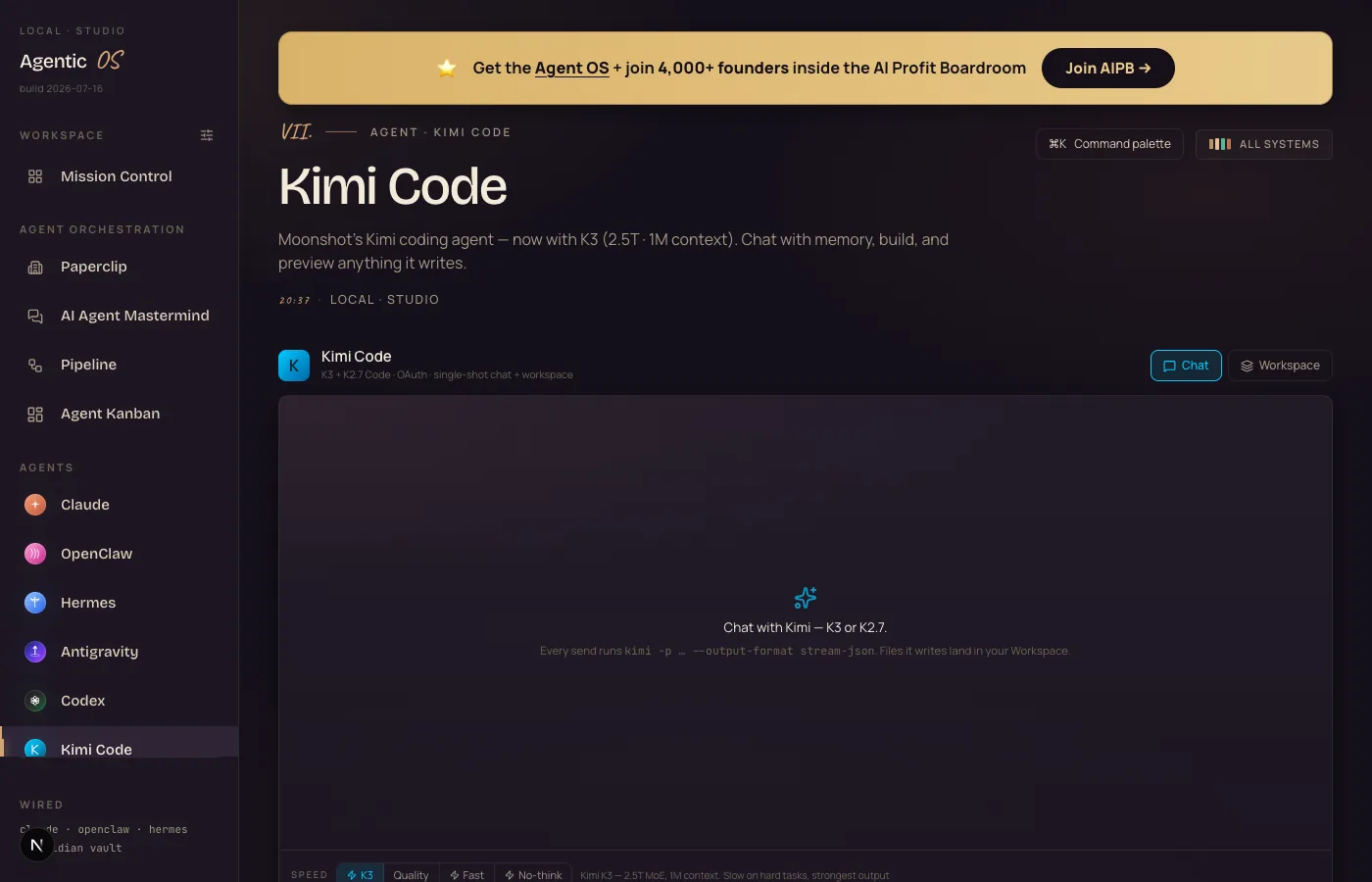
A frontier model launched this morning. By the afternoon it was a labelled switch on my dashboard, building websites into my workspace next to Claude, Hermes and Codex. This is what an Agent OS is actually FOR — and here's the whole wiring.
the wiring behind the toggle — a frontier model reduced to one labelled switch
1
afternoon, launch to live toggle
4
speed modes on the Kimi tab now
36
model profiles in the same room
$0
added cost — rides the coding plan
✦
I · the problem
The Scattered Cockpit Problem.
Count your AI tabs.
One for ChatGPT. One for Claude. One for Kimi. One for whatever launched this week.
Each has its own login, its own history, its own place your files end up — which is to say, no place at all.
Every new model makes it worse.
The launches keep coming, and each one adds a tab instead of adding a capability.
You don't have an AI stack. You have an AI junk drawer.
The K3 Control Room breaks that cycle for good.
Thinking it?"Sounds like infrastructure work. I just want to use the models."
That's the point of the story below: because the room already existed, adding a brand-new flagship took one afternoon and three commands.
You build the cockpit once. Every launch after that is a switch, not a project.
✦
II · how it works, in simple words
One room. Every machine. Labelled switches.
My Agent OS is a dashboard that runs on my Mac. Every AI I use — Claude, Hermes, Codex, Kimi, local models — is a surface in it: same workspace, same memory, files landing in folders I can see.
The Kimi tab drives Moonshot's models through the Kimi CLI. Until this week it had three speed modes: Quality, Fast, No-think.
Then K3 dropped — Moonshot's 2.5-trillion-parameter flagship with a million-token memory. And because the room already existed, "adding a frontier model" meant: one alias in a config file, one profile, one new button.
Now there are four switches. The new one says K3.
the room — every machine behind one wall of labelled switches, newest one still warm
Thinking it?"My setup is just… tabs. Is building this room hard?"
The room is the Agent OS — it exists, it's a zip, and members install it in an afternoon. You don't architect it; you unpack it.
This guide shows what living in it feels like on a launch day. That's the part tabs can never give you.
✦
III · exactly how it works, step by step
Launch tweet to live switch: the whole wiring.
Everything below happened on my machine on launch day, in order:
1
The catalog knew first.hermes update then hermes mcp catalog-style discovery — but for models the real check was the Kimi plan endpoint: k3 was already listed on the coding plan. No new account, no card.
2
One alias for the CLI. A nine-line block in ~/.kimi-code/config.toml teaching the Kimi CLI the name kimi-code/k3 — 1M max context declared, display name "K3".
3
One profile for Hermes.hermes profile create kimi-k3 --clone-from kimi-highspeed, point the model at k3. Now every Hermes workflow — kanban, loops, agents — can hire K3 by name.
4
One button for the dashboard. A fourth entry in the Kimi tab's speed modes: K3 — 2.8T MoE, 1M context. Slow on hard tasks, strongest output. The dashboard hot-reloaded; the switch just appeared.
5
Then the room got tested. "Build a beautiful website for an SEO agency" → files landed in the workspace. A luxury watch-repair site followed. Both browsable in the Workspace tab, both built by a model that didn't exist at breakfast.
6
And one honest bug got fixed. Long K3 builds looked frozen — the chat streamed only text while Kimi wrote files silently. The room now streams live activity: Write · index.html, byte counts, the works. A control room should show its needles moving.
So when someone asks "but what IS it?" — it's the difference between hearing about a model and flipping it on.
Build 1 through the room — "build a beautiful website for an SEO agency" (live)
What you're looking at: the actual site that landed in the workspace during the "nothing happened" moment — embedded live. The chat looked idle; this is what it was quietly building.
Build 2 through the room — the luxury watch studio, K3 mode (live)
What you're looking at: K3's watch-repair studio, scrollable right here — sweeping dial animation, serif display, appointment form. One sentence in the chat box made this.
What you're looking at: the switch itself — K3 selected in the Speed row, hint text stating exactly what it is and what it costs you (slowness, not money).
And the room kept producing. Same switch, three more jobs — a different kind of output each time:
Build 3 through the room — the game, upgraded with hunter drones (playable)
What you're looking at: K3's one-shot 3D game after a round-two upgrade — four hunter drones, a hull bar and a full Tron redesign, all requested through the same chat box. WASD to drive; the drones WILL find you.
Job 4 — the agent renders a VIDEO (Hermes profile + Blender, driven by K3)
What you're looking at: an MP4 the K3 agent made by driving Blender tool-call by tool-call — modelled the rocket, rigged the lights, keyframed 150 frames, checked its own frame luminance, and encoded the video. Nobody opened Blender.
Job 5 — SEO deliverables from live Search Console data (scroll it)
What you're looking at: a keyword-opportunity report K3 designed and built from my real Search Console export — 84,677 impressions scored into priority tiers with a what-to-do-this-week plan. The full SEO story lives in The Whole-Site SEO Brain.
Thinking it?"Doesn't running the Agent OS burn a fortune in tokens?"
No — that's the biggest myth about it. The everyday 90% runs on free local models on your own machine, and free APIs slot in for more — today's new switch rides a coding plan that was already paid for.
For the frontier work, the Agent OS drives the plans and CLIs you already own — Claude's CLI comes with your Claude subscription, K3 came with the Kimi plan. A layer on top, never a second meter.
And inside the AI Profit Boardroom there are full token-optimisation tutorials, so usage drops even further.
✦
what the new switch costs on the open market — and what it costs plan-holders ($0)
VII · three beliefs to drop
What's actually holding you back.
Wrong: "Keeping up with AI means reading everything on launch day."
Right: Keeping up means having a room the launch can be wired into. One afternoon of wiring beats a week of reading, and you end up with the model instead of opinions about it.
Wrong: "Dashboards are for big teams; I'm one person."
Right: One person juggling nine tabs loses MORE to friction than a team does — there's nobody else to remember where that output went. The room matters most when the whole operation is you.
Wrong: "By the time I set this up, the models will have changed again."
Right: That's the argument FOR the room, not against it. The models change monthly; the switches and wiring don't. Build the part that lasts.
Don't take my word for it
Members post their wins every day — agency owners, ecom founders, course creators, solo operators across 38 countries. Real businesses, real numbers, in their own words.
The screenshots in this guide are my production dashboard, not a demo build — the same room that runs the agency, the channel, and the guides you're reading. K3 was switch number thirty-six.
Thinking it?"I'm on Windows / a different setup — does the room translate?"
The pattern does: alias in your CLI's config, a profile in your runtime, a visible switch in whatever you look at daily. The Agent OS zip ships the Mac version ready-made; the wiring recipe works anywhere those three pieces exist.
IX · the SOP
Wire the next launch in one afternoon.
1
Check ownership first. Hit the model-list endpoint of every plan you already pay for. Launch models increasingly appear there free.
2
Teach your CLI the name. One alias block in the config — model id, context size, display name.
3
Clone a profile. Copy your closest existing profile and point it at the new model. Never build from zero.
4
Add the switch. Whatever your dashboard is — a toggle, a dropdown entry, an alias — make the model reachable in one click.
5
Verify from the endpoint. Served-model field, not self-report. New models routinely claim to be their predecessor.
6
Ship one real thing through it. A site, a file, a task — into the same workspace as everything else.
7
Bench before trusting. Same tasks, same judge as your other models. Feelings aren't scores.
8
Route by lane. Give the new switch the jobs it wins; keep the rest where they were.
✦
X · the 30-day roadmap
From junk drawer to control room.
Week 1
Stand up the room
Agent OS installed, your existing plans connected, workspace receiving files.
Week 2
Wire your models
Every model you already pay for becomes a switch. Kill the tabs as you go.
Week 3
Route real work
Your actual daily jobs through the room — watch where each model actually wins.
Week 4
Rehearse a launch
Next model drop: run the 8-step SOP and time yourself. Under an hour is the standard.
Build the cockpit once. Every launch becomes a switch.
the recap
What you just gained.
i.
You stopped collecting tabs.
Models become switches in one room, files in one workspace.
ii.
You gained the 3-command wiring.
Alias, profile, toggle — the same recipe for every future launch.
iii.
You gained visible needles.
Live build activity — no more "nothing happened" while an agent works.
iv.
You gained launch-day speed.
K3 went from tweet to production switch in an afternoon. So will the next one.
v.
You gained honest routing.
The bench decides which switch gets which job — not the hype cycle.
vi.
You gained it on existing bills.
The newest switch cost $0 — it was already on the coding plan.
The AI Profit Boardroom is where the actual Agent OS lives — the templates, the prompts, the daily rooms, the weekly walkthroughs. Same builds you read about here, taught hands-on inside.