JoinThe Goldie framework · launched today · 16 July 2026
The Kimi K3 Machine.
Moonshot just shipped a 2.5-trillion-parameter machine with a one-million-token memory — benchmarking around Fable and Sol level. I tested it, wired it into my Agent OS the same afternoon, and if you're on the Kimi coding plan, you already own it.
the whole launch story in one line — benchmark post to working switch, same afternoon
2.8T
total parameters (MoE)
1M
token context window
4×
the context of K2.6
$0
extra on the Kimi coding plan
✦
I · the problem
The Goldfish Problem.
Every AI coding session ends the same way.
You feed the model your files. It works brilliantly — for a while.
Then the context fills up.
It forgets the file you pasted an hour ago.
It re-asks questions you already answered.
It "fixes" code by breaking the thing it can no longer see.
So you babysit it. You re-paste. You summarise. You start fresh chats and lose the thread.
Your model isn't dumb. It's a goldfish — brilliant, with a memory that runs out mid-job.
The Kimi K3 Machine breaks that cycle for good.
Thinking it?"Another Chinese model launch. Do I actually care?"
This one's different for one selfish reason: if you already pay for the Kimi coding plan — like I do — K3 appeared on your account today at no extra cost.
A frontier-tier model, four times the memory, same bill. That's worth twenty minutes of your attention.
✦
II · how it works, in simple words
A bigger brain, and a much longer memory.
Two numbers explain the whole launch.
2.8 trillion parameters (Moonshot's docs corrected the launch-day 2.8T estimate). That's the machine's size — more than double K2.6, built as a "mixture of experts": only the relevant experts wake up for each request, so it's huge without being slow on everything.
One million tokens of context. That's the working memory — roughly 750,000 words in view at once. Your whole codebase, your whole doc folder, your whole chat history — all of it stays "in the room" while it works.
For comparison: K2.6 held 256k tokens. Most models you use daily hold less. K3 quadruples it.
And the third thing, which isn't a number: it's tuned for long-horizon agent work — tasks that take many steps and many minutes. Early testers report it grinding on hard problems for half an hour and coming back right, where other models give up or forget.
the memory upgrade, to scale — K3's window is ~8× a typical model's
Thinking it?"Big context windows always turn out to be marketing. Models forget the middle."
Sometimes true — which is why the guide below includes my own test rather than just the launch numbers.
And the early signal is specifically strong on long-horizon agent benchmarks — the ones where forgetting the middle makes you fail.
✦
III · exactly how it works, step by step
How I got K3 running within hours of launch.
No waitlist, no new account. Here's the exact path, from my machine this afternoon:
1
Checked what my Kimi coding plan serves. One request to the models endpoint. Three models came back: the K2.7 coder, the highspeed variant — and a new one, simply named k3. It's already on the plan.
2
Confirmed it's really K3. Funny wrinkle: ask the model what it is and it says "Kimi K2.7" — models are often the last to know their own name. The API's own response header settles it: served model: k3.
3
Wired it into the Agent OS. One new Hermes profile — kimi-k3 — pointed at the coding endpoint with the plan key. Two minutes.
4
Verified end to end. Sent a live prompt through the profile, got an answer back, and the profile appeared in the Agent OS dashboard next to the other 35.
5
Then gave it a real job. My standard one-shot test: build a complete, playable 3D browser game from a single prompt. The result's below — judge it yourself.
So when someone asks "but what IS it?" — it's Moonshot's new flagship: a much bigger brain with a four-times-longer memory, and it slotted into my existing stack in an afternoon.
IV · the sources — straight from launch day
The receipts, hours old.
"🚨 BREAKING: Kimi K3 benchmarks have released and it's ~Fable/Sol level"
— leo (@synthwavedd), on X, 16 July 2026
The benchmark drop · what everyone's reacting to
Frontier-tier numbers, day one
This is the post that lit up the timeline today: K3's launch benchmarks land it around the Fable and Sol tier — the two models everyone measures against right now. The replies zero in on the Terminal Bench scores, which is the benchmark that matters for agent work — a model that can drive a terminal for many steps without losing the plot. That's exactly the "long-horizon" claim from the leaks, showing up in the numbers.
Your model was never dumb. It just kept forgetting. That part's over.
V · my test — one prompt, one game
I gave it my standard test. Here's what came back.
Every new model that crosses my desk gets the same job: build a complete, playable 3D browser game — one prompt, one self-contained file, no fixes allowed. It's the test that separates demo-reel models from ones that ship working things.
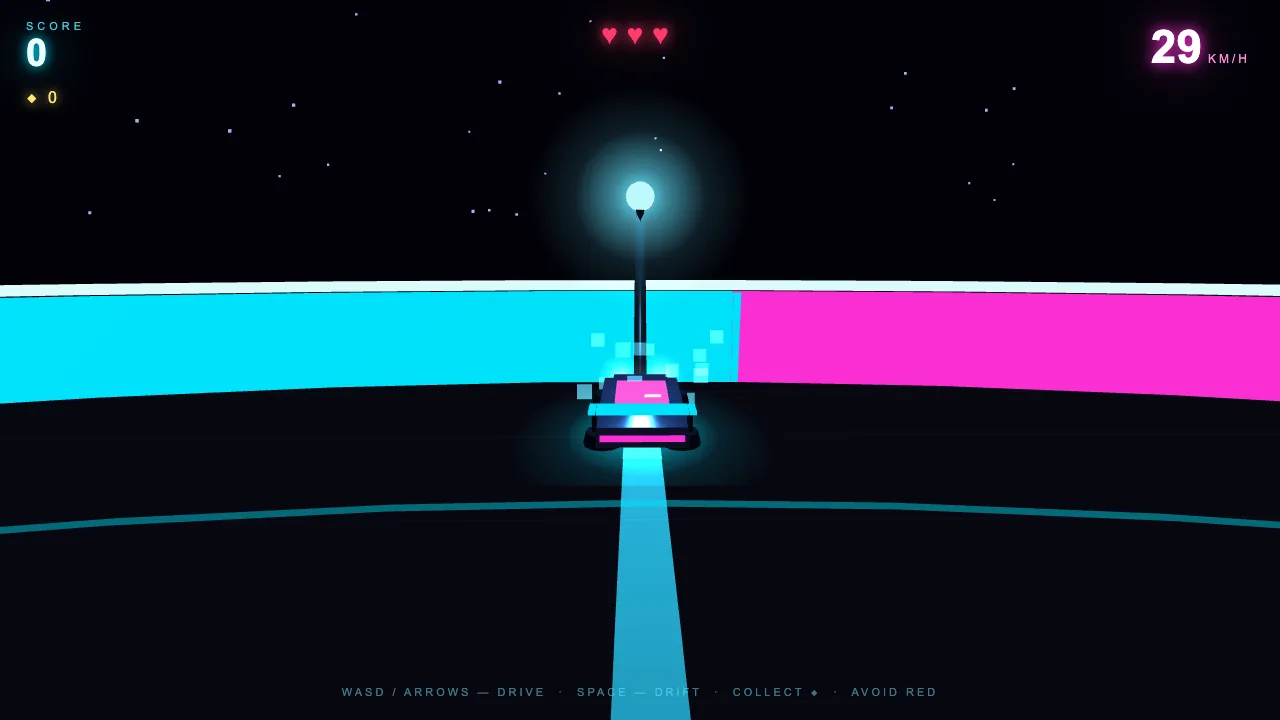
K3's brief: "Neon Drift Arena" — a neon hovercar drift game with orbs to collect, obstacles, a working score system and a lose condition.
K3's one-shot build · playable below — click to start
What you're looking at: the actual file K3 returned, embedded live — not a screenshot. WASD to drive, space to drift. Playtest notes below the beliefs section. Open it full screen from the sources panel above.
What you're looking at: my automated playtest mid-run — 29 km/h, light trail rendering, collision sparks where I clipped the lamppost. Not just "it renders": it drives, scores, and reacts.
slow and right: 13 minutes of thinking, then a game that just works
Thinking it?"One cherry-picked test proves nothing."
Agreed — that's why it's the same test every model gets, pass or fail, and the result ships unedited either way. My GoldieBench leaderboard runs on exactly this method.
The point isn't one game. It's whether a day-one model handles a complex, single-shot build without a human cleaning up after it.
✦
VI · wired into the agent os
From launch tweet to working profile in one afternoon.
The real story isn't that K3 exists — it's how fast a new flagship drops into a system that's ready for it.
My Agent OS runs every model through Hermes profiles. Adding K3 was three steps:
# 1 · see what the coding plan serves (k3 was just... there)
curl https://api.kimi.com/coding/v1/models -H "Authorization: Bearer $KIMI_API_KEY"

# 2 · one new profile, cloned from my existing Kimi setup
hermes profile create kimi-k3 --clone-from kimi-highspeed

# 3 · point it at k3 and go
hermes --profile kimi-k3 -z "K3, you alive?"
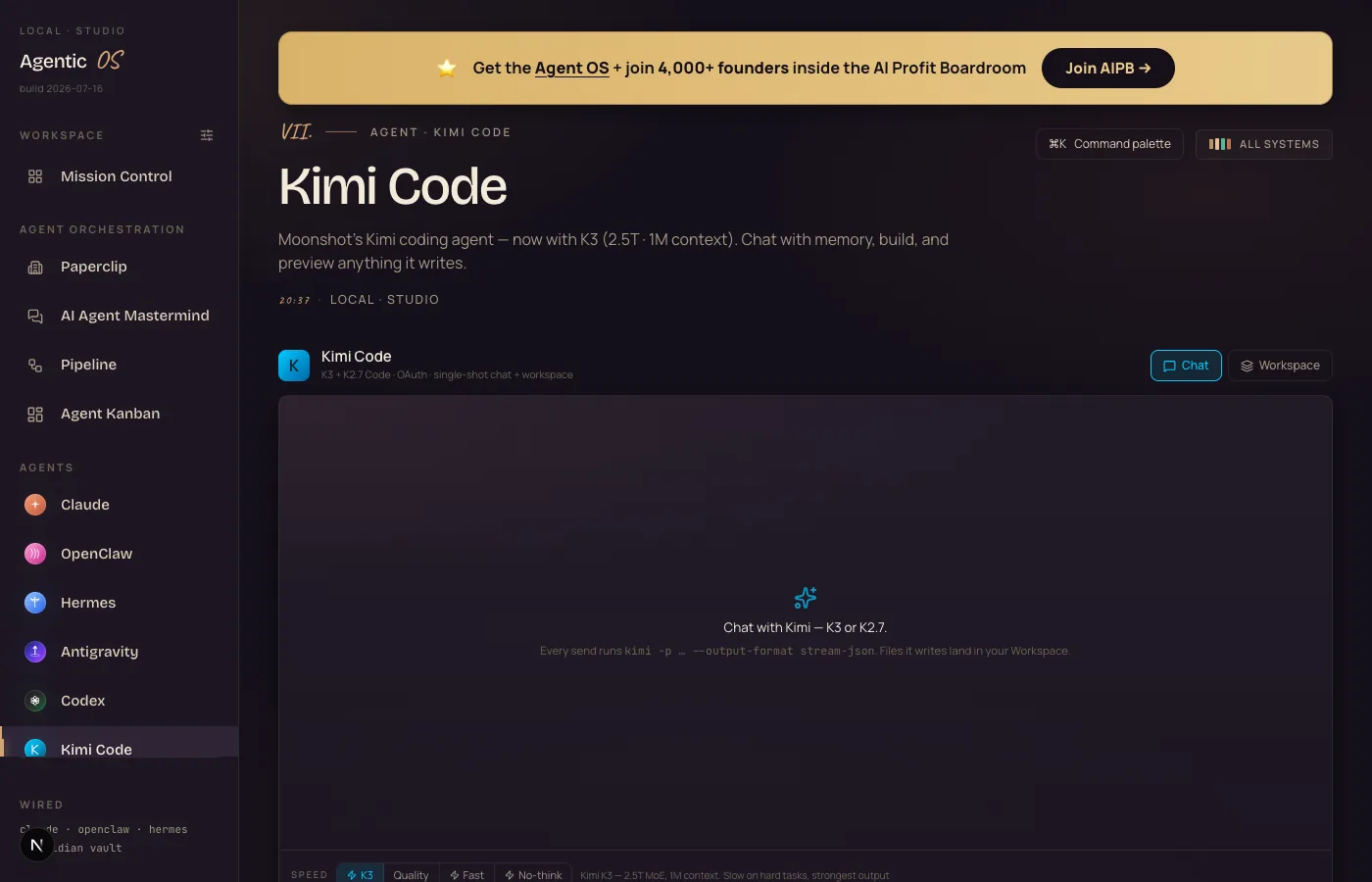
What you're looking at: my Agent OS Kimi tab after the update — a K3 button in the Speed row (selected, cyan) next to Quality, Fast and No-think. Same chat, same workspace; one more machine behind it.
That's it. The profile now sits in the dashboard next to every other model I run — same tools, same memory, same workflows. When the next flagship drops, it gets the same three steps.
the wiring pipeline — this is what "your stack is ready for new models" looks like
Thinking it?"I don't have a Kimi coding plan. Is this a dead end for me?"
No — K3 is also live on OpenRouter at $3 per million input tokens, day one. Any tool that speaks OpenRouter can use it right now.
But if you DO have the plan (it's the one that powers Kimi Code), you got a frontier model for free today. Check before you pay anyone.
✦
VII · the framework
The five parts of the Kimi K3 Machine.
i.
The Intake
A million tokens in one gulp — your repo, your docs, your whole conversation. Stop rationing what the model gets to see.
ii.
The Experts
2.8 trillion parameters (Moonshot's docs corrected the launch-day 2.8T estimate), arranged so only the relevant specialists wake per request. Scale without the wait — most of the time.
iii.
The Long Haul
Tuned for multi-step agent runs. It keeps grinding where smaller models drift, forget, or quietly give up.
iv.
The Plan Ticket
Already included in the Kimi coding plan, and on OpenRouter for everyone else. No waitlist between you and it.
v.
The Slot
It's one profile in an Agent OS, not a new religion. Wire it in, benchmark it, use it where it wins, keep the rest of your stack.
Frontier launches used to mean waitlists. This one was on my bill before I heard about it.
VIII · old way vs new way
Working with a goldfish vs working with K3.
what the tiers cost on the open market — frontier pricing, but not frontier-lab pricing
Old way
re-pasting context all day, every day
Cherry-pick which 5 files the model is allowed to see
Watch it forget the requirements from an hour ago
Re-explain the project in every fresh chat
Summarise your own codebase to fit the window
Long agent runs die quietly in the middle
New flagship models mean new bills and new waitlists
New way
one gulp, then it just knows
Hand it the entire repo — a million tokens fits
Minute 40 of the task, it still remembers minute 1
One profile in the Agent OS, wired in an afternoon
Long-horizon agent runs are what it's tuned for
Terminal-driving benchmarks near the frontier tier
Already included in the coding plan you may be paying for
Thinking it?"What's the catch?"
Speed, honestly. Early testers report hard tasks taking up to ~35 minutes on max reasoning — K3 thinks long. My game build wasn't fast either.
For agent work that runs unattended, slow-but-right beats fast-but-wrong every time. For quick chat, keep a fast model in the next slot over.
Thinking it?"Doesn't running the Agent OS burn a fortune in tokens?"
No — that's the biggest myth about it. The everyday 90% runs on free local models on your own machine, and free APIs slot in for more — and today's whole topic is a frontier model that costs plan-holders nothing extra.
For the frontier work, the Agent OS drives the CLIs and plans you already pay for — your Claude subscription includes the Claude Code CLI, your Kimi plan now includes K3. You're not paying twice; it's a layer on top of what you already own.
And inside the AI Profit Boardroom there are full token-optimisation tutorials, so usage drops even further and you never think about it again.
✦
IX · three beliefs to drop
What's actually holding you back.
Wrong: "Frontier AI means paying frontier prices."
Right: The frontier arrived on a coding plan today, and at $3 per million tokens on the open market. The gap between "best" and "affordable" closed while everyone was watching other launches.
Wrong: "I should wait for the reviews before touching a day-one model."
Right: A model is a profile, not a marriage. Wiring K3 in took an afternoon; if it underperforms, it costs nothing to bench it. The people who test on day one are the ones with real opinions by day seven.
Wrong: "Context size is a spec-sheet number, not a workflow change."
Right: "Read my whole project first" becoming a real instruction changes how you work — no more choosing which files the model deserves to see, no more re-explaining your own business every session.
Don't take my word for it
Members post their wins every day — agency owners, ecom founders, course creators, solo operators across 38 countries. Real businesses, real numbers, in their own words.
K3 launched this morning; by this afternoon it was a working profile in my Agent OS with a one-shot game build to its name. Same stack that runs my agency and channel — and the same three steps work on your machine tonight.
The AI Profit Boardroom is where the actual Agent OS lives — the templates, the prompts, the daily rooms, the weekly walkthroughs. Same builds you read about here, taught hands-on inside.