New — Gemma 4 July 2026 update · tested on my machine
The Self-Owned Agent. Run Hermes free, forever.
Google just fixed the one thing that made local AI agents unreliable. Download one file, wire one profile, and your agent works on your own machine — $0 per message, private, and it never expires.
$0per message, forever
7.7GBone download, yours
1.5sreplies on my Mac
0API keys needed
I · The problem
The Rented Brain Problem.
Imagine hiring a brilliant assistant.
They're great at the job.
But they don't work for you — they work for a landlord in another city.
Every sentence they speak, the landlord charges you.
Every file they touch gets photocopied and sent to the landlord's office.
If the landlord raises prices, you pay.
If the landlord changes the rules, revokes your key, or has an outage — your assistant vanishes mid-task.
And if your internet drops, they stop existing entirely.
That's every cloud AI agent you run today. A genius on a meter, in someone else's building.
The Self-Owned Agent breaks that cycle for good.
Thinking it?"Running AI on my own computer sounds like a project for real engineers."
It's three commands, copy-pasted. One app install, one download, one text file.
If you can install Spotify, you can do this. The full setup is in this guide.
II · How it works, in simple words
Your Mac becomes the AI company.
Three pieces, all free.
Gemma 4 is Google's open AI brain — a model file anyone can download and keep. On July 15, 2026, Google shipped an update that patched the one weakness local models always had: they were clumsy at using tools (the ability to actually run commands and edit files, not just talk). That patch is what makes this whole setup work now.
Ollama is a free app that runs AI brains on your own computer — think of it as the engine room. It downloads the brain once and serves it to anything on your machine.
Hermes is the agent shell — it gives the brain hands. It's what turns "a chatbot" into "an employee that creates files, runs commands and finishes jobs."
Wire the three together and you own the whole stack. No account, no key, no meter, no landlord.
The Self-Owned Agent — the brain, the engine room and the hands, all living on your machine
Thinking it?"Free local models are toys. The real power is in the cloud ones."
That was true last year. The July update specifically fixed tool-calling — the exact skill an agent needs.
I tested it the day I set this up: it called tools correctly on the first try, wrote a real file, and verified its own work. The receipts are below.
III · Exactly how it works, step by step
One message's journey — with nothing leaving the building.
The brain is literally one file. Gemma 4 (12B) is a 7.7GB file sitting in a folder on your Mac (~/.ollama/models — "the AI brain shelf"). Once it's downloaded, the internet is optional.
Ollama serves it like a tiny local website. The engine app listens at an address that only exists inside your computer (localhost — "this machine, talking to itself"). Nothing on that address can be seen from outside.
You type a message to Hermes. Hermes bundles your message and sends it to that local address — not to Google, not to any cloud.
The brain thinks on your own chip. Your Mac's processor runs the model. On my machine a reply starts in about 1.5 seconds.
When the job needs hands, the brain asks for tools. "Tool-calling" means the model replies with a structured request — "run this command", "write this file" — instead of just words. This is the part Google's July update fixed. Hermes executes it and hands the result back.
The loop repeats until the job is done. Think → act → check → continue. That's what makes it an agent, and every loop costs the same: nothing.
Nothing is metered, logged, or sent away. No token counter, no usage dashboard, no key to revoke. The bill for 10,000 messages is identical to the bill for one: $0.
So when someone asks "but what IS it?" — it's a brain file on your disk, an engine app that runs it, and an agent shell that lets it do real work. All three are free.
One message, start to finish — measured on my machine, July 2026
IV · Straight from Google
The update that made this possible.
On July 15, 2026, the Gemma team announced a big improvement release for Gemma 4 — and buried in the thread is the line that matters for agents: patched chat templates and tool-calling fixes for "accurate, consistent tool execution."
The announcement · why it matters
Google fixed the agent skill
This is the post that triggered this whole guide. The improvements roll out across the Gemma 4 family — and the tool-calling patch is the one that turns Gemma from "a chatbot you run locally" into "an employee you run locally." That's the unlock.
The family, in plain words: five sizes. E2B and E4B are the small ones for lighter machines (128K context — "context" is the AI's working memory). 12B is the sweet spot for a normal Mac. 26B and 31B are the big ones for heavy hardware (256K-class memory). This guide uses the 12B.
The Gemma 4 family after the July 2026 update — sizes and the machines they fit
Google spent millions training the brain. You keep it on a shelf at home.
V · The receipts
I tested it the same day. Here's exactly what I did.
How I tested, in plain English: my testbed is my own Mac (36GB of memory) running my real Agent OS dashboard. Every test is one command or one message, sent the normal way I'd use it in a working day. I measured the reply times the tools reported. Nothing cherry-picked — the numbers below are the only runs I did, first attempt each.
Experiment 1 · Is it actually fast enough?
The setup. Pulled the fresh July build (gemma4:12b-mlx — the version tuned for Apple chips) and asked it a simple question directly.
The result. The reply came back in 1.5 seconds. For comparison, cloud agents often take longer than that just reaching the server.
Experiment 2 · Can it use tools correctly? (the July fix)
The question. I gave it one tool — a pretend weather-checker — and asked it to check the weather using the tool.
The old failure. Local models used to answer in prose ("the weather is probably nice!") instead of actually calling the tool. That's what made them useless as agents.
The result. It returned a perfect, structured tool call — right tool, right format, right arguments — in 1.2 seconds. First try.
Experiment 3 · Can it do a real job, hands and all?
The setup. Through Hermes (the agent shell), I asked it to create a file with an exact sentence inside, then read it back and confirm.
The result. It wrote the file, re-opened it, and confirmed the contents — the full agent loop (think → act → check) on a free local brain. The file is real; I checked it myself afterwards.
Experiment 4 · Does it work inside the Agent OS dashboard?
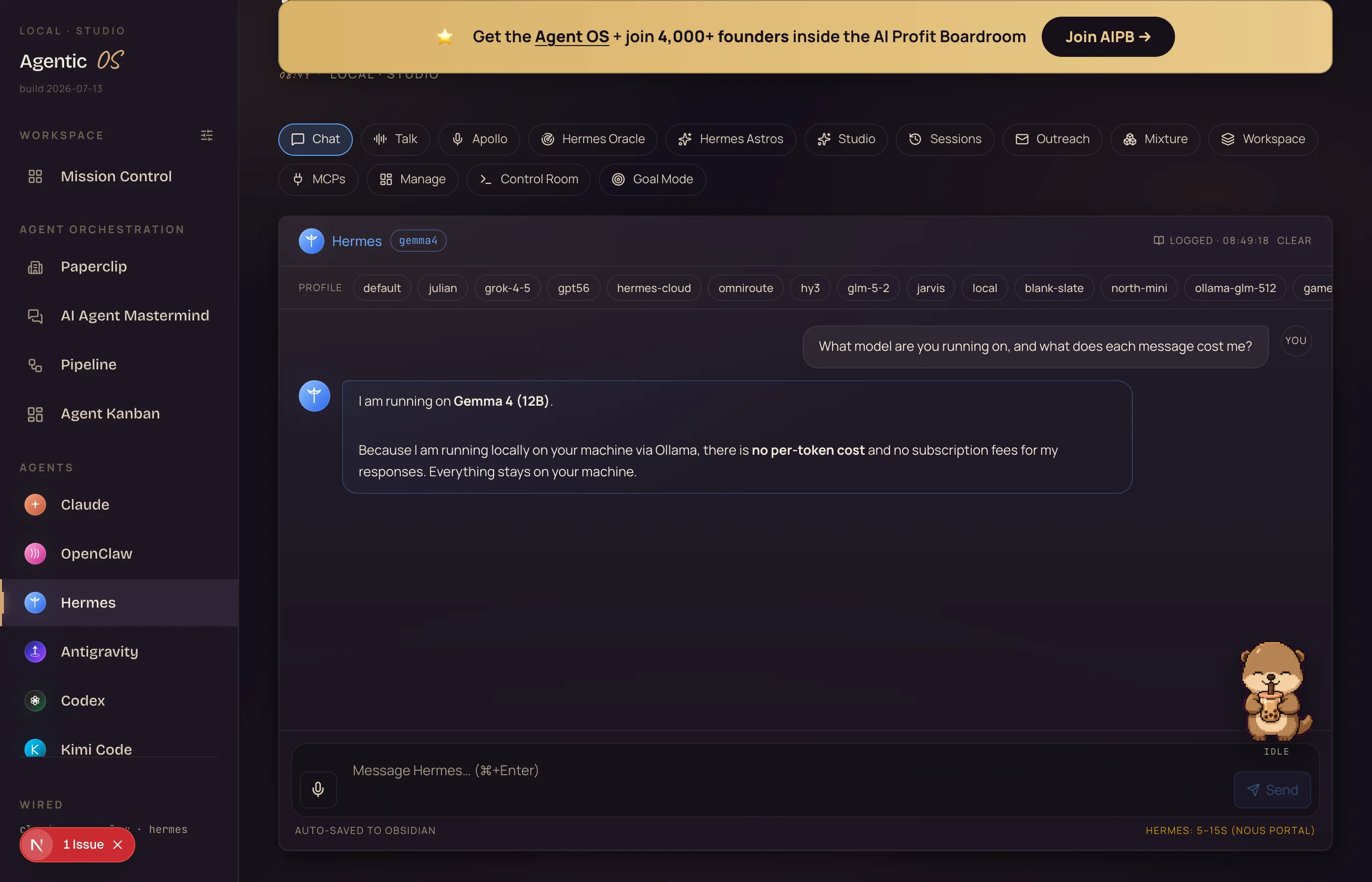
The setup. Added Gemma as a Hermes profile, opened my dashboard's chat, and asked it who it is.
The result. "I am Gemma… powered by the Gemma 4 (12B) model running locally on his Mac via Ollama." Reply in about 50 seconds through the full dashboard round-trip — an agent turn, not just a one-line answer.
What you're looking at: my actual Agent OS chat, talking to the new Gemma profile. It answers as the local model — this reply cost $0 and never left the machine.
VI · Old way vs new way
Renting a brain vs owning one.
Old way — the rented agent$20–$200+ every month, forever
Sign up, hand over a card, manage an API key
Every message ticks a token meter you're billed on
Heavy agent loops multiply the bill silently
Your prompts and files travel to someone else's servers
Rate limits throttle you at the worst moment
Internet down or provider outage = agent gone
Price hike or policy change? You absorb it
New way — the Self-Owned Agent$0/month after one 7.7GB download
No account, no card, no API key — nothing to manage
10,000 messages cost exactly what one costs: nothing
Agent loops run all day without a meter attached
Every prompt and file stays on your own disk
No rate limits — it's your chip, use all of it
Works on a plane, in a blackout, anywhere
Nobody can reprice, revoke, or retire your setup
Thinking it?"I already pay for Claude — why would I need this?"
Keep it. The point isn't replacing your best model — it's stopping the meter on the everyday 90%: drafts, summaries, file jobs, research grunt work.
Route the routine work to the free local brain, save the paid calls for the hard 10%. That's how the whole Agent OS runs.
You don't cancel your best employee. You stop paying rent on the routine ones.
VII · The framework
The Self-Owned Agent — five layers of owning it.
This is the repeatable method. Set up each layer once, own the whole stack for good.
i.
The Gem
Download the brain — Gemma 4, one 7.7GB file from Google, free and yours to keep. This is the layer nobody can take back.
ii.
The Engine Room
Install Ollama so the brain runs on your own chip. One free app; it serves the model to everything else on your machine.
iii.
The Hands
Wire it into Hermes with one profile. Now it doesn't just talk — it writes files, runs commands and finishes real jobs.
iv.
The Cockpit
Surface it in your Agent OS dashboard next to every other agent you run — one screen, and the free one handles the daily grind.
v.
The Deed
Enjoy what ownership actually means: no meter, no key, no logs leaving the building, no landlord. The agent is property now, not a subscription.
Layer iv in action — one free brain feeding every routine job in the OS
hermes --profile gemma4 -z "Create hello.txt saying: Gemma 4 runs Hermes free forever. Then read it back and confirm."
Mine wrote the file, read it back, and confirmed — the full agent loop, $0.
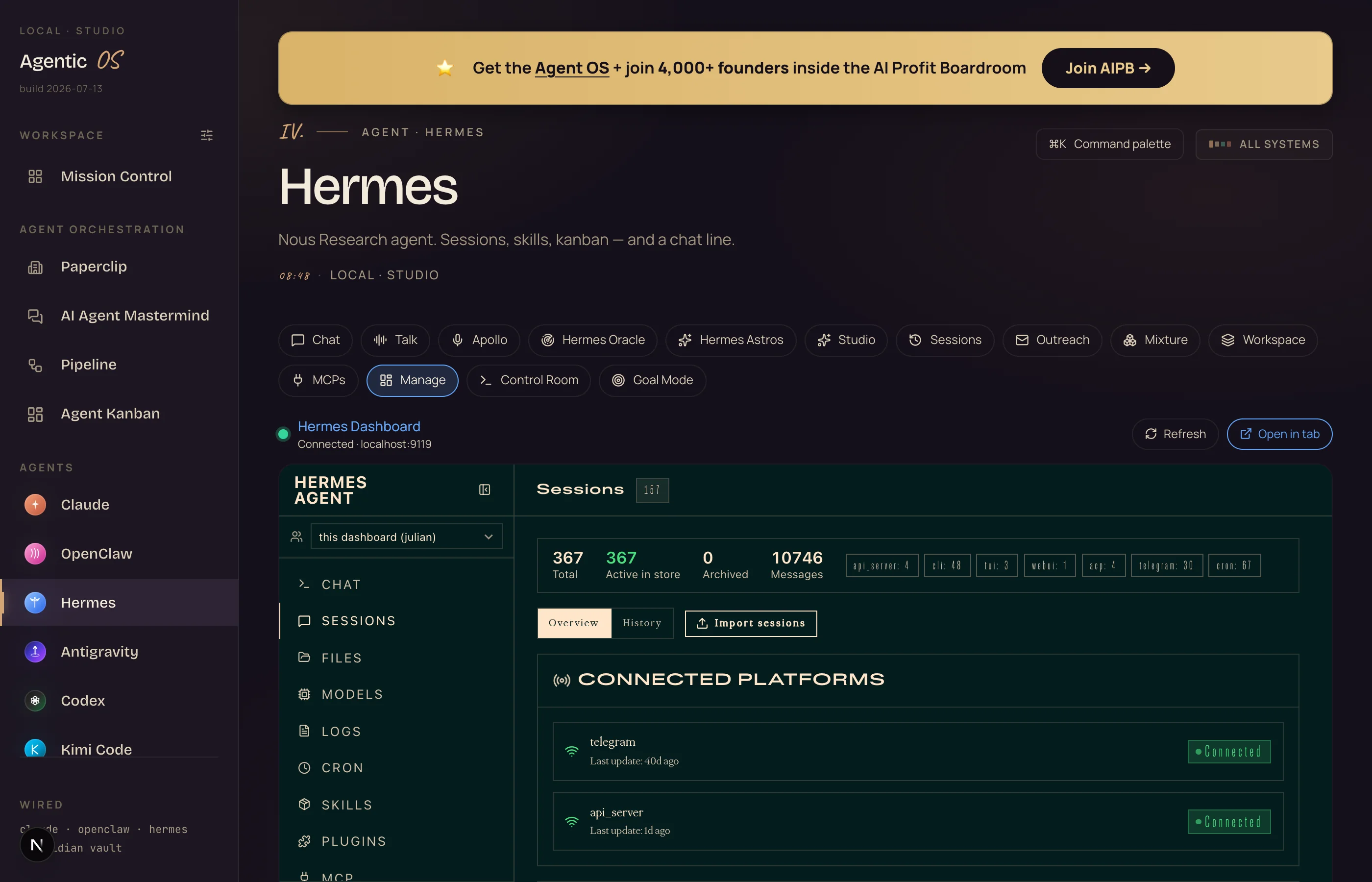
Step 6 — See it in your Agent OS. The dashboard picks the profile up automatically — it appears in the Hermes tab next to your paid agents, ready to chat.
What you're looking at: the Hermes command centre inside my Agent OS — the live agent your new profile plugs into (367 sessions running through it on this machine). The moment the gemma4 folder exists, it appears as a profile pill in the chat — no restart needed.
Thinking it?"My Mac probably isn't powerful enough for this."
The 12B brain needs roughly 8GB of memory while running — most Macs from the last few years handle it.
On an 8GB machine, use the E4B size instead: same July fixes, smaller brain, still free.
Thinking it?"Doesn't running the Agent OS burn a fortune in tokens anyway?"
That's the biggest myth about it. The everyday 90% runs on exactly this — a free local model, $0, nothing leaving the machine.
Free API tiers plug in on top, and for frontier work it drives the CLIs you already pay for — your Claude subscription includes the Claude Code CLI, so you're not paying twice. Plus the Boardroom has full token-optimisation tutorials.
IX · Three beliefs to drop
What's actually holding people back.
Wrong: "Serious AI has to live in the cloud."
Right: Google now ships its open brain as a file you keep. The cloud is a convenience, not a requirement — and for routine agent work, the local version is already good enough. I verified it the day the update landed.
Wrong: "Free means it'll cost me in quality."
Right: Free here means no meter — the model itself is the same one Google publishes for everyone. The July tool-calling patch was the missing piece, and it passed every agent test I threw at it, first attempt.
Wrong: "I'll set this up later, when local AI matures."
Right: It matured this month — that's what the update was. The people wiring free local brains into their stack now are the ones whose costs flatline while everyone else's climb.
Don't take my word for it
Members post their wins every day — agency owners, ecom founders, course creators, solo operators across 38 countries. Real businesses, real numbers, in their own words.
You stopped paying per thought. The meter is gone — 10,000 agent messages cost what one costs: nothing.
You own the brain outright. A 7.7GB file on your own disk that no company can revoke, reprice or retire.
Your work stays home. Prompts, files and client data never leave your machine — private by physics, not by policy.
Your agent has real hands now. The July update fixed tool-calling, so the free brain writes files and runs commands reliably — verified, not hoped.
Your stack survives anything. Outages, rate limits, price hikes, plane mode — the Self-Owned Agent doesn't notice.
Should you set it up this week? My advice: pull the model tonight — it's one command and the download runs while you sleep. The people who figure out AI agents now, while the tools are evolving fast, are going to be way ahead when everything settles. Every workflow you move off the meter compounds.
The AI Profit Boardroom is where the actual Agent OS lives — the templates, the prompts, the daily rooms, the weekly walkthroughs. Same builds you read about here, taught hands-on inside.