"Hey Hermes."Your agent now listens for you.
Hermes Agent just shipped voice activation: say the wake word from anywhere in the room and it opens a fresh session, listens, and acts — hands-free. Detection runs entirely on your machine, it's off by default, and it's free. Here's the announcement, how it works, and the beautiful one-tap toggle I built into the Agent OS chat — tested live, listener armed, mic verified.
Straight from Nous Research →
The three words that matter in that tweet: local, off by default, hands-free.
The always-on listener only watches for the wake phrase — no audio leaves your machine until you actually speak a command.
This is "Hey Siri" for an agent that can actually run your business.
Say the word. Everything else is automatic.
Wake → listen → act → re-arm.
A lightweight on-device detector watches your mic for the phrase.
When it hears "hey hermes", it pauses itself, opens a fresh session, and records your command with voice mode's silence detection.
Hermes transcribes it, acts, answers out loud — then the listener re-arms for the next wake.
Ending is spoken too: say "stop", "never mind" or "goodbye" and the conversation closes. (A real request like "stop the docker container" still goes through — only whole-utterance stop commands match.)
Three engines. The default needs zero setup.
openWakeWord (default) — free, local ONNX models, ships with a trained "hey hermes" model. Works out of the box.
sherpa — free, open vocabulary: type ANY phrase ("hey coder", "computer", "wake up neo") and it detects it with zero training. A ~13MB model downloads once.
Porcupine — Picovoice's engine for custom-trained keywords, free tier with an API key.
One listener, many agents — "hey coder" wakes your coder profile.
With the sherpa engine, every Hermes profile gets its own wake phrase — "hey hermes" for the default, "hey coder" for your coding profile, "hey trader" for the trading one.
Say a profile's phrase and the desktop app live-switches to it, opens a session there, and starts hands-free voice.
That's a voice-addressable TEAM of agents on one microphone.
One beautiful toggle in the chat. Tap the ear, it listens.
The CLI way is /wake on in a Hermes session.
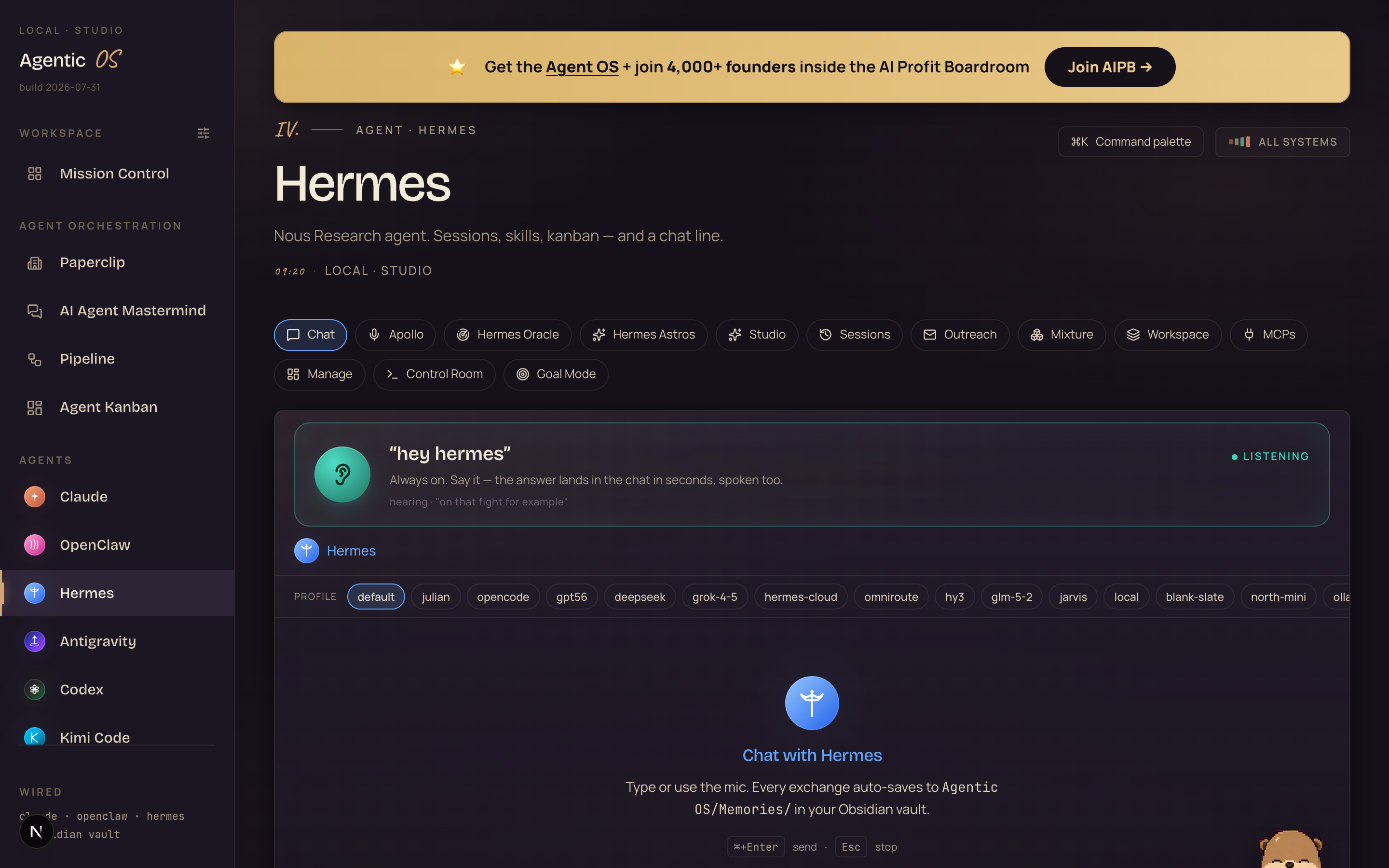
I wanted it one tap inside the Agent OS — so the Hermes chat now carries a wake-word card: a still, softly-lit ear, the phrase in display type, and a quiet LISTENING status — calm, no flashing.

How it actually works (and what I verified live today):
The card listens right in the browser — the same speech engine Chrome uses for dictation, running against the OS chat. Say "hey Hermes", speak your command, and it lands in the actual chat thread like you typed it. Hermes answers in the thread AND speaks the reply back out loud.
It arms itself. Grant the mic once and every time you open the Hermes tab the ear is already live — no clicking it awake each visit. That was the whole point: hands-free means hands-free.
And it's not naive: it fuzzy-matches the wake phrase (so "Hermes", "Hermees", "her mes" all land), ignores long ambient sentences, dedupes the stutter Chrome's recognizer produces, and cools down after each command so a conversation in the room doesn't machine-gun your chat.
Voice replies route to a fast cloud model — a spoken question deserves a ~4-second answer, not a 70-second one. Typed chat keeps whatever profile you selected.
Three routes in. All take under a minute.
One command in any Hermes session.
/wake on        # start listening (installs the engine on first use)
/wake status    # phrase, provider, state — and exactly what's missing if it won't arm
/wake off       # stop
The toggle IS the setting — it persists to ~/.hermes/config.yaml across sessions.
Click the ear icon in the composer.
Same toggle, same persistence — and hands-free conversations end with a spoken "stop".
The card you saw above — ships in the Boardroom template.
One tap in the Hermes chat — ever. It runs on the browser's own speech engine, so the mic prompt is Chrome's normal one, and after that first grant the card arms itself every visit.
Commands land in the real chat thread, answers come back in text AND voice. Members get it in the next zip update.
CLI wake "listening" but never waking? It's the mic permission.
This bites the CLI/desktop routes only — macOS grants mic access per process, and Hermes's Python backend needs its own grant.
Without it you get a "working" stream that only delivers silence.
Fix: System Settings → Privacy & Security → Microphone → enable the Hermes backend (it may appear as your terminal or python), then toggle the wake word off and on.
The Agent OS card sidesteps this entirely — the browser already owns a mic grant. That's exactly why I built it in the browser.
Get the voice-first Agent OS.
The wake word is one layer. In the full Agent OS it joins Apollo (the voice copilot with briefings and memory), voice builds, and every agent in one dashboard — with the wake-word card pre-wired.
The listening part costs literally nothing — detection is on-device, no API involved. Tokens only flow when you actually speak a command, and those route like everything else in the Agent OS: free local models for the everyday 90%, free API tiers next, and the CLIs you already pay for only on the hard stuff. A day of "hey hermes" around the house rounds to $0.
Why you're still typing everything.
Wrong: "Always-listening = always-uploading. No thanks."
Right: Detection is fully on-device — the listener only watches for the phrase, and no audio leaves your Mac until you speak a command. It's also off by default; nothing listens until you arm it.
Wrong: "Voice assistants are for timers and weather."
Right: This one fronts a real agent — files, browser, schedules, builds. "Hey hermes, draft my morning brief" is a working command, not a party trick.
Wrong: "Setup will eat my afternoon."
Right: The default engine ships trained. /wake on or one tap in the OS — under a minute, verified today.
158 pages of members running this stack — their words, their numbers, raw.
Read the 158-page wins doc →Arm it tonight. Say the word tomorrow morning.
The most futuristic feature in your stack is one tap away and costs nothing. Arm the wake word, put the machine across the room, and start tomorrow with "hey hermes — what's my day look like?"
Then come get the whole voice-first system — the Agent OS, the daily updates that wired this in within days of release, and 4,000+ founders building the same way.
Join the AI Profit Boardroom →Arm it, say "hey hermes", and watch your OS wake up. I'll see you in the next one.