By the end of this page you'll see the exact system where your whole AI team lives on one screen.
You give it a job. You walk away. You come back to finished work.
That's literally how it runs, every single day.
And near the end there's one feature — Goal Mode — that saves more time than everything else on this page combined.
Stick around for that one. Once you see it, you can't unsee it.
1
screen for every agent
1
shared memory (the vault)
5
scattered tabs replaced
4,000+
founders running this stack
five scattered tabs → one desk. same models, same intelligence — a different office.
I · The problem
The Five-Tab Problem.
Right now, most people using AI have a broken setup.
And they don't even know it.
You've probably got Claude open in one tab.
Maybe ChatGPT in another.
A voice app somewhere.
Notes scattered across three different places.
Five tabs. Five logins. Zero shared memory.
And every single time you open a new chat, you start from zero.
You explain your business again.
You explain your customers again.
You paste in the same context again.
Over and over and over.
Think about hiring a brilliant assistant. Smart. Fast. Great at everything.
But you lock them in a different building for every job.
Want to talk? Walk to the chat building.
Want something built? Walk to the task building.
Want them to remember yesterday? Sorry. No building for that.
The assistant is smart. But the office is a mess.
That's AI for most people in 2026.
The One-Screen AI Team breaks that cycle for good.
Thinking it?"This looks technical. I could never set this up."
The whole thing installs from a zip file.
Copy one folder, run one install command, open a webpage. About 30 minutes, once.
No GitHub account. No cloud account. The dashboard even works with zero agents installed — you add one at a time.
✦
II · How it works, in simple words
One screen. One memory. Agents behind doors.
The idea is simple.
One screen. One shared memory.
Every agent you use — Claude, Hermes, OpenClaw, whatever comes out next month — all sitting behind doors on the same dashboard, all reading from the same brain.
You stop visiting your AI. You give it a desk.
And once your AI has a desk, everything changes.
Because now it remembers you. It knows your business. It works while you sleep.
And when a new model drops — which happens every single week now — you plug it in like a new chip. Two clicks. Done.
III · Exactly how it works, step by step
The full journey of one job.
1.
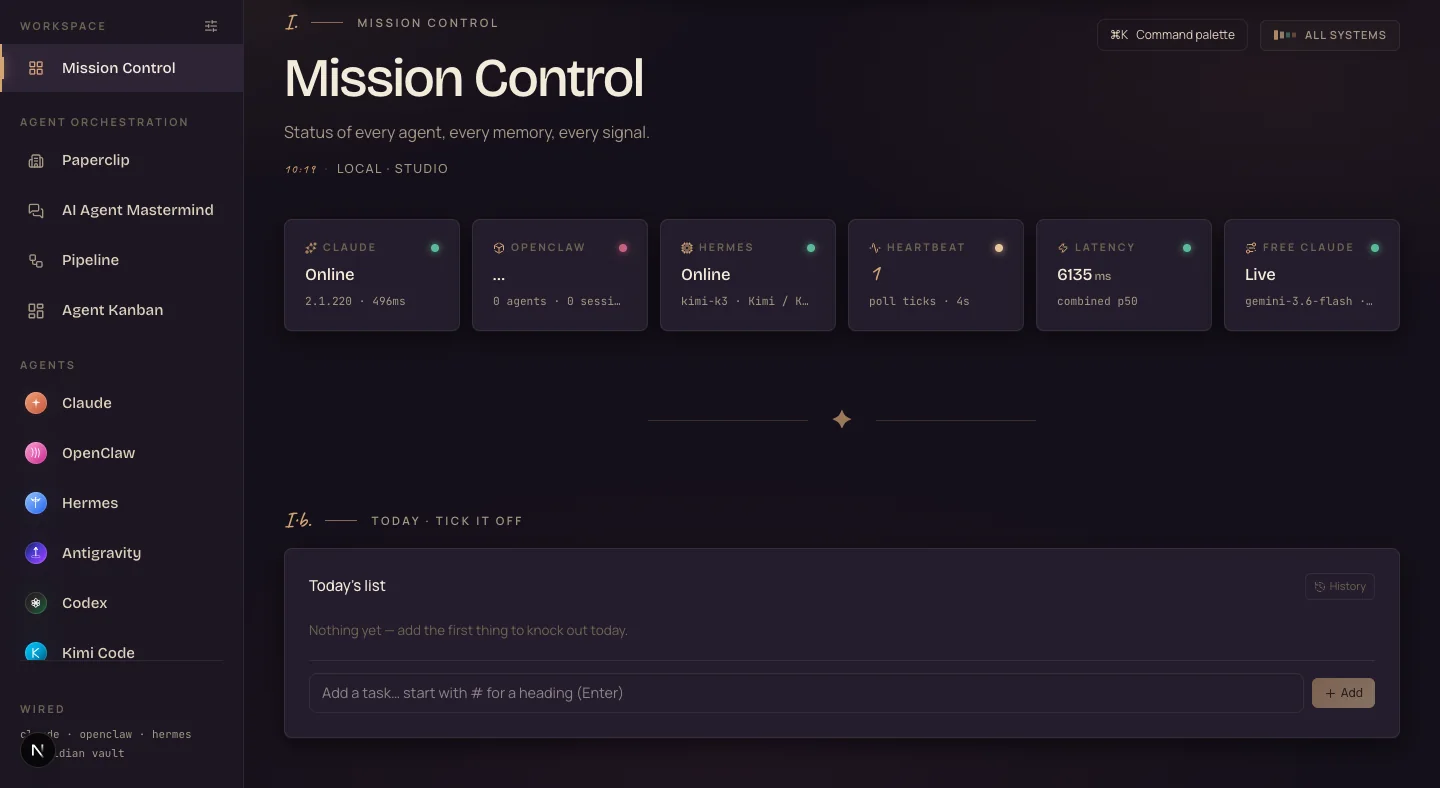
You open Mission Control. This is the home screen — a webpage on your own machine. You see every agent, whether it's online, what it's working on, and a live activity stream of everything happening across your whole setup.
2.
You give the job however you like. Type it in chat, say it out loud to Apollo (the voice side), or file it as a ticket on the Kanban board. Same team answers, whichever door you use.
3.
The agent reads the Obsidian vault first. The vault is just a folder of notes on your computer. It holds every past chat, every decision, every fact about your business. So the agent already knows you before it starts.
4.
It does the work while you do something else. A dispatcher picks the job up, spawns a worker agent, and that worker builds it — drafts, pages, research, whatever the ticket says.
5.
It saves everything back to the vault. The conversation, the output, the decisions — all written down, all searchable. Nothing lost. Ever.
6.
Scheduled jobs re-run on a timer. Oracle checks your competitors every few hours. Astros watches your keywords. Cron jobs are just tasks on a timer — set once, they run forever.
7.
You check the board. The work has moved to done. You review it, ship it, and the whole loop starts again — a little smarter than last time.
So when someone asks "but what IS it?" — it's a dashboard on your own computer where every AI you use shares one memory and one job board.
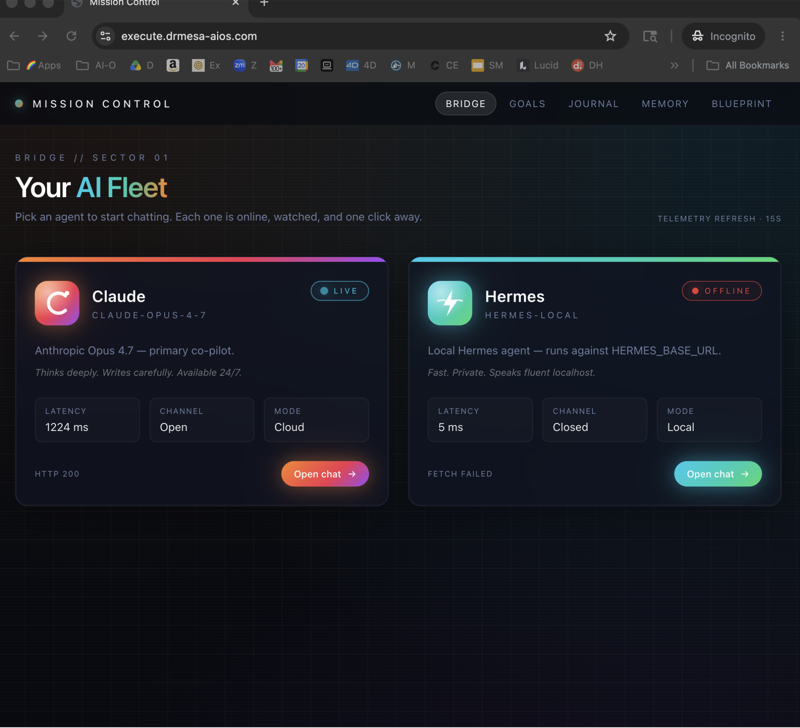
What you're looking at: my actual Mission Control, today. Every agent's status on one screen — Claude online, Hermes online, latency, and the Free Claude engine live. This is the first thing you see when you open the OS.
“You stop visiting your AI. You give it a desk.”
IV · The contrast
Old way vs new way.
Old way — without the One-Screen AI Team
5 tabs · 5 logins · hours re-explaining
Five tabs, five logins, zero shared memory
Re-explain your business in every single window
Answers scattered everywhere — and lost by Friday
Nothing runs unless you sit there clicking
Every new AI means one more disconnected account
Hours a week gone, just repeating yourself to a machine
New way — with the One-Screen AI Team
1 screen · ~0 min re-explaining
One screen; speak, type, or file a ticket — same employee answers
Reads your Obsidian vault, so it already knows you
Every session saved and searchable, forever
Workers ship builds off the board while you sleep
Scheduled jobs research your market on a timer
Every new model is one more chip at the desk
Thinking it?"I already pay for ChatGPT and Claude. Why would I need this?"
Keep them. The Agent OS runs the subscriptions you already pay for — it doesn't replace them, it connects them.
Same models, same intelligence. The only difference is the office. One group locked their assistant in five buildings. The other gave it a desk.
✦
V · The framework
Inside the One-Screen AI Team.
Here's every surface on the desk, in the order you'll meet them.
1.
Mission Control
The home screen. Every agent, its status, and a live activity stream of your whole setup — one glance tells you what your team is doing.
2.
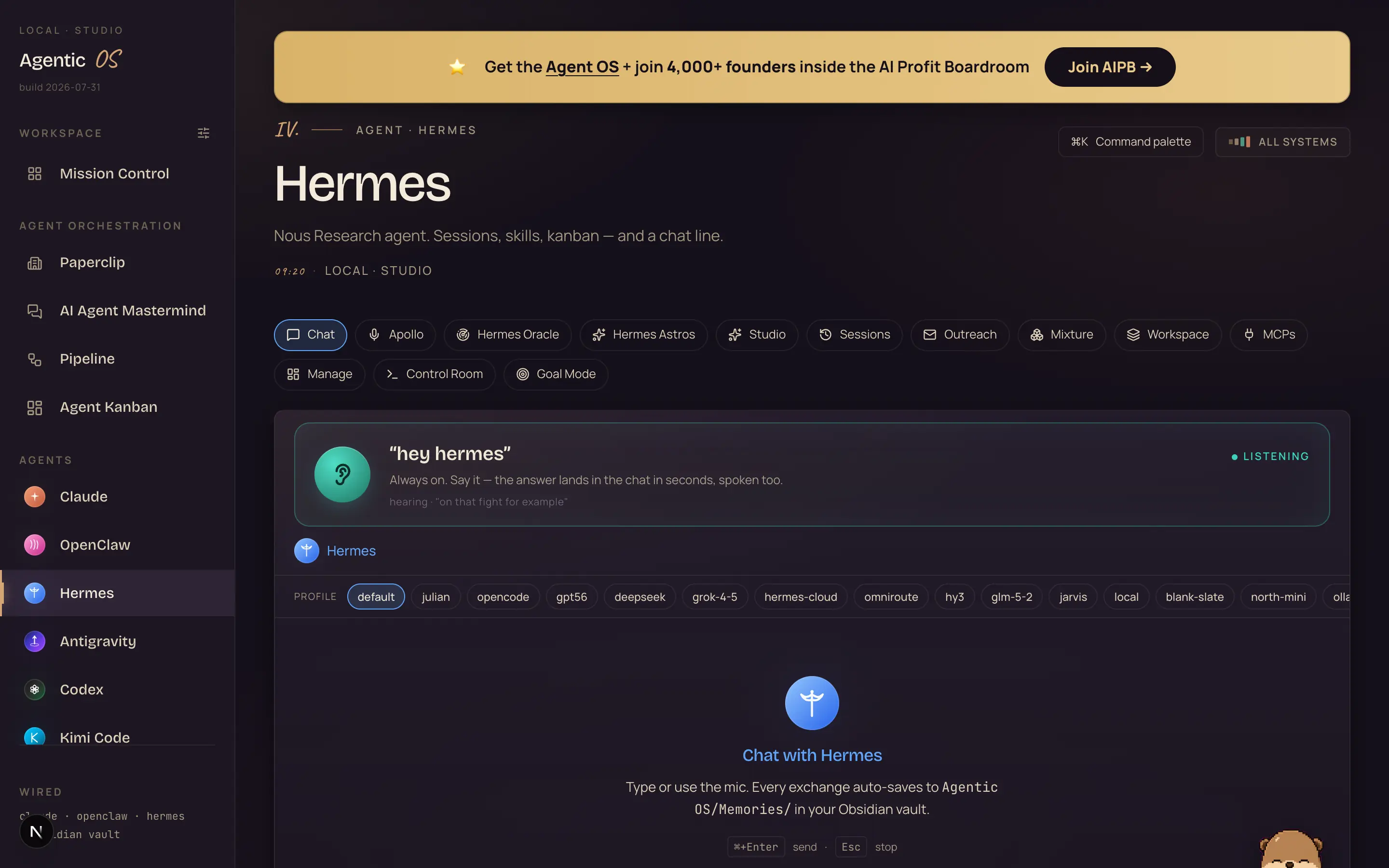
Chat + Apollo voice
Type anything and it responds — or talk to it out loud, like a phone call with your assistant. "Hey Hermes, switch this on." No typing needed. Everything gets saved.
3.
Oracle + Astros, on a schedule
Oracle watches your competitors every few hours and reports back. Astros monitors keywords in your industry and hands you content ideas. Both run on timers — set once, they run forever.
4.
The Obsidian vault — the memory
A folder of notes on your computer that every agent reads and writes. Every chat, task and decision lands here. Switch models and you lose nothing.
5.
The Kanban board — tickets, not prompts
A job board with to-do, in progress, done. You file tickets; a dispatcher spawns worker agents that build while you're elsewhere. You manage your AI like an actual team.
6.
Goal Mode
Type one big goal and walk away. The agent plans, works, checks its own progress and keeps going for hours. Alone. More on this below — it's the biggest time-saver in the system.
7.
Model chips
When a new model drops, you slot it into the desk in two clicks. The model changes; your memory, workflows and dashboard don't. You never fall behind again.
And you don't have to use everything. Music generator, video agent, SEO content system, AI avatars — use what fits, hide the rest with one click. The desk is yours to arrange.
VI · The memory
You never explain yourself again.
Now the part that makes this whole system actually work. The memory.
Everything in the Agent OS connects to an Obsidian vault.
If you've never heard of Obsidian, it's just a folder of notes on your computer. Nothing fancy.
But here's what happens.
Every time you chat with Hermes, the conversation gets saved into that vault automatically.
Every task. Every decision. Every piece of context about your business. All written down. All searchable.
And here's the part that matters: every agent reads from that same vault.
Claude Code pulls from it. Hermes pulls from it. Qwen 3.8 pulls from it. Free Claude Code pulls from it. Muse Spark, which just got added, pulls from it too.
Which means when you switch models, you lose nothing.
The new model already knows your business. It already knows what you decided last week. Your customers, your offers, your style.
There are thousands of saved sessions sitting in that vault right now from daily use. Thousands.
And not one of them needed re-explaining.
the memory loop: every chat saves to the vault → every agent reads from it → switch models, lose nothing.
VII · Tickets, not prompts
The Kanban board — manage your AI, stop babysitting it.
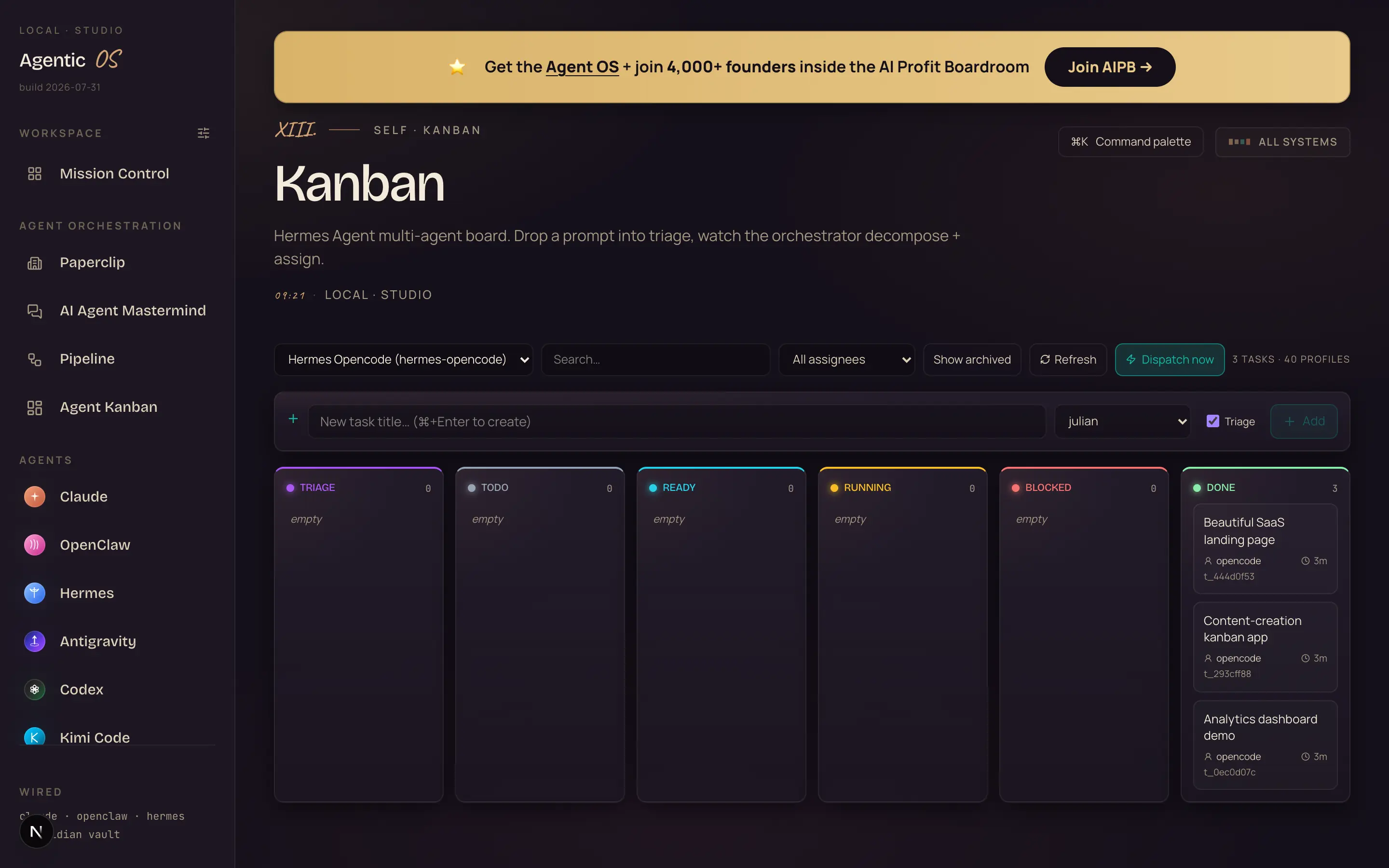
A Kanban board is just a job board. Columns for to-do, in progress, done.
You've seen one before, even if you didn't know the name.
But here's the difference. On this board, you don't write prompts. You file tickets.
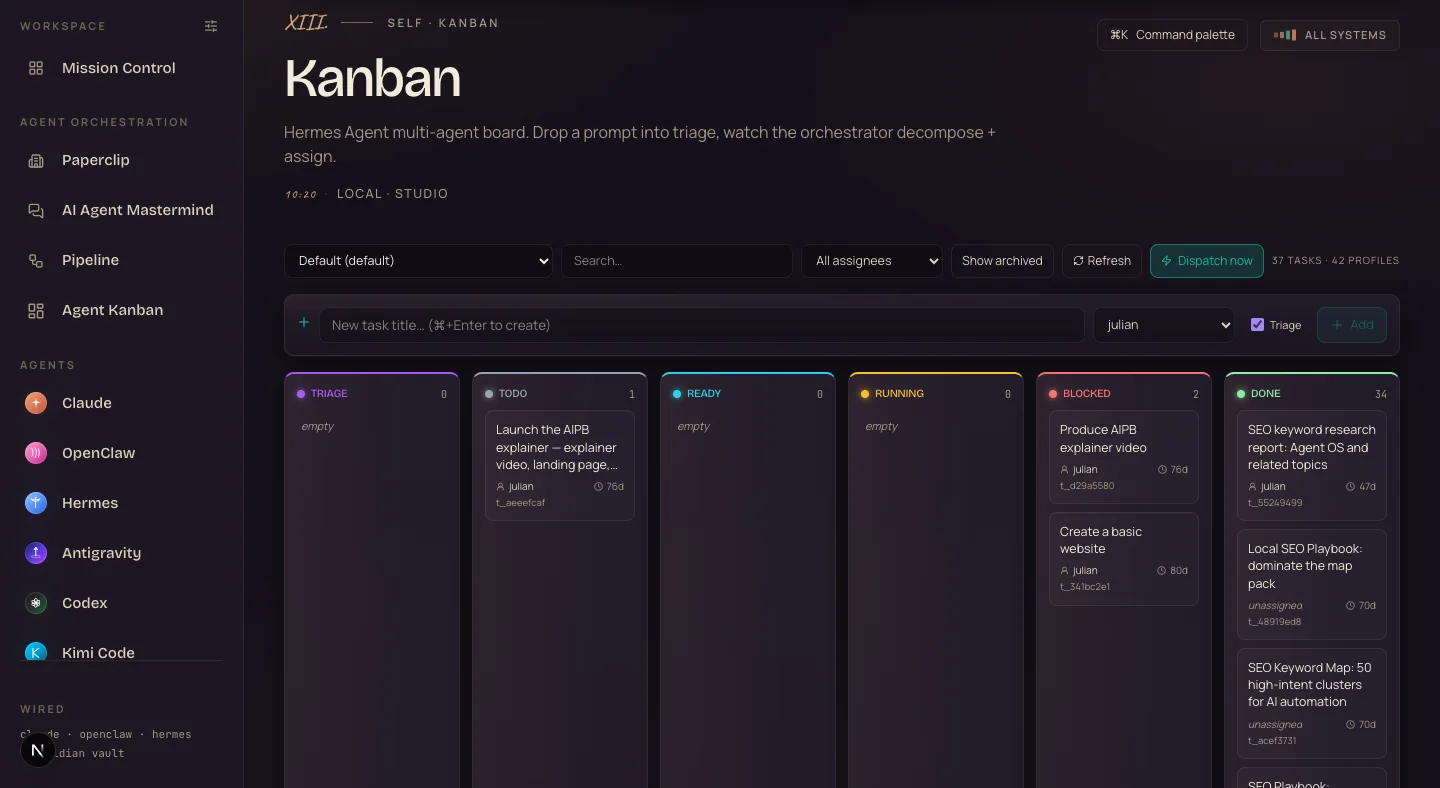
You type what you want done — like "write five email drafts for the spring promotion" — and a dispatcher picks it up, spawns a worker agent, and that agent builds it while you're doing something else entirely.
You come back later, check the board, and the work has moved to done.
One quick example. Say you run a small shop and you need product descriptions rewritten.
File one ticket before lunch, and the drafts are waiting when you get back.
That's the shift. You stop babysitting your AI and start managing it. Like an actual team.
What you're looking at: my real board this week. 37 tasks, 42 agent profiles — and 34 tickets already sitting in done. Each one of those was a job an agent shipped while I was doing something else.
the ticket lifecycle: you write it once → the dispatcher assigns it → a worker builds it → it lands in done.
Thinking it?"AI agents can't be trusted to work alone."
Guardrails are built in.
Anything risky — deleting a file, anything it's unsure about — it stops and asks first. It parks the task and comes back after you answer.
It works alone on the safe stuff and checks in on the risky stuff. You get the speed of autonomy without handing over the keys blind.
Cron jobs sound technical. They're just tasks on a timer. Automatic.
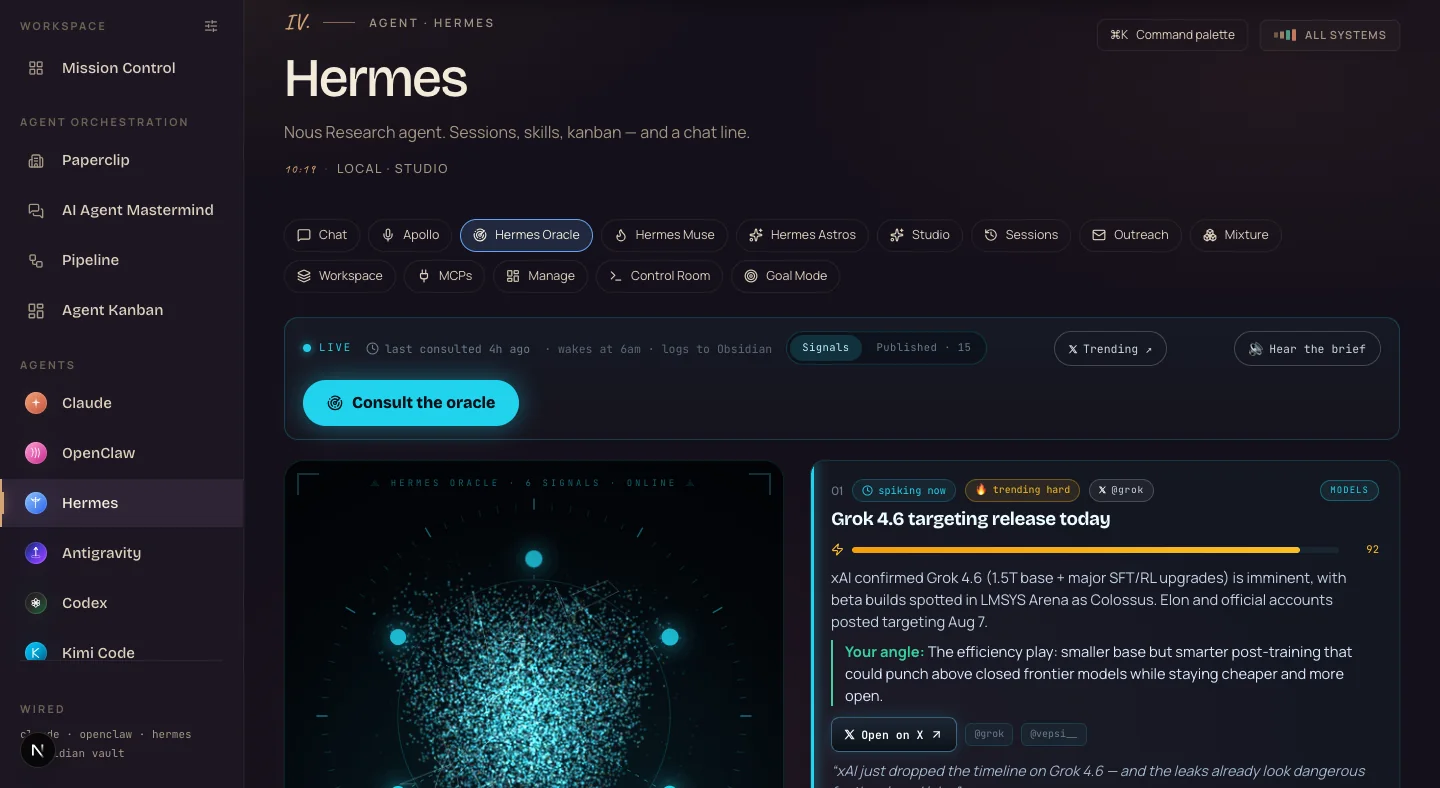
Oracle checks your competitors every few hours, on its own.
You open the tab and it says "updated five hours ago" — without anyone touching it.
Astros does the same with keywords in your industry, and hands you content ideas.
If you make content of any kind, that alone is worth the setup.
This replaces hours every week of reading competitor sites.
And you create new scheduled jobs from the Manage tab — set once, runs forever.
What you're looking at: Hermes Oracle, live. Last consulted 4 hours ago, on its own schedule — 6 signals ranked, each with the source and "your angle" already written. Nobody touched it.
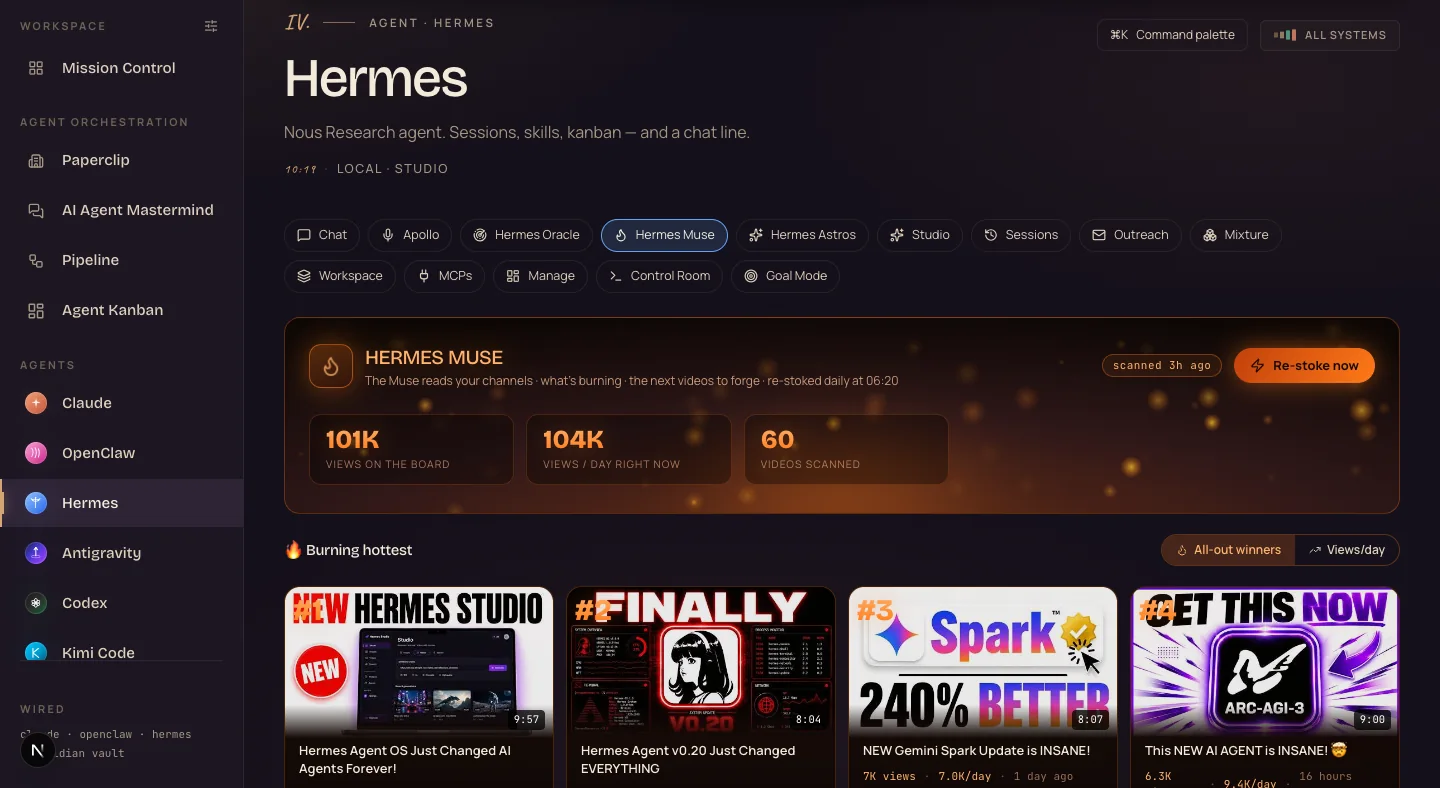
And this is Muse — the content-ideas side. It scanned 60 videos this morning, ranked what's burning hottest, and re-stokes itself daily at 06:20. That's the "keyword research while you sleep" surface.
Thinking it?"I travel a lot. I'm never at my desk."
The dashboard runs at home — and Tailscale (free, about 10 minutes to set up) opens the same dashboard from a laptop in another country, or from your phone.
Same tasks, same chat history, same memory.
Travel doesn't break the system. Your AI team stays home and keeps working.
“One screen. One memory. One AI team that never clocks out.”
IX · The payoff
Goal Mode — the feature I told you to stick around for.
Here it is.
You type one goal. Something big — the kind of thing that would take you a whole day.
Then you walk away.
Hermes loops on it for hours. Autonomously.
It plans. It works. It checks its own progress. It keeps going.
You're at the gym. You're with your kids. You're asleep.
You come back — and finished work is sitting there.
One goal in. Hours of work out. Zero touches in between.
Type it at night, wake up to progress.
After this, going back to prompting line by line feels like dial-up.
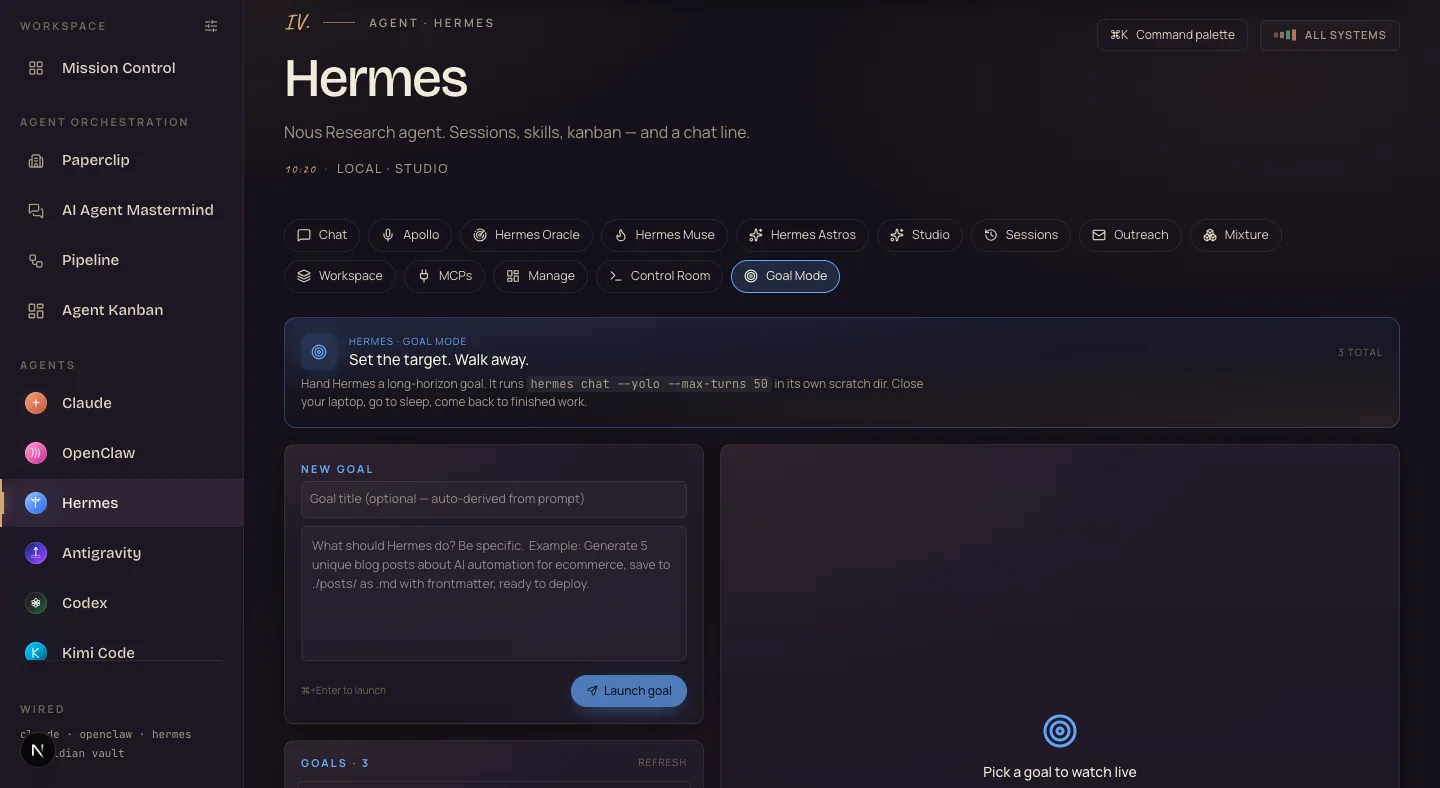
What you're looking at: the real Goal Mode tab. The header says it all — "Set the target. Walk away." You type the goal, hit launch, and close the laptop lid.
goal mode: one goal in → plan → work → check → repeat for hours → finished work out. zero touches in between.
X · Model swapping
New model? New chip. Two clicks.
New models drop every week now. That used to be a problem.
The old setup meant a new website, a new login, a new subscription — and building your context from scratch. Again.
In the Agent OS, a new model is a chip you slot into the desk.
Real examples. LFM 2.5 dropped — plugged in the next day.
Muse Spark 1.2 — same day.
Qwen 3.8 — plugged in.
Two clicks in the Manage tab.
The model changes. Your memory, your workflows and your dashboard don't.
You never fall behind again.
Models get better on their own — you don't control that. The system around them is completely in your hands.
And the system decides whether AI saves you two hours a week or twenty.
model swapping: the chip changes, the desk and the memory don't. LFM 2.5, Muse Spark 1.2 and Qwen 3.8 all slotted in within a day of launch.
XI · Run it free
The token question, answered.
You can run this on premium models. You don't have to.
Free local models are built in. LFM runs on your own machine — it costs nothing per message, it's fast, and it was trained on Hermes agent data, so it fits like a glove.
Hermes itself is free and open-source.
Free Claude Code is a proxy that runs Claude Code tooling through OpenRouter, onto cheap and free models. There's a free AI coder too.
Same task: a couple of dollars on premium, or zero on local.
Premium when it matters. Free for the bulk.
Thinking it?"Doesn't running the Agent OS burn a fortune in tokens?"
That's the biggest myth about it. Four things make it cheap:
1. Free local models handle the everyday 90% — on your own machine, nothing leaves it, zero per message.
2. Free APIs plug in — free-tier models slot in as profiles at no cost.
3. It drives the CLIs you already pay for. Your Claude subscription already includes the Claude Code CLI, and the Agent OS plugs straight into it — you're not paying twice. It's a layer on top of what you already own, not a new meter.
4. The Boardroom has full token-optimisation tutorials — so you cut usage to the bone and never think about it again.
Thinking it?"Don't I need a monster computer for this?"
No. If your laptop runs a browser, it runs this.
The heavy models live behind APIs or the CLIs you already have. The dashboard itself is just a webpage.
✦
XII · Three beliefs to drop
What's actually holding you back.
Wrong: "This looks technical. I can't set this up."
Right: The whole thing installs from a zip file. Copy one folder, run one install command, open a webpage. No GitHub account, no cloud account — and the dashboard works with zero agents installed, so you add one at a time. 3,900+ business owners are using it, and plenty had never used AI before. Setup is about 30 minutes, once.
Wrong: "AI agents can't be trusted to work alone."
Right: Guardrails are built in. Anything risky — deleting a file, anything it's unsure about — it stops and asks first, parks the task, and comes back after you answer. It works alone on safe stuff and checks in on risky stuff. You get the speed of autonomy without handing over the keys blind.
Wrong: "This must burn through tokens. It'll be expensive."
Right: It can run on premium — it doesn't have to. LFM runs local and free, Hermes is open-source, Free Claude Code routes onto free models, and the frontier work runs through the CLIs you already pay for. Premium when it matters, free for the bulk. And no monster computer needed — if your laptop runs a browser, it runs this.
Don't take my word for it
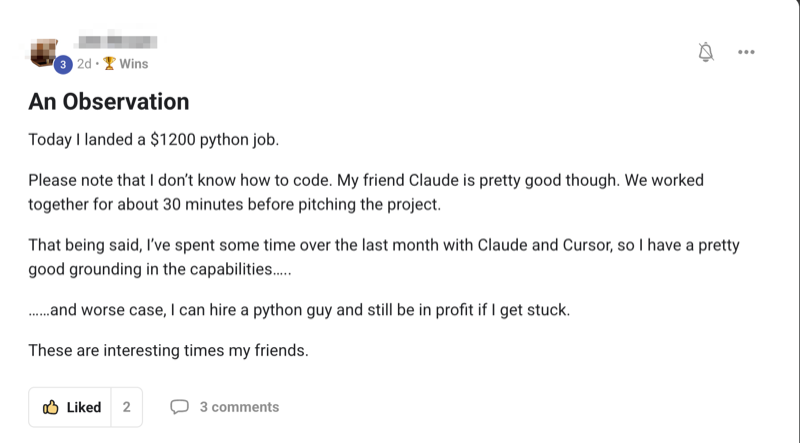
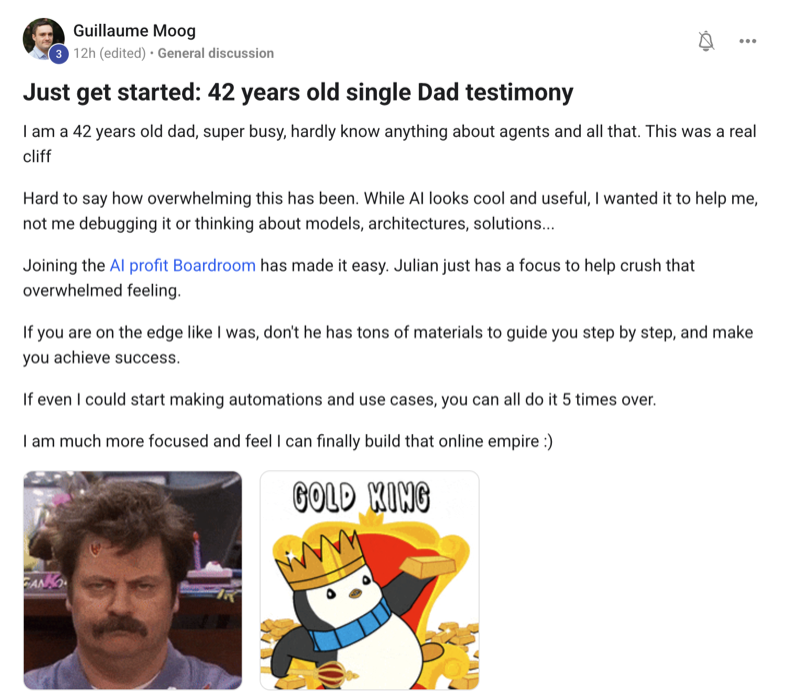
158 pages of members who already broke through these exact beliefs. Their stories — real businesses, real wins — are documented here.
This is the kind of thing worker agents ship off that board — one ticket each.
Both of these are real, playable, and built by an AI model in one shot. Click in and play.
Cursor stays free while you play — hit "play fullscreen" for full mouse-look.
Dragon Realm — an open-world 3D hunt. Built by MiniMax in one shot; scored 9.0/10 on GoldieBench. play fullscreen ↗A DOOM-style shooter. Built by MoA (Mixture-of-Agents); scored 8.6/10 on GoldieBench. play fullscreen ↗
XIV · The receipts
Real people. Real wins. Inside the Boardroom right now.
Here's what's already happening for the members running this stack — agency owners, ecom founders, course creators, solo operators. Different businesses. Same shift.
Join 3,900+ founders running the One-Screen AI Team.
The AI Profit Boardroom is where the actual Agent OS lives — the zip, the 30-day roadmap, the coaching calls, the ticket library. The same desk you just read about, set up with you inside.