Google's New Button Puts Your Site Inside AI Search
One click from one reader — and Google starts showing them your site everywhere.
Google just changed how AI search picks websites, and this time the change works in your favor.
Yesterday, August 20th, Google released a button that any website can add to its pages.
When a reader clicks it, Google shows them your site more often — in their results, their Top Stories, their AI Overviews, and their AI Mode answers.
One click from one reader, and your site starts appearing inside AI answers for that person.
I've already installed it across my own sites, and further down this page you'll see the real button running live.
every number on this page comes from Google's Aug 20 announcement + Search Central docs§1The numbers
600,000 sources picked. Twice the clicks.
Over 600,000 sources have already been chosen this way, and Google's own data says people are twice as likely to click a site they've marked as preferred.
0sources already picked
2×more likely to click through
1click is all it takes
Google's own data: readers click through twice as often to sites they've marked as preferred.
§2The problem
The Algorithm Lottery Problem.
For two years, everyone watched AI Overviews answer questions right on the results page.
Sites lost clicks.
Nobody could do anything about it.
The algorithm decided who got cited in AI answers.
And you just had to hope it picked you.
This update flips that — and the Algorithm Lottery stops being the only game.
THINKING IT?"Another Google update that helps Google, not me."
This one ships as code Google wrote for you to paste on your own site.
It exists to send readers back to you — that's the whole point of it.
§3The flip
For the first time, your readers tell Google who to trust.
And Google listens.
OLD WAY~2 years of hoping
Publish, then pray the algorithm cites you
Stack schema, entities and mentions to look trustworthy
Watch AI Overviews answer without your link
Lose clicks and have no lever to pull
A core update can erase your visibility overnight
NEW WAY1 click, same day
A reader taps one button on your page
Google pins your site into their results, Top Stories and AI answers
Your name shows up with a visible trust badge
That reader is yours — no more out-ranking anyone for them
No core update can take a reader's own choice away
"Your feed will adjust on the fly, and remember your requests."— Google's announcement, Aug 20, 2026
Tweet 1 · the launch
Google says the quiet part out loud
Google's own news account frames the whole release as helping publishers "build stronger, direct connections with their readers." That's Google telling you this button exists to send people back to your site.
§5The 30-second backstory
How we got here, in three steps.
You need this to understand why yesterday matters.
§6The catch — until yesterday
Readers had to dig through settings. Most never did.
By May, about 345,000 sources had been selected — real, but slow.
§7What shipped yesterday
The button moves to your page. Friction gone.
A reader clicks it, Google adds your site as their preferred source, and then sends them straight back to where they left off.
§8What happened when friction dropped
345,000 → 600,000+ in three months.
Since the friction dropped, selections jumped — and the button only shipped yesterday.
§9What this actually is
The closest thing to an email list inside Google.
You earned that reader once — now Google keeps bringing them back, on its own, across four surfaces.
"You earned the reader once. Google keeps bringing them back."
§10Google's own thinking
"News is personal." Trust now shapes what shows up.
Nick Fox, who runs this area at Google, framed it simply: every person has a different set of sources they trust and want to hear from most — Preferred Sources lets you set yours and see them more often.
That's Google, in plain words, saying reader trust now shapes results.
§11The label
Your brand gets a visible badge inside the AI answer.
For everyone worried that AI search erases brands — this does the opposite, every single time they search a topic you cover.
§12The setup
The whole install is two lines.
Google published the code in its Search Central docs — one script tag, one div, paste once.
the entire Preferred Sources install
<!-- 1 · in your <head> --><scriptasyncsrc="https://news.google.com/swg/js/v1/publisher.js"></script><!-- 2 · where the button should appear --><divgoogle-add-preferred-source-btn></div>
That's the full install. Optional extras: data-theme="dark" for dark sites, data-lang to force a language.
THINKING IT?"I'm not technical enough to add code to my site."
If you can paste two lines into a template — or ask your AI assistant to do it — you can run this.
Further down you'll watch my agents install it across four sites in one instruction.
§13The experts jumped on it
When Marie Haynes moves on day one, pay attention.
Tweet 2 · the expert flag
"It directly impacts your visibility in AI Overviews and AI Mode"
Marie Haynes — one of the most respected people in SEO — flagged the button within hours of launch, and named exactly what it touches: your visibility in AI Overviews and AI Mode. When someone at her level jumps on a feature the day it ships, that's your signal.
§14Even simpler
No code? Use the deep link.
Point any button or link at this URL and Google's own page handles the rest — with your site pre-filled.
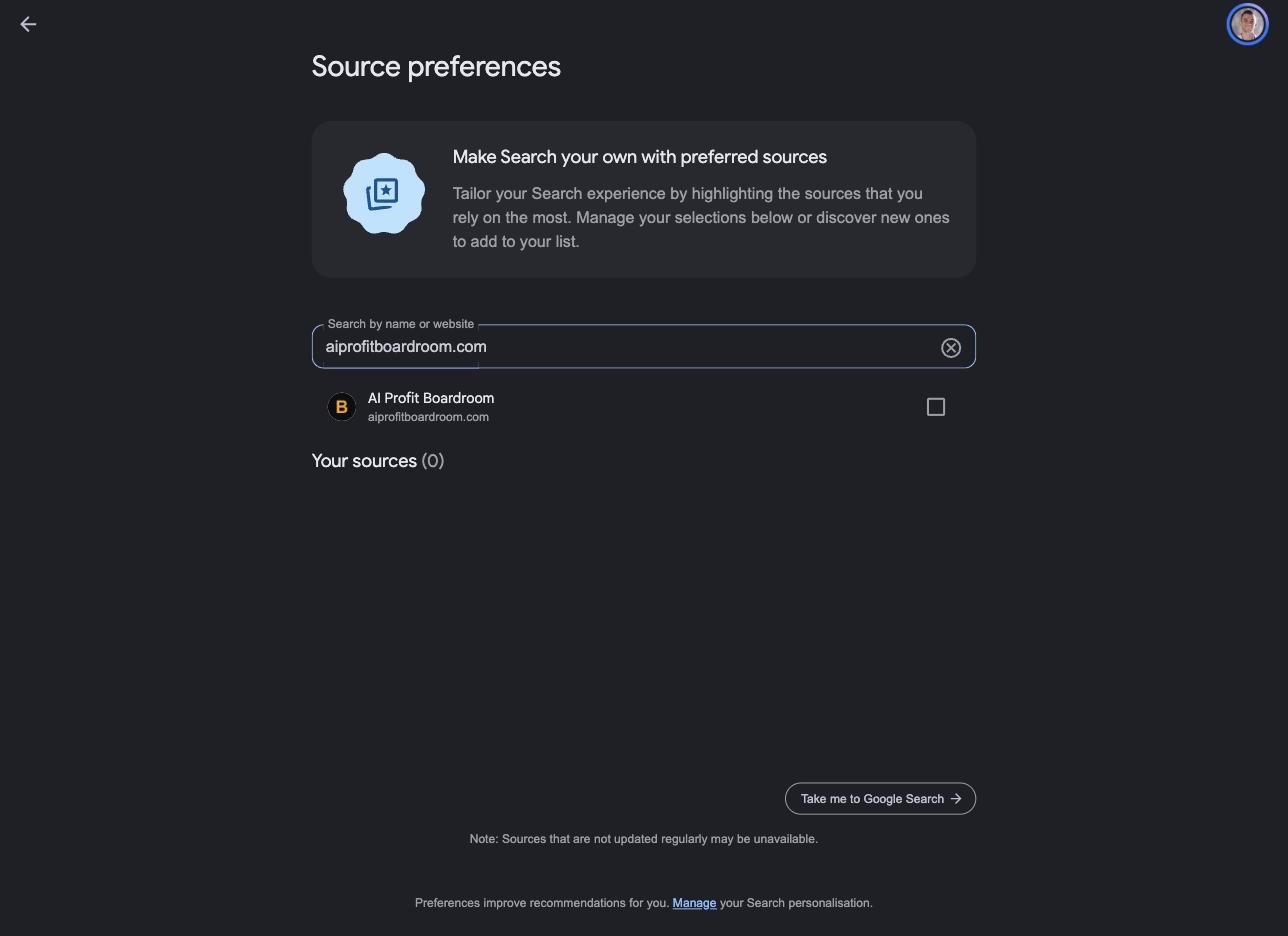
What you're looking at: the real Google source preferences page, opened through the deep link with my site pre-filled — AI Profit Boardroom shows up as an addable source, one checkbox from preferred. Captured live while writing this guide.
real capture · google.com/preferences/source · Aug 21, 2026§15One thing to know
It works at the domain level — not folders.
The whole site gets preferred, not a single section.
§16My rollout — receipts
I shipped it across my sites while writing this guide.
My Claude Code publishing pipeline handles all my sites, so the button rollout is one instruction — the agents patch every blog template and deploy.
What you're watching: the real rollout session, replayed at reading pace — one instruction, four blog templates patched, four additive deploys, all live.
What you're watching: the LIVE site, recorded after the deploy — scroll to the end of any post and Google's real "Add to Preferred Sources" button is rendering. Not a mockup.
recorded on the live site · aiprofitboardroom.com · Aug 21, 2026
THINKING IT?"I don't have an agent pipeline to do this for me."
You don't need one — it's two lines pasted into one template, once.
On WordPress that's a footer widget; on any site builder it's one custom-HTML block.
§17Where to put it
The best spot: the end of your best content.
Someone just read something that genuinely helped them — that's the moment they'll click, so start with your top ten posts.
Tap the three-dot menu on any item and just tell Google what you want — typed like a text message, and it remembers.
Tweet 3 · the product lead
Google's Search VP lists both levers in one post
Robby Stein — VP of Product for Google Search — sums up the release as two moves: click the Preferred Sources button to save your favorite sites, and tell Google what you want more or less of in Discover. Both levers now sit with the reader, not the algorithm.
§20Why a site owner should care
The Discover lottery is ending. Asked-for content wins.
For years Discover traffic was random — a post takes off, then vanishes, and curiosity-bait gamed the feed.
Now readers type "less of this" in their own words and it sticks: clickbait gets filtered out person by person, and content people genuinely asked for gets pulled in.
§21See the pattern
Reader loyalty just became a ranking input.
Google is moving from "the algorithm decides everything" to "the user tells us what they trust, and we weight it."
The boring old advice — publish things people actually want, build a real audience — now has a direct mechanical payoff inside Google.
§22Feature three — same thread
Audio briefings: named sources, links out.
Custom daily audio briefings in the Google News app — every story with clear source attribution and links to the full articles.
§23Why now — the honest read
Google needs the open web to keep publishing.
Publishers have been losing traffic to AI answers and saying so loudly — and if sites stop earning visits, they stop publishing, and Google's AI answers get worse.
So Google is building loyalty pipes back to publishers. You don't have to love the motive to use the opening.
§24The limits — so you see it clearly
This is a loyalty tool, not a discovery tool.
It multiplies an audience you've already earned — a first-time visitor hasn't picked you yet, and the badge alone won't force a click.
And the twice-as-likely number is Google's own data — directionally sensible, but treat it as Google's number.
"You still need content worth preferring. The button just makes sure Google acts on that trust."
§25Strategy — what changes
AI search now has two lanes. Run both.
Lane one is the old game: earn the algorithm's trust — schema, entities, my Shortlist Stacking play. That work still matters.
Lane two is new: earn the reader's click on that button, and skip the algorithm race entirely for that reader.
THINKING IT?"So do I stop doing normal SEO?"
No — lane one still decides what strangers see, and strangers are where new preferred readers come from.
The two lanes feed each other: SEO brings them in, the button keeps them.
§26The part to really get
It stacks. Month after month.
A small slice of readers clicks each month — and every one of them sees you in their AI answers from then on.
Six months in, you've got a growing pool nobody can take away with a core update. The reader chose you.
§27The window
Most sites are doing nothing — because they don't know it exists.
The feature shipped yesterday: early sites collect preferred readers for months while everyone else catches up.
600,000 selections spread across the entire web means your niche is probably wide open. Not hype — just timing.
THINKING IT?"What if Google kills this feature next year?"
Then you spent a few minutes on two lines of code — and collected months of extra clicks in the meantime.
Google is growing this feature, not shrinking it: it went from one surface to four in a year.
§28Also confirmed
Two new carousels — and a "Highly Cited" label.
A recent-articles carousel with your preferred sources flagged inside it, a forum-and-perspectives carousel for opinion searches, and a label that marks original reporting over rewrites.
§29Three thoughts people have here
And why they don't hold up.
Wrong: "AI search ended SEO — why bother."
Right: This update is Google itself proving that wrong — badges inside AI answers, readers sent back out to full articles. The game changed shape, and the shape now favors sites that act on updates like this one.
Wrong: "My site is too small for this to matter."
Right: Backwards. A tight, loyal audience converts to preferred status at a far higher rate than a huge casual one — loyalty density beats raw size. Local outlets are already testing it; if a small local paper qualifies, your niche site qualifies.
Wrong: "I'll wait and see if it sticks."
Right: Adding the button costs a few minutes. Waiting costs every reader who visited during those months and would have clicked. A free lever with published code, on a feature that grew 345k → 600k in three months — waiting has a price, acting basically doesn't.
Don't take my word for it
Operators in my community post their wins every day — agency owners, ecom founders, course creators across 38 countries, in their own words.
A public layer where algorithms rank everyone — and a personal layer where each user's choices reshape what they see.
The good news: content worth preferring is also content worth citing. Both layers point the same way now.
§31Where this leaves you
Everything you need is live right now.
✓ the button code — in Google's docs today✓ the deep link — works today✓ your readers — already on your site★ running live on my sites — you watched it above
Get the AI SEO system that keeps ranking through every headline.
The publishing pipelines, the SEO agents and the full system zip live inside the AI Profit Boardroom, with four coaching calls a week to ask about your exact content setup.