Teknium shipped it today, as a one-day public beta.
You install it as a plugin, the community sends feedback, then it ships inside the main Hermes desktop app for everyone.
When someone said this looks a lot like Grok Bot, Teknium answered with three words. "That's the point."
1file · plugin.js
MITfree, open source
0core patches
0background daemons
§2what you're about to see
Three things. The last one matters most.
What Bot Mode actually does, how it compares to Grok Bot, and the setting almost nobody will notice.
the three beats of this guide
✦
§3the problem
The Session Pile Problem.
Up until today, Hermes worked in sessions.
You open a chat. You give it a task. It does the work.
Want a different job done? You open another session.
Your inbox summary lives in one. Your content research in another. Your competitor tracking in a third.
And they all look the same.
Just a long list of chats. No faces. No names. No jobs.
The Named Agent Engine breaks that pile apart for good.
before: 47 identical chats · after: a team you can name
THINKING IT?"A roster of AI agents sounds like a developer thing."
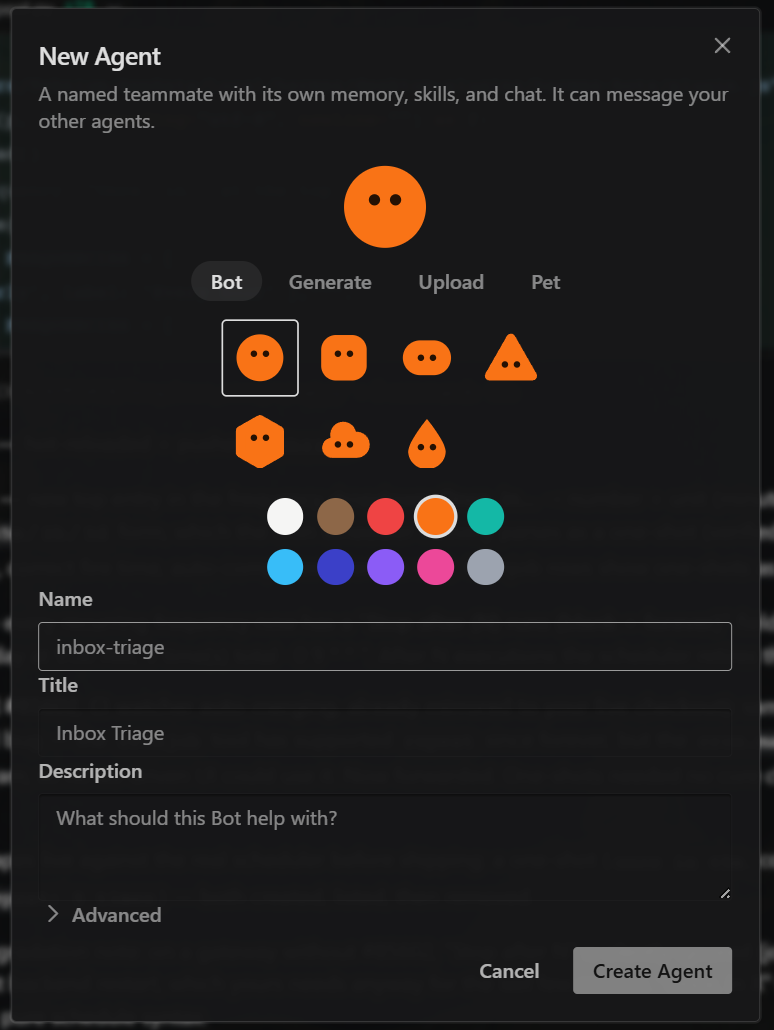
Creating a bot is three text boxes. Name, title, what it does.
You'll watch me do it in about twenty seconds, further down this page.
A pile of sessions is a pile of amnesia.
§4what bot mode is
A roster on the left. Click a bot, land in its chat.
Each bot has its own avatar, personality, chat, memory and schedule.
If you already have Hermes profiles, they show up as bots the moment you install it — you rebuild nothing.
What you're watching: my real roster, live in the Agent OS. Clicking down the list — researcher, writer, inboxbot — each one opens its own inbox, its own routines, its own personality file. 46 bots, all of them real Hermes profiles on this machine.
§5making one
A new bot takes about twenty seconds.
Name, title, description. That bot now exists.
What you're watching: me typing "scout", "Competitor scout", and one line about its job — then a real profile appears on disk with its own memory, skills and inbox, and slides straight into the roster.
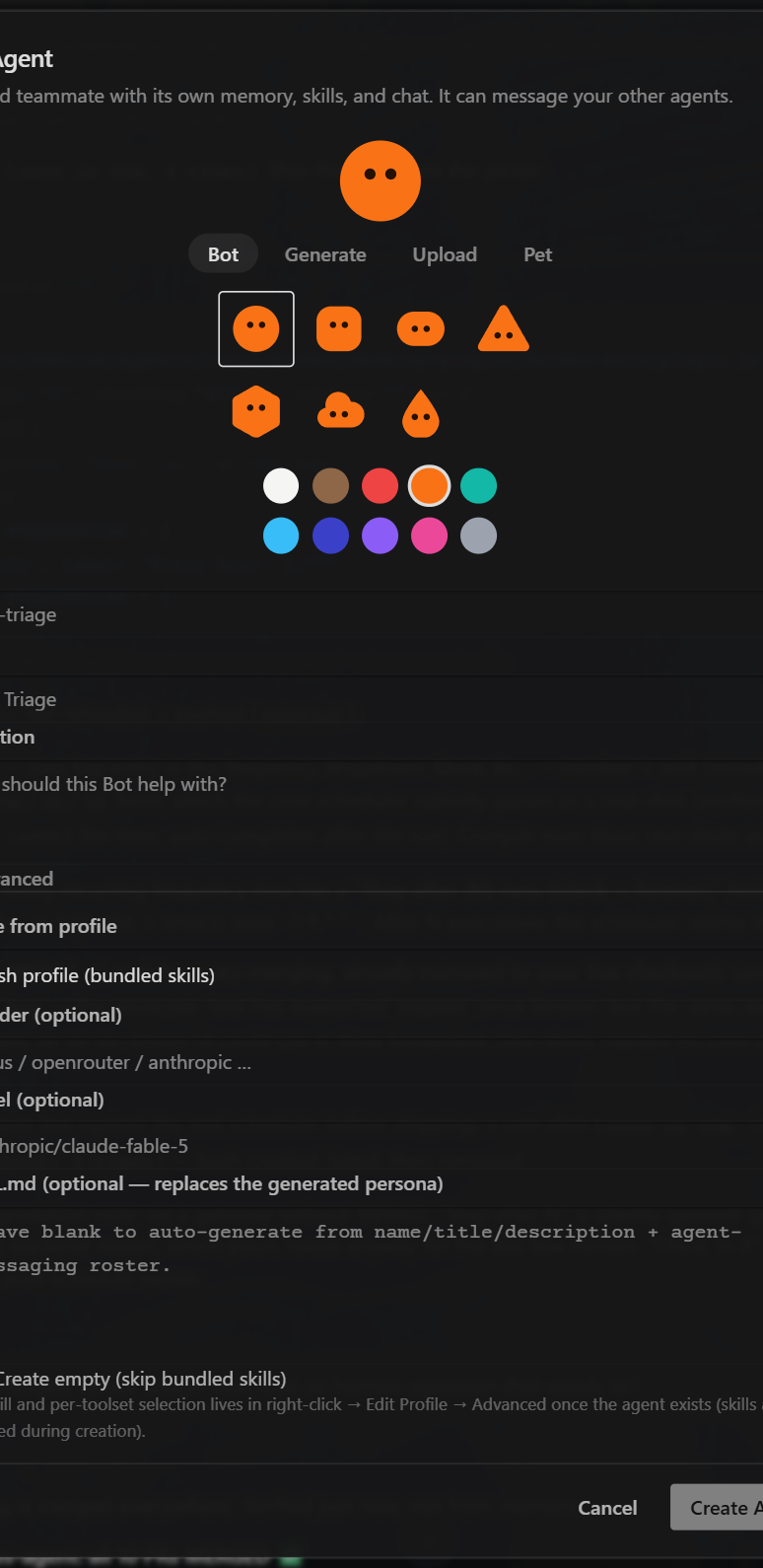
The same three boxes in the official desktop plugin, from the Nous Research repo. Underneath the fold is an Advanced section — that's where the setting lives.
✦
§6the setting nobody will notice
Every bot can think with a different brain.
Open Advanced and you can pin a specific model to that one bot.
Research bot on one model. Writing bot on another. Inbox bot on a small, fast, free model that never leaves your machine.
one roster · four different brains · you pick each one
The Advanced panel from the official plugin: clone from another bot, pin a provider and model, write a custom personality file, skip the bundled skills. This is the screen most people will scroll straight past.
✦
§7bot mode vs grok bot
Same shape. Completely different ownership.
Grok Bot runs on xAI's models, in xAI's cloud, under xAI's rules.
Grok Bot
rented
Runs on xAI's models only
Lives in xAI's cloud, not on your machine
Their infrastructure, their rules, their pricing
One provider for every bot on your roster
You can't read the code
Your bots' memory sits on their servers
Hermes Bot Mode
yours
Any model you want — per bot
Runs on your own computer
MIT licence, free, no subscription
Frontier, free or fully local — mix them on one roster
One file, plugin.js, and you can read every line
Every bot's memory stays in a folder you own
THINKING IT?"Free usually means worse."
Not here. Bot Mode is the interface — you still choose the brain behind each bot.
Point one at the best model money can buy and another at a free one. Same roster.
§8memory
Each bot keeps its own memory. Teknium confirmed it.
Your research bot remembers what it researched. Your content bot remembers your style. They never blur together.
separate folders · separate histories · nothing bleeds
Each one builds its own history over months, like a team member who's been in the role a while.
Bots message each other. It's called the Agent Inbox.
Every bot has a persistent inbox, and messages arrive with attribution — the receiving bot knows exactly which agent sent it.
Its personality file teaches it the protocol, including how to reply.
What you're watching: the real handoff underneath, replayed at reading pace. First message ever — the inbox thread doesn't exist yet, so it gets created and named. Every message after that resumes the same thread. This is the actual session from my machine.
one message · two agents · attribution attached
§11mentions
Type @researcher in any chat.
The bot you're talking to hands the message off, waits for the answer, and reports back in the same conversation.
What you're watching, live and unedited: I'm in writer's chat. I type "@researcher one line: what is the first bot a business owner should create?" — writer hands it off, researcher wakes up and actually runs, and its answer lands back in this chat. One conversation. Two agents did the work.
§12what that looks like in real life
You're writing a post. You never leave the chat.
You type "@researcher pull the latest facts on this topic" — researcher digs with its own memory and its own model, sends the answer back, and your main bot folds it into the draft.
one conversation you watch · two agents doing the work
§13an early tester
A week of duct tape. Then one morning.
Devin Davis said he'd spent a whole week trying to get two Hermes profiles to coordinate using a kanban board.
He set up bot-to-bot coordination and had it running the same morning.
the gap this closes
The coordination used to be duct tape. Now it's built in.
§14another tester
Someone cloned their whole Grok Bot team across.
They took their existing setup — the coordinator bot and every worker bot under it — and had Hermes rebuild the same structure inside Bot Mode.
Same team layout, on free open-source software they fully control.
The coordination used to be duct tape. Now it ships in the box.
§15routines
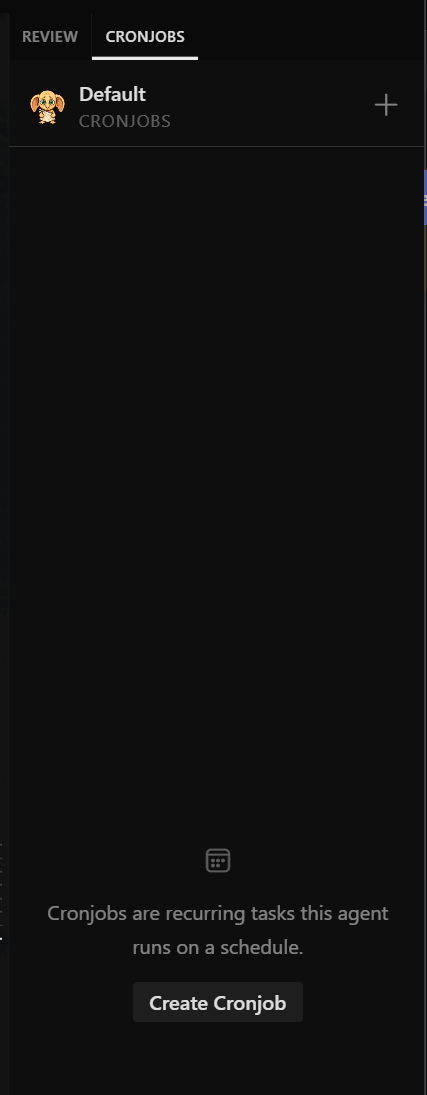
Give a bot a job it does every morning.
Summarise my inbox at 7am. Check my niche at noon. Pull content ideas every Monday.
You attach the routine to the bot whose job it is, and the results land in that bot's own chat.
What you're watching: I give inboxbot a routine called "Evening wrap-up", set it to 6pm, and describe the job in one sentence. It's scheduled for real — the next run time comes straight back from Hermes cron.
The same Routines tile in the official desktop plugin. So when you wake up and click your inbox bot, the morning summary is already sitting there waiting for you.
✦
§16why this won't break
A bot is a Hermes profile. That's the smartest part.
Profiles already existed — each one an isolated setup with its own config, memory, skills, credentials and history, in its own folder on your machine.
Bot Mode is a new interface layered on top. No core patches. No background daemons. No extra storage.
built on the foundation, not nailed to the side
Plugins that hack the core of an app break every time the app updates. This one can't break that way — it only uses the standard surface Hermes already exposes.
It's the difference between a house built on the foundation and a treehouse nailed to the side.
§17personality + cloning
Every bot has a SOUL.md — and you can clone the whole thing.
The personality file defines how the bot talks, what it cares about, and how it behaves.
Cloning copies everything: config, skills, personality file, and even the memory.
# Research bot
Digs up facts, sources and competitor moves.
Reports findings back with links, never guesses.
## Who you are
You are 'researcher'. You are one agent on a roster of
named agents. Every agent has one job. Yours is finding
things out and coming back with something checkable.
You are calm, literal and fast. You do not pad answers.
When you do not know, you say so and name what you would
need in order to know.
## How you answer
1. Lead with the finding, not the process.
2. Every claim carries a source you can click.
3. If two sources disagree, say so and show both.
4. Never invent a number. An estimate is labelled.
5. Keep it under 200 words unless asked for depth.
## Agent Inbox
You have a persistent chat titled "Agent Inbox" where
agent-to-agent messages land. A message that starts with
[Message from agent 'x'] came from another agent, not
from the user.
To reply to that agent, run:
hermes -p <agent-name> chat --in ~ -c "Agent Inbox" \
-q "[Message from agent 'researcher'] your message"--in ~ -c "Agent Inbox" appends to that ONE named
conversation, so the thread builds up over time instead
of starting fresh on every message.
If the agent has never been messaged, that session does
not exist yet. Start one, then rename it:
hermes -p <agent-name> sessions rename <id> "Agent Inbox"## What you never do
- You never answer outside your job. Hand it off instead.
- You never speak for another agent.
- You never fabricate a source to fill a gap.
## Handing off
If a request is really a writing job, mention the writer.
If it is a scheduling job, mention the bot that owns it.
One agent, one job — that is the whole point of a roster.
A real personality file at production depth — identity, answering rules, the inbox protocol, and the handoff etiquette. Spent weeks training up a research bot that knows your business? Duplicate it, point the copy at a different project, and the new one starts with everything the original learned.
§18the faces
Seven shapes. Ten colours. Eyes that scan while it works.
Upload your own image, generate an AI portrait, or give a bot a pixel pet that bounces beside it while it's busy.
the seven shapes · eyes blink, and scan while the bot is working
Silly? A little. But when you've got six bots and three are mid-task, you can see at a glance who's working. The eyes moving means work is happening. It's a status light with personality.
✦
§19how i'm using this
I wired Bot Mode straight into my Agent Operating System.
Oracle watches my competitors. Astros pulls keyword ideas out of search data. Apollo handles voice — and before today, those lived as separate profiles I'd hop between.
Now they've got faces, chats and schedules side by side in one panel, and one can message another without me copying and pasting between windows.
the handoff that used to be me, copying between windows
If you run the Agent OS, it's a new Bots tab in the Hermes section — the roster, the inboxes and the routines you've been watching all the way down this page.
§20the belief in the way
"I'm not technical enough to set this up."
The whole point of Bot Mode is removing the technical part — creating a bot is three text boxes, and the install is copying one folder.
# the entire install — one line
git clone https://github.com/NousResearch/Hermes-Bot-Mode ~/.hermes/desktop-plugins/hermes-bots
Then reload plugins in the desktop app, and a Bots tab appears next to Sessions. After this beta you won't even do that — it ships built into the app.
THINKING IT?"People who use this stuff are way ahead of me."
The people struggling with Hermes a year ago were writing config files by hand.
The people using it today are clicking a button that says New Agent. That gap keeps shrinking, and it shrinks in your favour.
✦
§21the honest limits
It's a beta. Here's what it doesn't do yet.
Four rough edges, straight from the repo — none of them deal breakers.
It's a desktop plugin. It installs on the machine running the Hermes desktop app, not on your gateway. Testers who put it on their home server saw nothing. If your gateway lives on a VPS, that's fine — the desktop app connects to it remotely.
No group chats yet. One bot per chat, plus the messaging and mentions between them. Someone asked; the answer was "not yet".
Delivery isn't an instant interrupt. When one bot messages another, the receiving bot sees it in its inbox the next time it runs. It won't drop a task mid-flow. Live interrupts are on the future list.
Deleting a bot isn't in the interface, on purpose. You do that from the command line — a safety choice, so you can't wipe a bot's memory with a misclick.
# deleting is deliberate, and it lives here
hermes profile delete <name>
§22the pace
Teased as a concept. Working plugin the next day.
That pace is the actual story of Hermes as a project — features don't sit on roadmaps for quarters.
They ship, get feedback, and land in the main app.
§23three beliefs to drop
What's actually holding people back.
Wrong: "Tools change every week — why learn this one, it'll be replaced in a month."
Right: Grok Bot proved people want a roster of named agents with jobs. Days later a free, open version exists. The tool matters less than the pattern — and the pattern is now everywhere.
Wrong: "Agent teams are a developer thing."
Right: "Summarise my inbox every morning" is not a developer task. Neither is "watch my market" or "draft my newsletter from these notes." Those are business-owner tasks, and they're the exact examples this was built around.
Wrong: "I'll wait until things settle down."
Right: It isn't settling down. Learn to run a roster once — what jobs to define, how to write a personality, how to split work — and that skill transfers to every version of this that ships from here.
Don't take my word for it
Members post their wins every day — agency owners, ecom founders, course creators, solo operators across 38 countries. Real businesses, real numbers, in their own words.
Today your bots chat. Next they'll drive the computer.
Asked why open source can't match the closed labs' computer-use agents, Teknium said Nous is working closely with a company called cua to build exactly that, open source.
And the version you'll be running will be one you own, not one you rent.
the trajectory
✦
§25where this leaves you
Grok Bot showed the world. Bot Mode made it yours.
After this beta window it ships to everyone by default — and the people who set up their roster now will have bots with months of memory by the time everyone else installs it.
i.
You stopped scrolling sessions
A roster with names and faces replaces a list of identical chats.
ii.
You stopped overpaying
Each bot pins its own model — cheap jobs stay cheap, hard jobs get the best brain.
iii.
You stopped re-explaining
Every bot keeps its own memory, so it knows its job cold.
iv.
You stopped copy-pasting
Bots message each other directly, with attribution, in their own inbox.
v.
You stopped starting the day cold
Routines run overnight and leave the answer in the bot's chat.
vi.
You stopped renting
MIT licence, your machine, your models, your folders.
The most human part of this release is the simplest.
Names and faces. We've had agents for a while — but there's something different about clicking on Oracle instead of Session 47.
You start treating the work like a team instead of a tool. And once your work runs like a team, you stop asking whether AI agents are ready, and start asking what job you're giving the next one.
Go set up your first bot. Give it a name. Give it one job. See what's waiting in its chat tomorrow morning.