Meet Apollo.Say the word — your Mac gets to work.
Apollo is the voice copilot inside my Agent OS. Say the wake word and it answers, runs agent tasks, remembers what you tell it, reads you a morning briefing from your own notes — and even builds apps while you talk. Below: 18+ real things to say to it — from opening your boards by voice to building a countdown timer out loud — plus how it all works, with real screenshots.

It's live right now. Click in.
Why "Apollo"? The god of oracles.
Apollo is the god of light, music and — most importantly — the spoken oracle. You ask, and the answer comes back as a voice.
That's exactly what this is: a voice you speak to from across the room, that answers, acts, and remembers. The sun-god name fits a copilot that's always on and always listening for you.
I got tired of typing to my own computer.
Before
Every single thing I wanted from AI started with me opening a tab and typing.
Quick question? Type it. Add a reminder? Type it. What's on today? Open three apps.
My hands were always busy — cooking, walking between rooms, holding a coffee — and the AI just sat there waiting for a keyboard.
The most natural interface I own — my voice — did nothing.
Then I gave my Agent OS a voice, a wake word, and a memory.
After
Now I say "Apollo" from across the room and it's listening.
It answers in a calm English-butler voice, runs real agent tasks, and remembers what I tell it.
Every morning it reads me a briefing built from my own notes — not generic news, MY day.
And when I say "build me a snake game", it actually builds it while I watch.
Same Mac you already own. It just listens now.
Why listen to me on this.
I run an AI agency with 70+ people where AI handles about 80% of the ops, and a room of operators wiring the same systems into every kind of business.
No invented quotes here. The wins are real and written by the members themselves — agency owners, ecom founders, creators, solo operators across 38 countries. Read them in their own words.
Read the 158-page wins doc →Commit to talking to your AI today. Not typing.
Below are the six things Apollo does, each with exactly what to say.
Here's the deal I want to make with you.
Tonight, try ONE voice command on your own setup. Just one. Say a wake word, ask for a briefing, tell it to remember something.
Because the moment your computer answers you out loud, something clicks — it stops being a tool you operate and starts being a copilot you work with. That shift changes how much you use AI every single day.
Be one of the people who makes that shift today.
Commit to the transition. One voice command, tonight.
This is Apollo, live on my Mac.
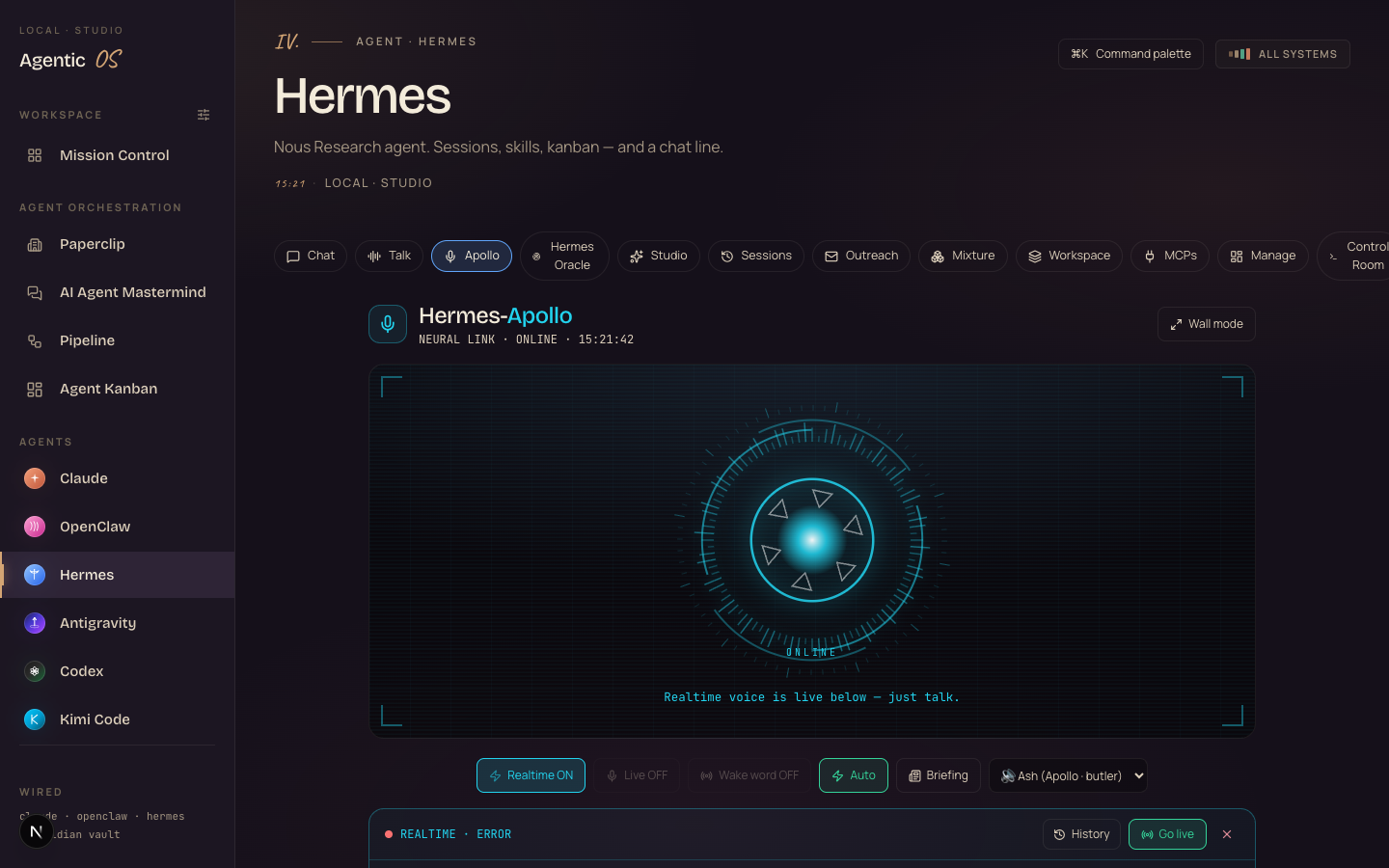
That's the actual tab (localhost:3737/hermes?tab=apollo). The glowing core pulses while it listens and speaks. Under it: Realtime mode, the wake-word toggle, one-tap Briefing, and the voice picker — "Ash (Apollo · butler)" is the refined English butler voice.
Real commands, real outcomes. Steal these.
This is the part most demos skip. Here's what talking to Apollo looks like across a normal day — simple sentences, real results. Every one of these runs through the same loop: it hears you, decides whether to just answer or actually act, then reports back out loud.
Answers out loud in a second — no calculator app, no tab.
Three options, spoken — pick one while you make coffee.
Instant — useful mid-scheduling without breaking flow.
The OS surface opens — no clicking through tabs.
Agent mode runs the command; the page is up before you sit down.
It checks the machine and tells you — for real, not a guess.
It looks, lists them, and you decide what to bin.
Written to disk AND your Obsidian vault — permanent.
Next week you ask about Mike, and it knows.
It recalls from the vault — your own notes, read back.
A spoken morning rundown built from YOUR vault — open tasks, what you worked on, today's top priorities.
Weekly mode reads back your completed items — your wins, not vibes.
Straight from your daily notes, out loud.
The Agent Factory builds it and previews it in the tab — free.
A working app appears while you keep talking.
Built, previewed, saved to your workspace gallery.
A clean draft, read back — tweak it by voice.
Your rambling becomes copy — the transcript is already there.
Memory + vault + summary, in one spoken answer.
Notice the pattern: none of these needed a keyboard, a tab, or an app. One wake word, one sentence, done. That's the entire pitch — the friction between "I want" and "it's done" drops to a sentence.
The six abilities behind those commands.
Say "Apollo" from across the room.
Flip the wake-word toggle once and it stands by. Say "Apollo" (or "Hermes" — both work, and it forgives mis-hearings) and it starts listening — no click, no keyboard. Every use case above starts with this word.
Apollo: "Two priorities remain from your daily note, sir — shall I read them?"
Quick answers — or real work on your machine.
Apollo has a fast mode for instant answers, and an agent mode that actually does things — it runs the Hermes agent with real tools, so "open", "check", "find" and "look at" commands genuinely execute on your Mac. It picks the right brain automatically ("Auto"), so a question comes back in seconds and a job gets properly done.
A live conversation, not walkie-talkie turns.
Tap Go live and it's a continuous call: you just talk, it talks back, you interrupt it mid-sentence like a real assistant. This is the mode in the screenshot — "REALTIME · just talk."
"Apollo, remember…" — and it's in your vault.
Tell it to remember something and it writes it to disk AND to your Obsidian vault (Agentic OS/Apollo). Ask "what do you remember about X" and it recalls. Every conversation is also logged daily into the vault — your spoken thoughts become searchable notes.
Apollo: "Noted and filed, sir."
"Brief me" — from YOUR notes, not the news.
One tap (or say "brief me") and Apollo reads your real Obsidian vault — open tasks, what you actually worked on, your daily-note priorities — and delivers a spoken morning briefing in the butler voice. Weekly mode recaps your wins. It never invents anything; it's grounded in your own files.
Describe an app — and watch it appear.
Say a build idea and Apollo hands it to the Agent Factory — the same free build engine in the OS — then previews the result right there in the tab and confirms out loud when it's done. Your voice, straight to a working app, saved in your workspace gallery.
Apollo: "Building it now… ✅ Built — previewing below."
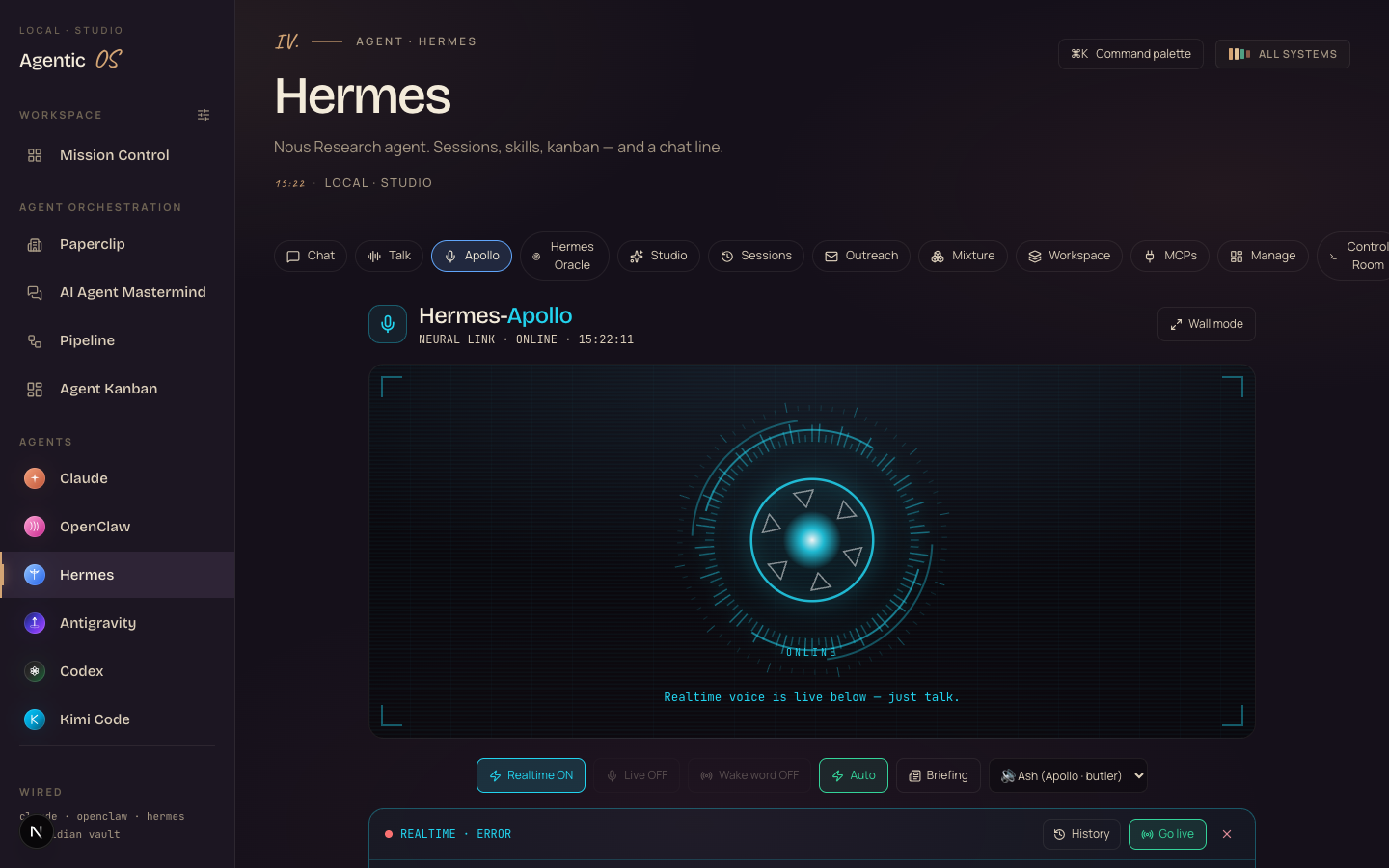
Apollo is one tab of the Agent OS.
The voice copilot is great on its own — but it's powerful because of what it's plugged into. The same OS runs your agents, your builds, your memory, and every model you use.
You're not buying a tool. You're getting the whole operating system I run a seven-figure business on.
Get the Agent OS →No — that's the biggest myth about it. The Agent OS runs the everyday 90% on a free local model on your own machine (the fast MLX Gemma 4), so most work — including a lot of what Apollo does — costs $0 and never leaves your Mac. Free APIs slot in for more, and for the frontier stuff it drives the CLIs you already pay for — your Claude subscription already includes the Claude CLI, and the Agent OS plugs straight into it, so you're not paying twice.
It's a layer on top of what you already own, not a new meter. And inside the Boardroom there are full token-optimisation tutorials so you cut usage to the bone.
How most people use AI. And how it feels with a voice.
- Open a browser tab for every question
- Type, wait, read, copy, paste
- Reminders go in your head (and vanish)
- Mornings start with checking 3 apps
- AI sits idle whenever your hands are busy
- "Apollo" from across the room — it's listening
- Answers out loud; runs real agent tasks
- "Remember this" → written to your vault
- Mornings start with a spoken brief of YOUR day
- "Build me X" → a working app, previewed live
What's holding you back.
Wrong: "Voice assistants are toys — Siri can barely set a timer."
Right: Phone assistants are locked boxes. Apollo sits on top of a real agent with tools, your files, and your memory — that's why "check the server" and "build me a game" actually work.
Wrong: "Talking to an AI about my business isn't private."
Right: Apollo runs in YOUR Agent OS on YOUR Mac — the memory files and vault notes live on your disk, and the everyday work runs on a local model. That's more private than any cloud assistant.
Wrong: "Setting up a voice assistant must be a weekend project."
Right: It's one tab in the Agent OS. Open it, toggle the wake word, talk. The whole thing is already wired to the agent, the vault and the build engine.
158 pages of members already running this stack — real businesses, real wins, in their own words.
Read the 158-page wins doc →Give your Agent OS a voice.
Everything in this guide is running on my Mac right now — the wake word, the briefings, the memory, the voice builds. It's the difference between operating AI and working with it.
Inside the AI Profit Boardroom you get the full Agent OS — Apollo wired to the Hermes agent, the fast free local engine, Free Claude Code, Agent Kanban, the memory vault, every CLI you already pay for in one dashboard, a 30-day roadmap, daily tutorials, coaching calls, and 3,900+ founders across 38 countries building alongside you. Every upgrade — like this one — lands for members the week it ships.
It's the operating system I run a seven-figure business on. You get the whole thing.
Get the Agent OS →Open the Apollo tab, flip the wake word on, and say hello tonight. I'll see you in the next one.