The Goldie Neon Forge™.
Type a prompt. Get a video.
There's a video studio living inside my Agent OS. I type one sentence. Claude 5 writes the whole motion design — scenes, transitions, kinetic type, neon effects. HyperFrames renders it to a real MP4 on my Mac. Cost per render: zero. Press play — this is what came out of one prompt.
I was you. Then my videos started making themselves.
Before
I post video every single day. The bottleneck was never ideas — it was production.
Intros, promo clips, B-roll for launches — each one meant an editor, a timeline, and hours I didn't have.
The first version of my video generator was honestly embarrassing. I typed a prompt and it just printed my own words back as a title card. Five seconds of nothing.
AI "video tools" kept giving me that: generic, boring, ignoring what I actually asked for.
Then I rebuilt it so the AI actually designs the video.
After
Now I type one sentence into the Video tab.
Claude 5 writes the entire motion design — scene by scene, with neon glow type, beat-flashes, particle fields, my real screenshots.
HyperFrames renders it on my Mac. No cloud fees. No editor. About eight minutes, start to finished MP4.
The three videos on this page? All typed. Today.
You can have this too. Same tools. Same path.
Real people. Real wins. Inside the Boardroom right now.
Here's what's happening for the members already running this stack — agency owners, ecom founders, course creators, solo operators.
158 pages of members documenting real wins with this exact stack — real businesses, real screenshots, real numbers.
Read the 158-page testimonials doc →Commit to transitioning today. Not tomorrow.
You just watched a video that nobody edited. It was typed.
Everything below shows exactly how the Forge works — and it's reproducible on your machine.
So here's the deal.
Promise yourself one thing right now: you'll finish this guide AND type your first video prompt tonight. Just one sentence.
Because the moment your videos make themselves, daily content stops being a grind and starts being a pipeline.
The people sitting still are getting passed. The people implementing today are the ones who'll look back in six months and say "that was the moment."
Be one of those people.
Commit to the transition. Commit to taking action today. This changes everything about your workflow.
The Goldie Neon Forge™.
A forge takes raw metal and hammers it into something finished.
This one takes a sentence and hammers it into a rendered video — through five stations:
The Prompt
You describe the video in plain English — the subject, the punchlines, which screenshots to use. One sentence works. A paragraph works better.
The Author
Claude 5 writes the actual motion design: scenes, timing, transitions, kinetic type — real composition code, not a template with your words pasted in.
The Arsenal
Every project ships with a built-in FX library — neon glow stacks, light sweeps, shockwave rings, spark bursts, count-up numbers, beat-flash cuts. The author is required to use them. Boring is not allowed.
The Render
HyperFrames replays the composition frame-by-frame in a headless browser and encodes the MP4 — on your Mac, deterministic, zero cents per render.
The Vault
Every project, render and log is saved — Projects list, Render History, and the files on disk. Re-render, download, or remix any of them, any time.
One box. One sentence. That's the job.
The Forge lives in Mission Control → Video.
You type what you want — the topic, the numbers to punch, the closing line — and hit Create + render.
That's your entire involvement. No timeline. No keyframes. No editor.
Pro tip from my own prompts: name the screenshots you want showcased and give it your punchlines word-for-word. The author follows your brief faithfully — "Close with: STOP WRITING PAGES. START RUNNING THE LINE." came out exactly like that.
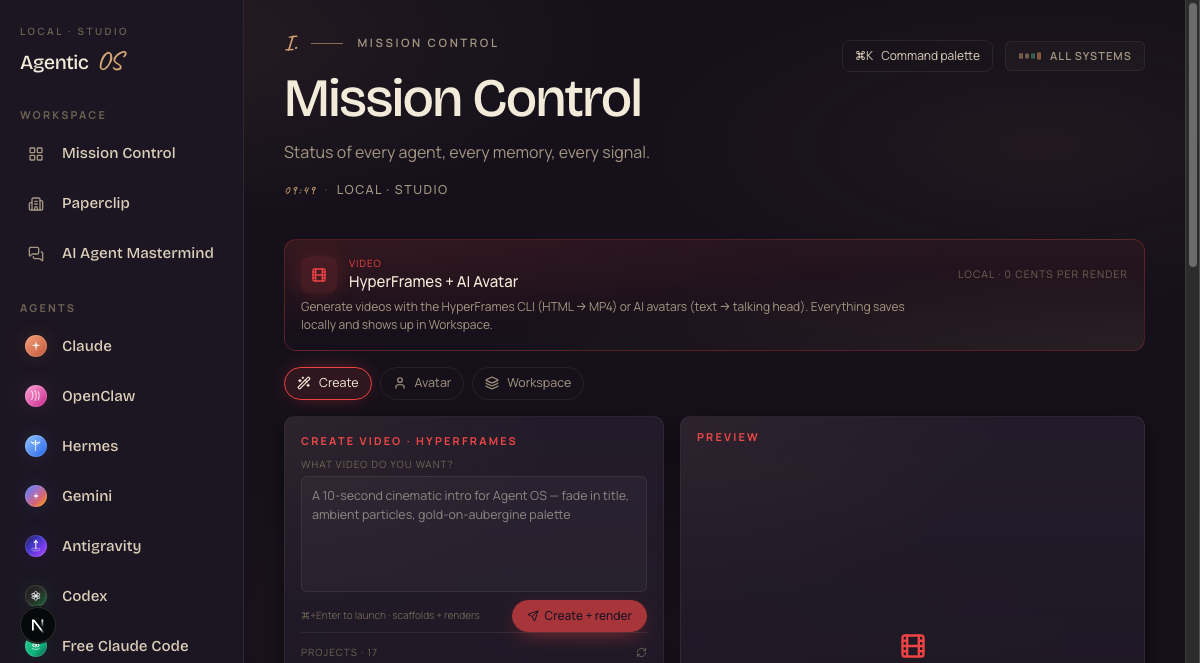
→ Mission Control → Video → Create
▶ Open the Forge · new tabYou don't need to. The motion designer is Claude 5, and the quality floor is enforced by the system — you only bring the message.
If you can write a YouTube title, you can run the Forge.
The AI writes real motion design.
This is the part every other tool fakes.
Claude 5 doesn't fill in a template. It writes the whole composition — every scene, every cut, every effect — following a design system it's not allowed to ignore:
⚡ Hook in the first 3 seconds. 💥 A signature effect in every scene. 🔢 Every number counts up. ✨ Neon glow type, sticker chips, beat-flash on every cut.
Watch what that produces — four employees, each introduced in their own neon colour, nobody touched a timeline:
Generic comes from templates. This writes original motion design per prompt — and the neon system bans flat backgrounds, static numbers and quiet openings outright.
My first version WAS generic. That's exactly why the quality rules are now enforced, not suggested.
Rendered on your Mac. Zero cents.
No cloud render farm. No credits. No watermarks.
HyperFrames steps through the composition frame-by-frame in a headless browser and encodes a real 1080p MP4 — the same input always produces the same video.
A 30-second video renders in about a minute. The whole pipeline — prompt to finished file — is roughly eight minutes, and your only cost is the authoring tokens (pennies).
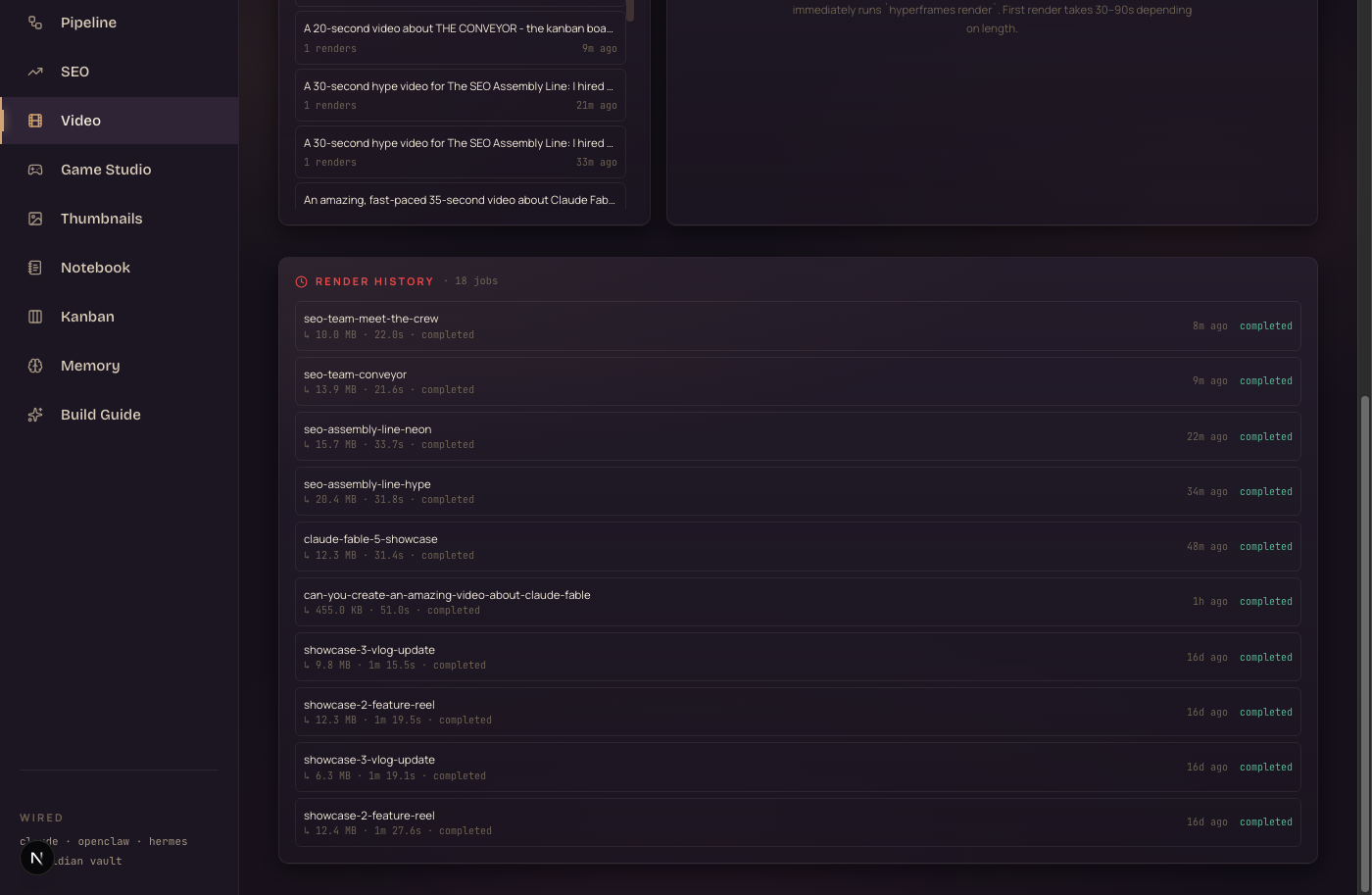
→ Video → Render History — today's jobs: seo-assembly-line-neon · seo-team-meet-the-crew · seo-team-conveyor — all completed
This one runs on open-source HyperFrames on your own machine. Render fifty versions if you like — the bill stays zero.
Get the Neon Forge in your business.
The Forge — the Create panel, the Author wiring, the FX arsenal, the render pipeline — ships as part of the Agent Operating System inside the AI Profit Boardroom.
And because it lives in the OS, it knows your work: your screenshots, your builds, your brand — so the videos it makes are YOUR videos.
- The full Agent OS zip — the exact system in every screenshot above
- A 30-day roadmap — install it, wire your assets, ship your first typed video
- Every prompt — including the exact ones that made the videos on this page
- Coaching calls — we set it up together, step by step
- 3,100+ founders building with this stack · someone's online 24/7
Every video is a project, not a one-off.
Nothing disappears into a download folder.
Every prompt becomes a project: the composition source, the assets it used, every render, every log — all kept, all listed in the Video tab.
Want a different ending? Edit the prompt, hit render again. Want yesterday's video? It's in Render History with a Download button.
Here's the third one from today — twenty seconds explaining the kanban that runs my AI team:
→ Video → Projects — every typed video, re-renderable
→ on disk: ~/.agentic-os/video-projects/
An edit session vs a sentence.
- Brief an editor (or open Premiere yourself)
- Hunt for stock, build the timeline, keyframe the text
- Or: pay a SaaS video tool monthly + per-render credits
- Get back a generic template with your words swapped in
- Revisions = another round trip, another day
- Result: video is the bottleneck of daily content
- Type one sentence in the Video tab
- Claude 5 designs original scenes, cuts and neon effects
- Your real screenshots star in it automatically
- HyperFrames renders the MP4 on your own Mac
- Revisions = edit the prompt, hit render again
- Result: three finished videos before lunch — typed
Start with one intro.
Don't try to replace your whole edit pipeline tonight.
Type one prompt for the video you make most often — your intro, a product teaser, a stat punch for Shorts.
Use it as the cold open of your next video. Measure the retention.
Then make it a habit: every launch, every guide, every win gets a typed trailer the same hour.
The people who figure out AI agents now, while the tools are evolving fast, are going to be way ahead when everything settles. Every workflow you build compounds.
Keep them — this isn't for your 20-minute mains. It's for everything that never gets made because it's not worth an edit session: trailers, section bumps, Shorts, launch teasers.
The Forge makes the videos that currently don't exist.
What you just gained.
You stopped editing.
One typed sentence becomes a finished MP4 — scenes, cuts and effects designed by Claude 5.
You stopped paying per render.
HyperFrames renders locally on your Mac. Fifty takes, zero dollars.
You got a quality floor.
The neon system is enforced — glow type, beat-flashes, count-ups. Boring isn't allowed out of the Forge.
Your real work stars in it.
Your screenshots ship into every project automatically — videos about YOUR builds, not stock footage.
Everything's re-renderable.
Projects + Render History + source on disk. Edit the prompt, render again.
You saw the proof.
Three videos on this page — trailer, crew, conveyor — all typed today, all playable above.
"Stop editing videos. Start typing them."
Type your first video tonight.
If you want the Neon Forge working for your content — not just impressing you on this page — grab the Agent Operating System inside the AI Profit Boardroom.
You get the zip file. The Video tab. The FX arsenal. Every prompt that made the videos above. Coaching calls where we wire it in together, step by step.
3,100+ members. Daily tutorials. A 30-day roadmap. A member map to find builders near you.
Get the Agent OS → Inside the AI Profit Boardroom · aiprofitboardroom.com link in the description ↓One sentence. One render. Tonight.
I'll see you in the next one.








