Hermes Desktop just landed on Ollama.
One command. A full agent army on your machine.
Ollama and Nous Research just shipped the thing local-AI people have been asking for. Hermes Desktop — the multi-agent engine, the self-improving skills, the messaging integrations — now runs as a desktop app on macOS, Windows, and Linux. And you launch the whole thing with one command: ollama launch hermes-desktop. Local model or cloud. Your choice. Your machine.
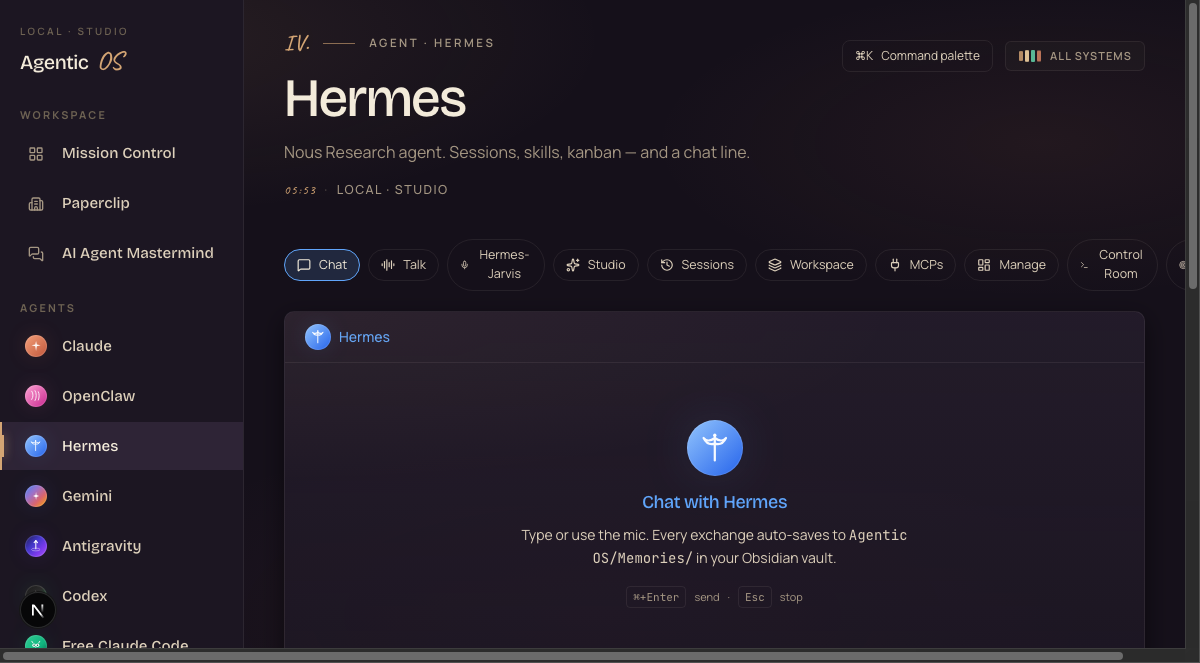
I was you. Then I put Hermes inside my OS.
Before
I used to run every agent in a separate window.
One tab for research. One terminal for tasks. Nothing talked to anything.
Every long job blocked the next one — I'd sit there watching one agent think.
And everything ran through cloud APIs, with the meter running.
Then Hermes went local — and into my Agent OS.
After
Now Hermes runs on my own machine, on my own models, through Ollama.
It spawns parallel subagents — three research jobs at once while I keep working.
It writes its own Python skills from plain English, and they get better as I use them.
And it answers me on the messaging apps I already live in.
You can have this too. One command. This page walks you through it.
One command. The whole thing.
Let me start with the install, because this is the part that used to hurt.
Getting an agent framework running used to mean Python environments, API keys, config files, and an afternoon you never get back.
Now it's this:
ollama launch hermes-desktop
— the entire install, verbatim
That's it. Ollama pulls the app, wires it to your models, and Hermes Desktop opens.
You choose local or cloud at launch. Local means your data never leaves the machine. Cloud means more horsepower when you want it.
You're in your kitchen making coffee. Your laptop is running a research agent on a model that lives entirely on your own disk. Nobody's metering it.
It's one command. If you can type seven words into a terminal, you're done.
Ollama handles the models. The desktop app handles everything else.
Parallel subagents. Your context stays clean.
Next big one — multi-agent workflows, straight from the desktop.
The old problem: you ask your agent to research three topics, and everything lands in one giant conversation. By topic three, it's confused about topic one.
Hermes Desktop spawns parallel subagents with isolated contexts.
Each one gets its own clean workspace. They run at the same time. You review the aggregated results without any of it cluttering your main thread.
Practical version: you're prepping a video. You fire one subagent at the tool's pricing, one at competitor coverage, one at the changelog. Ten minutes later you have three clean briefs — and your main chat is still focused.
Skills that write themselves — and get better.
This is the feature that separates Hermes from every chat app.
You describe what you want in plain English. Hermes generates a Python skill that does it.
Then — and this is the part I love — it improves the skill as you use it. Hits an edge case, fixes itself, keeps the better version.
It ships with 70+ skills out of the box. But the real power is the library you grow around your own workflows.
You say "every Friday, pull my channel stats and summarise what worked." That's a skill now. It runs forever. It gets sharper every week.
Same — early agent frameworks broke constantly. That's exactly why self-improving skills matter.
When a skill fails, Hermes fixes the skill — instead of you babysitting it. The system gets more reliable with use, not less.
One agent. One memory. Every surface.
Here's the one that changes daily life.
Hermes Desktop connects to Telegram, Discord, Slack, WhatsApp, Signal, and Email.
Same agent. Same memory. Every app you already use.
You're out at lunch. You WhatsApp your agent: "did the outreach batch finish?" It answers — because it's the same Hermes that ran the batch this morning on your desktop.
No more "the desktop AI" and "the phone AI" being strangers. One brain, every door.
Fair — and it's the right question to ask. Even the replies under the launch post raised it.
Two rules keep you safe: run it local (your data stays on your machine), and connect one surface at a time, starting with the lowest-stakes one — a private Telegram bot, not your client Slack.
Tool approvals stay separate from chat turns. You stay the one holding the keys.
Run Hermes inside the Agent OS.
If you want to get the most out of Hermes Desktop — the parallel subagents, the self-learning skills, the messaging surfaces — check out the Agent Operating System inside the AI Profit Boardroom.
It's the full operating system I've built that connects Hermes, Claude, and OpenClaw into one dashboard. Your agents share one memory. They know your goals. So when Hermes spawns a research swarm, it already has your full business context.
- The full Agent OS zip — the dashboard from every screenshot on this page, Hermes tab included
- The Hermes setup walkthrough — Ollama, local models, messaging surfaces, step by step
- A 30-day Hermes roadmap — first agent day 1, first skill week 1, full swarm by week 4
- 4 weekly coaching calls — with members running Hermes in production right now
- 3,100+ founders · 38 countries · someone online 24/7
Cloud-rented agents. Or your own.
- Every agent run goes through a cloud API with the meter on
- One conversation window — long jobs block everything
- Research topics bleed into each other in one context
- Skills are whatever the vendor shipped — take it or leave it
- Your agent lives in one app; your messages live in six others
- Your data rides through someone else's servers
- ollama launch hermes-desktop — running in minutes
- Parallel subagents with isolated contexts — batch everything
- Aggregated results, clean main thread
- 70+ skills shipped, plus skills it writes for YOUR workflows
- Telegram, WhatsApp, Slack, Discord, Signal, Email — one brain
- Local models = your data never leaves your machine
Should you run it today?
If you have a Mac, Windows, or Linux machine with 16GB+ of memory — yes.
Start local with a small model. If you're on something like an M1 Pro with 32GB, mid-size models run comfortably for agent work, and you can flip to cloud for heavy jobs.
Start with one workflow. One research batch. One skill. Then grow it.
The people who figure out local agents now, while the tools are evolving fast, are going to be way ahead when everything settles. Every skill you grow. Every workflow you wire. It all compounds.
What you just gained.
You stopped fighting installs.
One command — ollama launch hermes-desktop — and you're live.
You stopped waiting in line.
Parallel subagents run batches while your main thread stays clean.
You stopped accepting stock tools.
Hermes writes Python skills from your plain English — and improves them.
You stopped app-switching.
One agent, one memory — on WhatsApp, Slack, Telegram, and four more.
You stopped renting.
Local models on your own machine. No meter running.
You kept the keys.
Local-first, one surface at a time, approvals separate from chat.
One agent. One memory. Every surface — and it's yours.
Make Hermes part of your operating system.
If you want your Hermes setup to actually save you time every day — not just be another app you check sometimes — go grab the Agent Operating System inside the AI Profit Boardroom.
It turns Hermes, Claude, and OpenClaw into one system with shared memory, shared context, and one dashboard you control. Every new Hermes update — like the subagents and the self-learning skills you just saw — makes the whole system more powerful automatically.
- 3,100+ members · daily tutorials · 30-day Hermes roadmap
- The 158-page wins doc — read it here
- Every prompt, every workflow, the Obsidian memory setup, coaching calls








