The Goldie Deep Dive™ + NotebookLM.
NotebookLM used to need you to bring the sources. Not anymore. Its new research agent goes out, reads the web, and brings the best sources back to you — in about 30 seconds. So I wired it straight into my Agent OS. I type a question. I watch the sources land. Then I chat them or turn them into visuals.
NotebookLM stopped waiting for your sources — and went and found them.
On 8 June 2026, Google shipped the biggest NotebookLM upgrade yet, titled "Do better research with NotebookLM." The big one: a brand-new agentic research mode. You start with a loose question, and NotebookLM goes and builds your source repository for you — using Google Search to pull high-quality sources straight off the web.
It also gave every notebook a secure cloud computer that writes and runs real code, and it now turns research into things you can see — charts, data visualisations, mind maps, slides, even images.
"You can now start with loose ideas and questions. NotebookLM can guide you through building your source repository directly in your chat… it can even use Google Search to find relevant, high quality sources from the web and add them to your notebook."
— NotebookLM team, "Do better research with NotebookLM", 8 June 2026
The numbers back it up. On advanced web research and source discovery, the new system hit a 78.2% win rate against the old one. That's the headline: research that used to take you an afternoon of open tabs now happens while you make a coffee.
I used to lose whole afternoons to research.
Before
Every new topic started the same way.
Twenty tabs open. Reddit, blogs, comparison posts, half of them junk.
I'd copy bits into a doc and lose track of what came from where.
Hours gone, and I still didn't trust half my sources.
By the time I had the research, I'd lost the energy to use it.
Then NotebookLM started doing the hunting for me — right inside my Agent OS.
After
Now I type the question and hit one button.
Thirty seconds later, the best sources are sitting in my notebook.
Each one titled, summarised, and linked — I can see exactly where it came from.
Then I chat them, or turn them into a mind map or a chart. Same afternoon's work, done before the coffee's cold.
You can have this too. Same tool. Same one button.
Commit to never tab-hunting again.
You've seen the proof. Real people. Real results.
In a second I'll show you exactly how the research agent works, step by step.
So here's the deal.
Promise yourself one thing right now. Before you sleep tonight, you'll point this at one real question from your work and let it find the sources for you. Just one. Because the moment you stop being the one digging through the web, your whole research workflow changes.
The people sitting still are still opening twenty tabs. The people building today are asking one question and getting the answer.
Be one of those people.
Commit to the transition. Commit to taking action today. This changes how you learn anything.
The Goldie Deep Dive™.
Five steps turn a single question into a researched, visual knowledge base — the loop NotebookLM just unlocked, running inside your Agent OS.
Ask
You start with a loose question — no sources, no setup. Just the thing you actually want to know.
Hunt
NotebookLM's research agent goes out and reads the web for you — finding the strongest, most relevant sources, not the first ten links.
Gather
The sources land in your notebook — titled, summarised, and linked, so you see exactly where every fact came from. Trust built in.
Query
Now you chat the whole stack. Answers come grounded on the sources it found — no hallucinations, every claim traceable.
Visualise
Turn the research into a mind map, a chart, an audio overview, a slide deck. Knowledge you can see and share, not just read.
Hunting tabs yourself vs an agent that hunts for you.
Here's the difference between how most people research and what happens when the agent does the digging.
- Open twenty tabs and start skim-reading
- Half the sources are junk or out of date
- Copy-paste bits into a doc, lose the links
- No idea which claim came from where
- Hours gone before you can even use it
- Result: tired, and still not sure you trust it
- Type one question, hit one button
- The agent reads the web and picks the best sources
- They land in your notebook, titled and linked
- Every answer is traceable to a real source
- Then chat them or turn them into visuals
- Result: trusted research, before the coffee's cold
That's the whole point of this one. It doesn't invent — it goes and finds real sources, shows you each one, and grounds every answer on them.
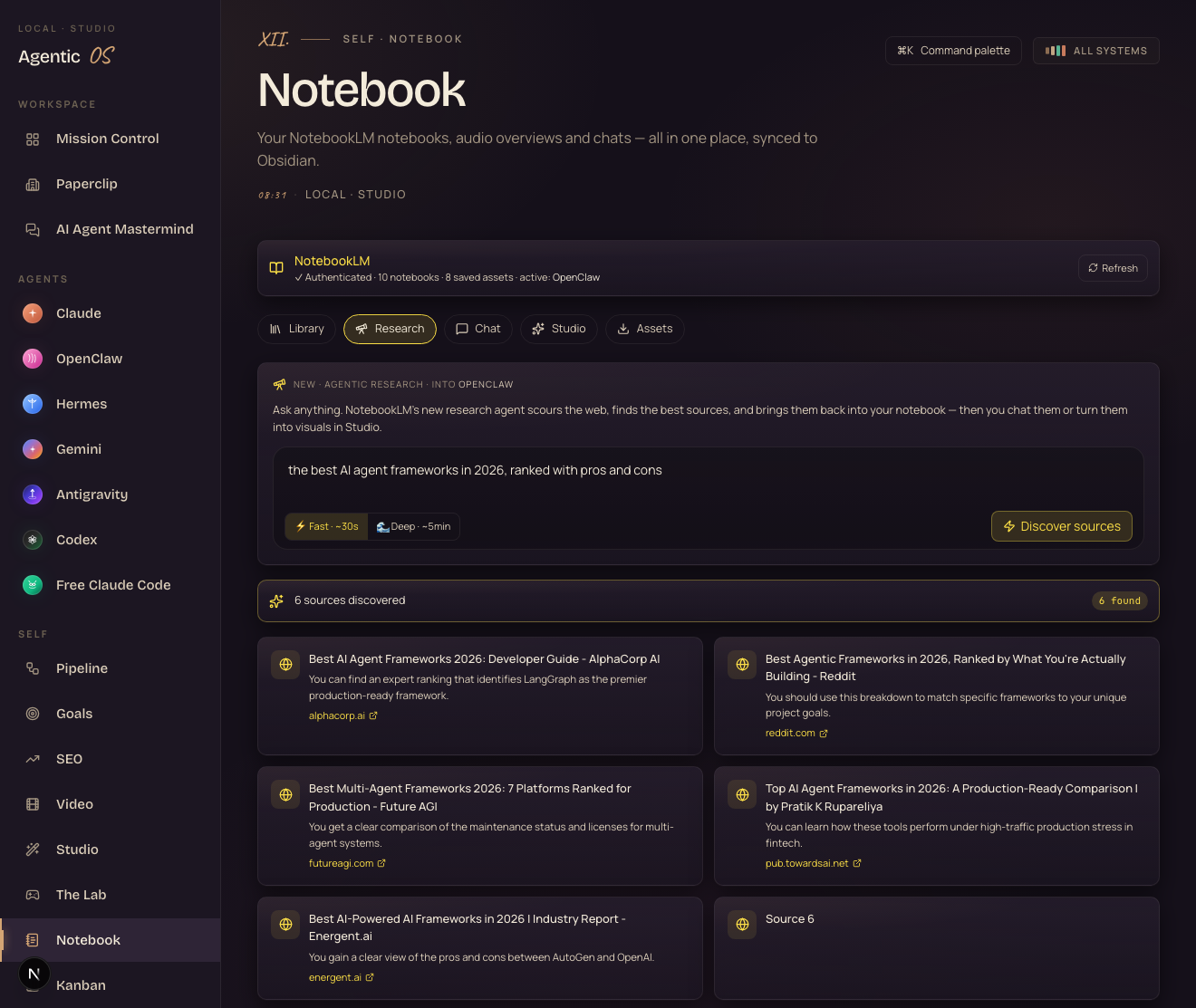
When I asked it for the best AI agent frameworks of 2026, it came back with real pages — a Reddit ranking, a developer guide, a production comparison — each linked. You can check its work.
Watch the agent find your sources.
I built this straight into the Notebook tab of my Agent OS. Here's the real thing — I asked for the best AI agent frameworks of 2026, and the agent went and found the sources, live.
Open Research, pick a notebook
It's a tab right next to Library and Chat. Research drops what it finds straight into the notebook you choose.
Ask, and pick a depth
Type your question. Fast finds ~10 sources in about 30 seconds. Deep combs ~40 sources over a few minutes.
Watch the sources land
Each one shows up as a card — title, summary, and a link back to where it came from. You see the research happen.
Import, then chat or visualise
One click adds them to the notebook. Now ask questions grounded on them — or turn them into a mind map, chart, or audio overview in Studio.
It's one tab. You pick a notebook, type a question, and hit a button. No exports, no plugins, no terminal.
If you can type a question into a box, you can run a full research project.
Then it turns your research into anything.
This is the part that still feels like magic. The same notebook — the one the agent just filled with sources — becomes the raw material for finished assets. No new prompts, no design tools. I pressed a few buttons. Every single thing below was made by NotebookLM from those 10 sources, using the new update. All real. All mine. Open any of them full screen.
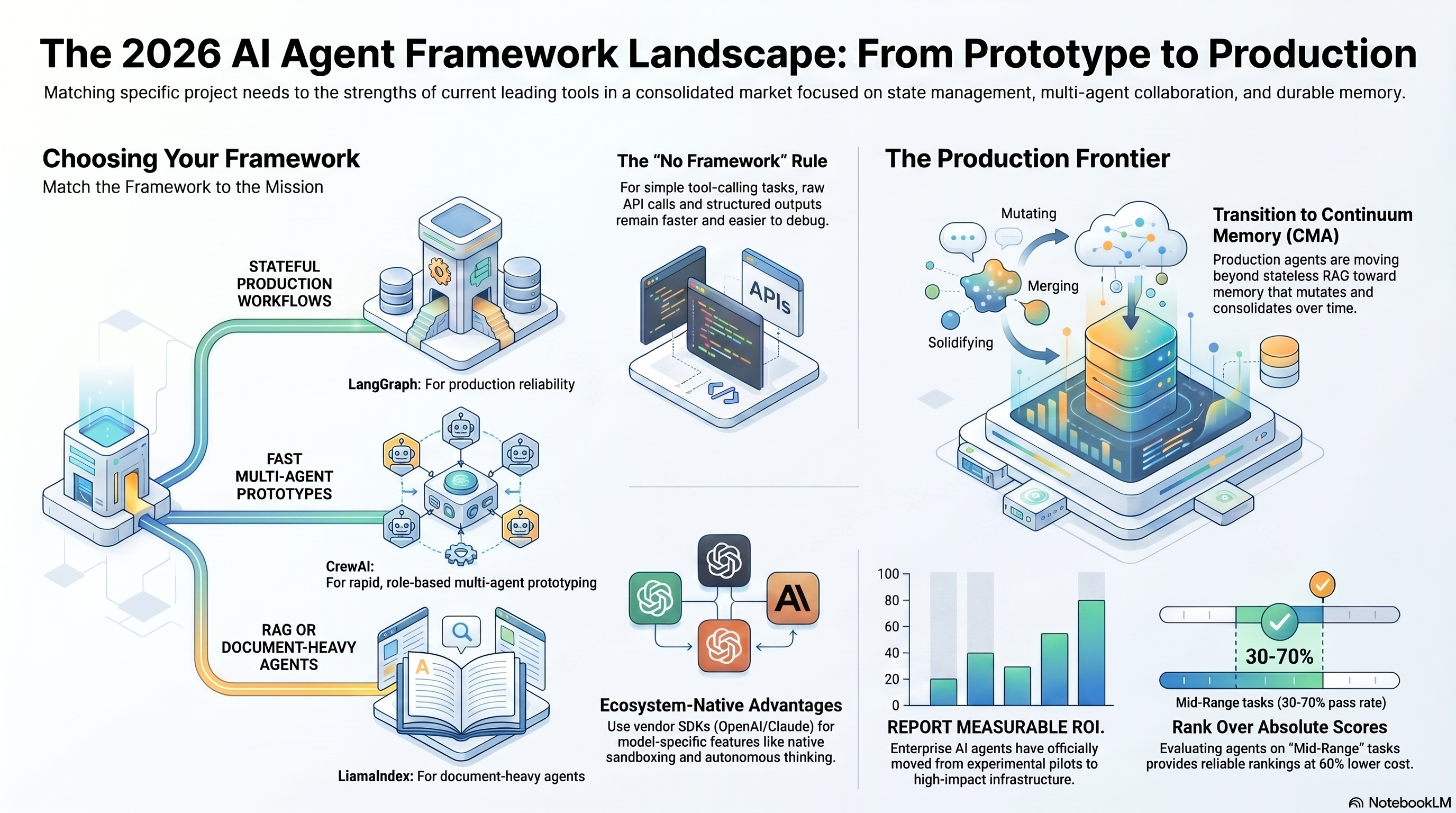
Two hosts talk through your research
NotebookLM turned the 10 sources into a back-and-forth podcast — like two experts discussing exactly what you just researched.
Open fullscreen ↗A narrated video of the findings
A visual, narrated video walkthrough — on-screen points and all — built straight from the same sources.
Open fullscreen ↗Five finished assets — a podcast, a video, an infographic, a report, a mind map — all from one notebook, one button each. I didn't design a single one.
You research once. Then you press a button and the asset comes out. That's the whole shift.
Where the deep dive earns its keep.
Size up a market
"Who are the real competitors in X?" — get the sources, not a guess, in 30 seconds.
Learn anything fast
Drop in a topic you know nothing about and walk away an hour later sounding like you do.
Fuel your content
Research a video or post topic, get cited sources, then turn them into a script or outline.
Prep for a client
Research their industry before the call. Walk in already knowing the landscape, with receipts.
Turn it into a visual
One more click makes the research a mind map or chart — perfect for a deck or a video.
Feed your agents
The sources live in your notebook, so your AI answers with real, cited context — not fluff.
You do — every time you Google before a decision, a post, or a call. That IS research; it's just slow and scattered right now.
This turns those scattered searches into one question and one trusted answer. Everyone does that.
Get the Agent Operating System.
The Research tab is one piece of the Agent OS — the dashboard you saw it running in. Want the whole thing, NotebookLM wired in and ready to research, without building it yourself? That's the Agent Operating System inside the AI Profit Boardroom.
It connects OpenClaw, Claude, and Hermes into one dashboard, with NotebookLM and your Obsidian memory plugged in. Your agents share one brain — so the research you gather feeds everything else. It all compounds.
- The full Agent OS zip — the dashboard you've seen here
- The NotebookLM + Obsidian memory setup, wired in
- Every prompt + a 30-day roadmap
- Four coaching calls every week with people building now
- Daily tutorials + a member map to find operators near you
What's holding you back — and why it's wrong.
"AI research can't be trusted — it makes things up."
This one finds real web sources and shows you every link. Answers are grounded on them and traceable. You can check its homework — that's the difference.
"I'm faster doing it myself."
An afternoon of tabs vs ~30 seconds for ~10 sources. You're not faster — you're just used to the slow way. Once you see it land, there's no going back.
"I'll set this up later."
Later is more afternoons lost to tabs while everyone else asks one question. The research gap between the two is widening every week. Start today.
158 pages of members who turned scattered AI tools into one system that researches, remembers, and builds for them — real businesses, real wins.
Read the 158-page testimonials doc →What you gained.
NotebookLM reads the web and finds your sources.
One loose question in, real sources out.
Every source titled, summarised, and linked.
Grounded answers, every claim traceable.
Turn research into mind maps, charts, audio.
Right next to your agents and your memory.
Stop hunting the web. Ask once. Let the agent bring the answers home.
Make research a 30-second job.
The Research tab is the front door — but the real power is that everything it finds lands next to your agents and your memory. Inside the Agent Operating System, your research, your team, and your goals all share one brain, in one dashboard you control.
Your agents understand your business. They remember everything. And every NotebookLM upgrade — like this new research agent — makes the whole system more powerful automatically.
- I built it in one session. You get the zip file
- Every prompt + the NotebookLM setup wired in
- The Obsidian memory your whole team shares
- Coaching calls where we set it up together, step by step
- 2,200+ members, daily tutorials, the 158-page wins doc
Or read the 158 pages of member wins first →








