The full Hermes + Agent OS stack lives inside the AI Profit Boardroom Join
New framework — Hermes 0.16 + Agent OS

The Goldie Skill Vault™ + Hermes Agent.

My new framework — built on the Hermes Skills Hub rehaul. 796 skills, six hubs, source preview, security scan, trust tiers, all browsable from inside Agent OS. Pick what you want. See what it does. Install on purpose.

796
skills loaded
6 hubs
connected
~2 min
to update
My story · why this matters

I was you. Then I built the Skill Vault.

Before

I was running Hermes with a handful of skills.

The browser was a blank box — a name and an Install button.

I'd install one, get the wrong thing, uninstall, try another. No previews. No idea what was about to run on my Mac.

Half the time I just ignored the skills tab and did the work myself.

All that power, locked behind a bad shop window.

Then the Skills Hub rehaul landed.

After

Now I see 796 real skills across six hubs in one search.

Every result is a card — description, source, trust tier, security scan.

I open Preview, read the actual SKILL.md, decide, install.

I've added more skills this week than the previous two months put together. And every one of them runs inside Agent OS with shared memory.

You can have this too. Same Hermes. Same Vault. Right here.
III · the receipts

Real people. Real wins. Inside the Boardroom right now.

Here's what's happening for the members already running this stack — agency owners, ecom founders, creators, solo operators. Different businesses. Same result.

3,100Founders in AIPB
319kYouTube subscribers
$137k/moAIPB community
38Countries · live members
258Real wins documented

158 pages of member wins — real businesses, real outcomes.

Read the 258-win testimonials doc →
Before you scroll on —

Commit to updating this today. Not someday.

You've seen what changed. Now you get the walk-through.

The next 10 minutes show every new piece and the skills worth installing first.

Here's the deal.

Promise yourself one thing right now. You're going to run hermes update AND install at least one new skill before you sleep tonight. Just one. Because the moment your agent starts picking up real, scanned, source-verified skills, what it can do for you changes completely.

The people sitting still are getting passed. The people implementing today are the ones who'll look back in six months and say "that was the moment."

Be one of those people. Commit to the transition. Commit to today.

V · the framework

The Goldie Skill Vault™.

Four layers. Stack them and the Skills Hub stops being a guessing game and starts being a sharp tool. Here's what each gives you.

i.

The Catalogue

796 skills across six hubs in one search. You stop hunting in tabs and start picking from a real shelf.

ii.

The Preview

You read the actual SKILL.md before installing. No more mystery code landing on your machine.

iii.

The Scan

Security scan visible on demand — critical, high, medium counts. You install on purpose, not on faith.

iv.

The Tier

Trusted, built-in, community — colour-coded per result. You spot the trust level at a glance.

VI · old way vs new way

Why this rehaul changes how you ship.

Old Way
~ 1 skill / week
  • Blank box with a name and Install
  • One source — bundled defaults only
  • No preview — you install and pray
  • Security scan ran silently in the background
  • No clue if it was official or random
  • Result: you avoided the skills tab
New Way
~ 1 skill / day
  • Skill cards — name, desc, tags, scan, install
  • 796 skills, six hubs, one search box
  • Preview the real SKILL.md first
  • Scan visible — critical / high / medium counts
  • Trust tiers colour-coded — trusted / built-in / community
  • Result: you actually use the skills tab
vii · how to get it

Two commands. Two minutes.

Update Hermes — the new browser is in 0.16.0 and up:

hermes update

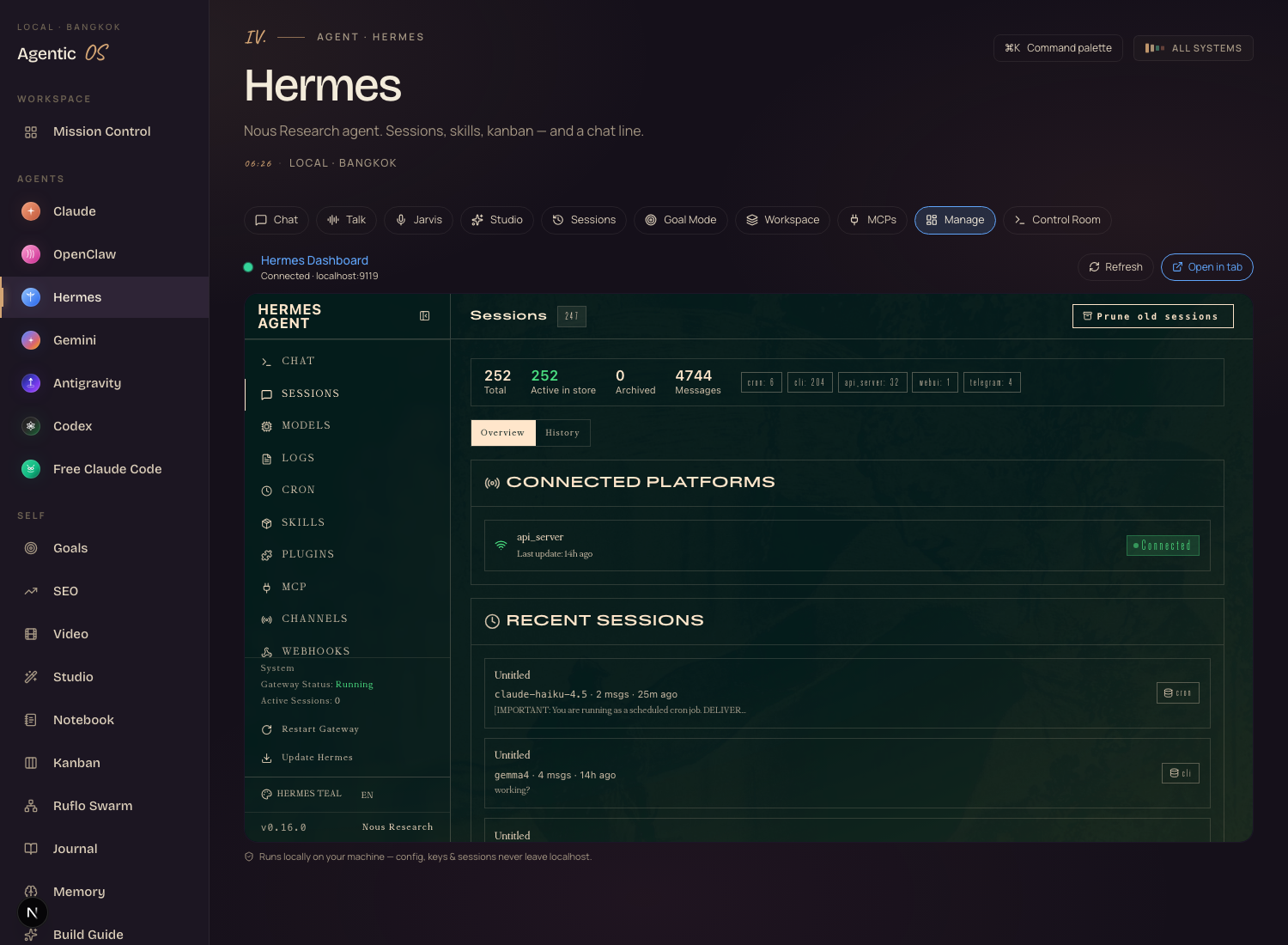
Then open Agent OS → Hermes → Manage. That's the dashboard tab where the new browser lives. (Real screenshot of mine, right now, below.)

The Hermes dashboard embedded inside Agent OS — Manage tab — showing 252 sessions, 4,744 messages, connected platforms

My live Hermes dashboard inside Agent OS — 252 sessions, 4,744 messages, the new browser is one click away in the Skills panel.

Thinking it?
"But I'm not technical — this is going to break my setup."

If you can paste hermes update and press Return, you can run this.

The update is non-destructive — your model, providers, profile and existing skills all carry across. Two minutes, no migration.

viii · what's new in this release

Six things changed. Here's each one — what was, what's now.

1 · Skill cards instead of a blank box

Before: a name and an Install button. No description. No preview.

Now: every skill is a card — name, official tick if it's trusted, description, tag list, Preview, Install. You see what it does before you click anything.

You're looking for a web search skill. You read "high-quality web search with source citations", see the trusted + official badges, and only then hit install. No more mystery skills landing in your profile.

2 · Six connected hubs on arrival

Before: one source — the bundled defaults.

Now: Hermes shows every hub it's wired to on arrival — Official, Hermes Index, skills.sh, GitHub, ClawHub, LobeHub, browse.sh. Proof it's actually connected.

You search "youtube" and get hits across all six hubs at once. Way more choice from one search.

3 · Read the actual SKILL.md before installing

Before: install, hope, uninstall if it sucked.

Now: hit Preview and the real SKILL.md shows up — name, description, usage instructions, tools it uses. You read the source before you install the source.

Skill says it touches your email. Open the preview, see exactly which IMAP commands it runs, decide if you're comfortable. Then install.

4 · Security scan visible on demand

Before: the scan ran on install. You never saw it.

Now: same scan, but visible — Safe / Caution / Blocked badges plus a count of Critical / High / Medium issues. Run it before installing, not after.

A community skill shows 1 High and 2 Medium issues. Click in, see they're shell commands you don't want, pass.

Why this matters: skills run on your machine with real tool access. Seeing the scan before installing is the difference between trusting blindly and trusting on purpose.

5 · Trust tiers, colour-coded

Before: no signal which skills were official vs random.

Now: three tiers — Trusted (green shield), Built-in (gold crown), Community (blue people). Colour-coded per result.

You search "github", see six results. Three green trusted, one gold built-in, two blue community. Start green, fall back to blue only if needed.

6 · Search feedback

Before: a list of results with no context.

Now: "20 results · 0.4s · index 50 · official 1" sits below the search box. You know how fast, how many, and how many came from each source.

You can tell at a glance whether you're seeing all the official skills or you need to broaden to community hubs.

Thinking it?
"I'll wait until the tools stabilise."

They won't. The agentic space ships breaking changes every week — that's exactly why you want to be living in it now, not catching up later.

Every release you learn, every new skill you wire in, compounds. The 0.16 browser already makes the next 50 skills 5× cheaper to install.

if you want this all wired up for you
Agent OS — Claude, OpenClaw, Hermes

Get the full Agent Operating System.

The new Skills Hub is brilliant on its own. The real unlock is when those skills run inside a system that already knows your business — your Obsidian vault, your goals, your kanban board, your voice. That's Agent OS. Claude, OpenClaw and Hermes wired into one dashboard with shared memory.

  • The full zip file — the whole Agent OS, ready to run
  • Every prompt and the Obsidian memory setup
  • Coaching calls every week where we set it up together
  • A 30-day roadmap to get your agents live
  • A room of 3,100 operators building right now
Join the AI Profit Boardroom → link in the description ↓
ix · skills worth grabbing first

The skills I'd install on day one.

Every name below is real — pulled from my own Hermes profile or one search away in the new browser. No invented packages. Open Manage → Skills, search the name, hit Preview, install.

obsidian
Reads and writes your Obsidian vault. The brain of the Agent OS memory loop.
When: day one if you use Obsidian.
github-pr-workflow
Opens PRs, reviews diffs, leaves comments — from chat or voice.
When: you push code.
github-code-review
Reads any PR and writes a structured code review. Pairs with above.
When: you review PRs.
youtube-content
YouTube research, transcript pulls, channel + video analysis.
When: you make videos.
spotify
Control Spotify, queue songs, search albums by voice.
When: you want a fun first demo.
himalaya
CLI-driven email triage — read, reply, archive, search your inbox.
When: you live in email.
agentmail
Gives the agent its own dedicated email inbox to operate from.
When: you want the agent to send/receive on its own address.
1password
Wires Hermes into 1Password CLI for safe secret use mid-task.
When: you want zero pasted credentials.
antigravity-cli
Operate Google's Antigravity CLI: plugins, MCP, full agent loop.
When: you use Antigravity for coding.
huggingface-hub
Search, download, evaluate models from Hugging Face — no browser tabs.
When: you test open models.
kanban-orchestrator
The orchestrator side of the kanban skill pair — assigns tasks to workers.
When: you run parallel agents.
kanban-worker
The worker side — picks tasks off the board and ships them.
When: pair with the orchestrator.
codebase-inspection
Reads a whole repo, summarises structure, finds the entry points.
When: you onboard onto code a lot.
webhook-subscriptions
Hermes listens for webhooks and turns each one into an agent run. Glue.
When: you wire Hermes to other tools.
architecture-diagram
Clean architecture diagrams from a plain-English description.
When: you ship docs.
adversarial-ux-test
Roleplay the hardest, tech-resistant user — for stress-testing flows.
When: you ship UX changes.
How to install any of them: Agent OS → Hermes → Manage → Skills. Search the name. Preview the source. Check the scan. Install. ~10 seconds each.
x · the three things holding you back

What's holding you back — and the truth.

"My setup is fine. I don't need to update."

Your old browser is now a worse version of itself. The new one gives you 796 skills, source preview, and security scan for the price of two minutes. Skipping it is choosing slower.

"I'll figure it out when something breaks."

By then you're patching at midnight while a client waits. The release notes name every fix. Reading them once now beats reverse-engineering a broken setup later.

"I don't trust community skills."

You don't have to. Read the SKILL.md, see the scan, check the trust tier. That's the whole point of this release — you only install what you've actually inspected.

158 pages of members who already broke through these exact beliefs.

Read the 158-page testimonials doc →
xi · the quiet fixes worth knowing about

What else 0.16 cleaned up — the background stuff.

Most release walkthroughs miss this part. The visible features are great, but the boring fixes are usually the ones that stop your setup falling over.

xii · should you update?

Short answer — yes, today.

Update path: hermes update. Two minutes. If you were on 0.15 the rest of your config carries across cleanly — model, providers, profile, skills.

The people who figure out AI agents now, while the tools are evolving fast, are going to be way ahead when everything settles. Every release you learn, every new skill you wire in, every workflow you build — it all compounds. The Skills Hub rehaul makes wiring those skills in five times faster than it was last week.

One small heads-up: if you launch the dashboard from a script with --tui, that flag is gone. Drop it before you update so the script doesn't break.
xiii · recap

What you just gained.

You stopped guessing. Skill cards show name, description, tags, scan and source before you click install.
You opened the catalogue. 796 skills across six hubs in one search box.
You read the source. Preview the actual SKILL.md before it lands on your machine.
You saw the scan. Safe / Caution / Blocked + critical / high / medium counts, on demand.
You picked by trust. Trusted, built-in, community — colour-coded per result.
You measured the search. Results, time, per-source counts under every query.

Read the skill. Run the scan. Then install.

Agent OS

Build your whole AI stack with me.

If you want your agents to actually save you time every day — not just be another tool you check sometimes — grab the Agent Operating System inside the AI Profit Boardroom.

One dashboard. Shared memory. Your business baked in. And every new release — like this Skills Hub rehaul — slots straight in. You just keep getting more powerful.

  • The full zip, every prompt, the memory setup
  • Weekly coaching calls — we build it together, step by step
  • Daily tutorials + a 30-day roadmap
  • A member map to find operators near you
Join the AI Profit Boardroom →

Real members. Real wins.

See all 258 wins (158 pages) →
Run hermes update first. Decide second. See you in the next one.
The Goldie Skill Vault™ · Hermes 0.16 + Agent OS · Built for operators · used in 38 countries