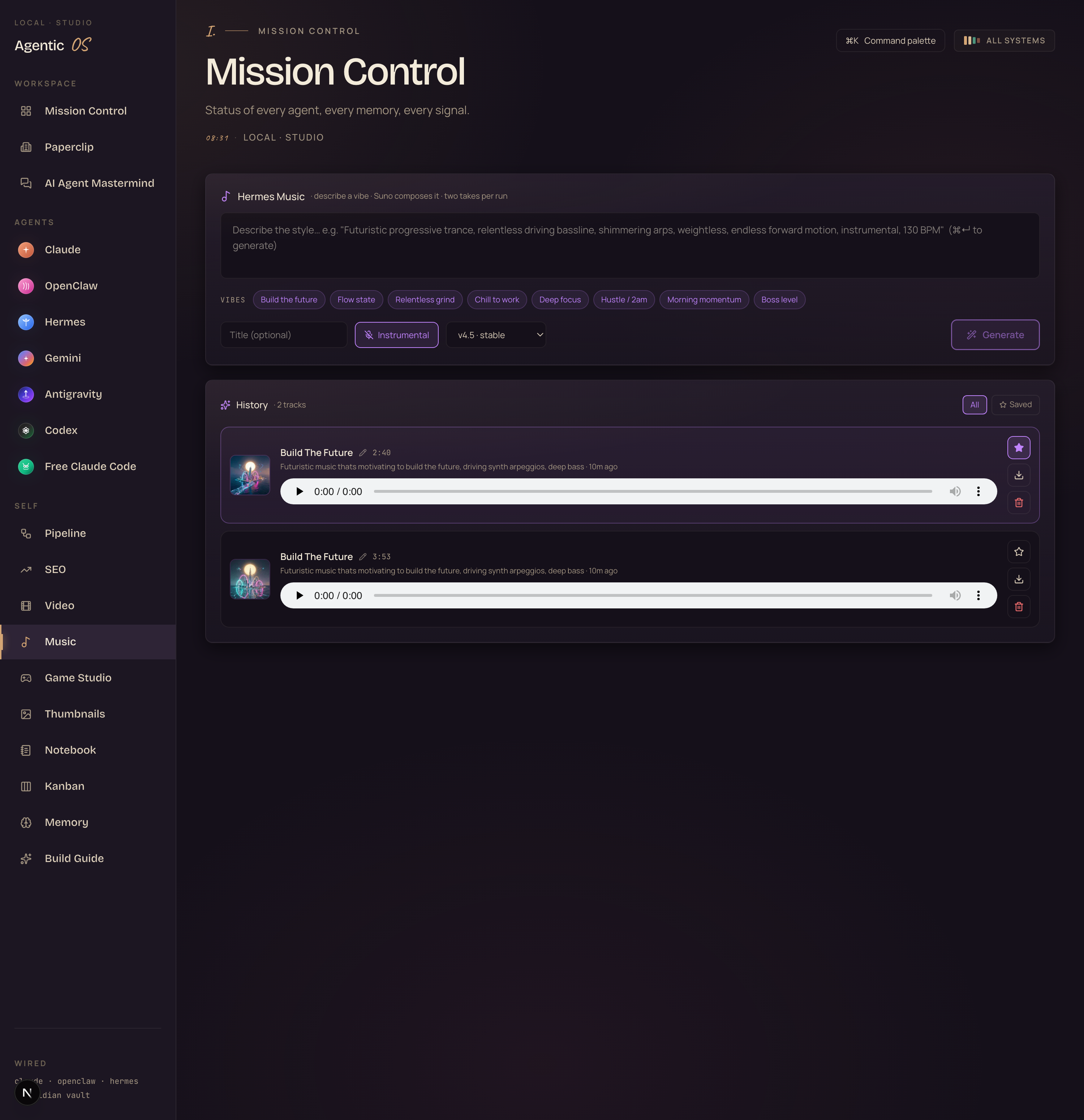
The Goldie Resonance Engine™ + Hermes Music.
My new music agent lives right next to the video one, inside my Agent OS. I type one line — the vibe I want — and it composes two finished tracks. I preview them. I save the ones I like. I play them on a loop while I build. No stock-music site. No monthly fee. In a second you can listen to the exact tracks it made for me from one sentence. Let's go.
One sentence in. Two finished tracks out. Press play.
I gave it one line: "Futuristic music that's motivating to build the future, driving synth arpeggios, deep bass, uplifting, 120 BPM, instrumental." Ninety seconds later it handed me these two. Real audio, made by the agent, playing right here on the page. Hit play.
 ▶ Real track · take 1
 ▶ Real track · take 2
That's the whole magic in one breath. I didn't open a music app. I didn't hum anything. I described a feeling and it built me music to match — two versions, so I could pick.
And it's not just for me typing prompts. There are one-tap vibe buttons baked in — the exact focus moods I work to. Click one, hit generate, get a fresh track. That's the part nobody's set up yet: your own music studio, on your own screen, making the exact soundtrack you build to.
I was you. Then I built the music agent.
Before
I wanted good focus music to work to. Just the right vibe to build the future.
So I paid for a stock-music sub. Then another. I'd lose ten minutes hunting for one track.
The lo-fi videos had ads. The library loops were generic. None of it was ever the exact feeling.
And half of it I couldn't even use in my own videos without a licence headache.
The breaking point — I just wanted "relentless, shimmering, 130 BPM, instrumental" and nothing on earth had it.
So I built a music agent into the Agent OS, right next to the video one.
After
Now I type the exact vibe and it composes it. Two takes, in about ninety seconds.
I preview them, save the keepers, and they live in my history forever.
I press play and build to my own soundtrack — made for that exact mood.
No stock site. No monthly fee. No licence worry. It's mine.
You can have this too. Same agent. Same screen.
Commit to transitioning today. Not tomorrow.
You just heard two real tracks built from one sentence. That's the bar now.
The next few minutes show you exactly how it works — describe, generate, save, play.
So here's the deal.
Promise yourself one thing right now. You're going to finish this guide AND make your own first track before you sleep tonight. Just one. Because the moment you stop renting other people's music and start composing your own, the whole way you work changes — and so does what else you realise your AI can build for you.
The people sitting still are getting passed. The people building today are the ones who look back in six months and say "that was the moment."
Be one of those people.
Commit to the transition. Commit to taking action today. This changes how you work.
The Goldie Resonance Engine™
Here's the idea. You don't write notes. You name a feeling — and the engine turns it into sound that matches. Like striking a tuning fork and getting the whole song back. Four parts make it work.
You describe a feeling, not notes.
Type the mood — "relentless, shimmering, 130 BPM, instrumental" — or tap a one-click vibe. You never need to know music theory. You just need to know how you want to feel while you work.
It composes two finished tracks.
About ninety seconds later you get two full versions of your vibe — real, mixed, downloadable music. Two so you can pick the one that hits. The tracks up top came off this step.
Every track is saved, starred, and yours.
Preview it, name it, star the keepers. Your whole history sits in one place, on your machine. Nothing expires. Nothing gets lost. Build a library of your own focus music over time.
Your own soundtrack, on tap.
Press play and build to music made for that exact mood — deep focus, hustle, boss level. No stock site, no monthly fee, no licence worry. It's the soundtrack to the work, made by you.
Name the feeling. The engine gives you the song. — The Goldie Resonance Engine™
The old way of getting music doesn't fit you.
Here's how most people get work music today versus how it works once your AI composes it.
Renting other people's loops.
- Open YouTube or a stock-music site, scroll through endless playlists.
- Pay a monthly sub for a library you only half-use.
- Sit through ads, or settle for a track that's "close enough."
- Never quite get the exact feeling you wanted to work to.
- Worry whether you can even use it in your own video legally.
- Do the whole hunt again tomorrow.
Composing your own.
- Type the exact vibe — or tap a one-click mood — and hit generate.
- Get two finished, mixed tracks in about ninety seconds.
- Instrumental for deep work, or with vocals — your call.
- Preview, star the keeper, build a library that's all yours.
- Made for you, by you — no licence headache.
- Need a new mood tomorrow? Describe it. Done.
Same goal — music to build to. The difference is whether you're hunting through someone else's catalogue for "close enough," or naming the exact feeling and having it composed for you. One of those is actually yours.
You don't need a single music word. The two tracks up top came from "futuristic, motivating, build the future, 120 BPM, instrumental."
You describe a feeling, not a melody. And if you're stuck, you tap a one-click vibe and it fills it in for you.
Step one — describe the feeling.
This is the whole front door. One box. You type the mood you want to work to, the way you'd describe it to a friend. Or you tap one of the vibe buttons and it fills the box for you.

There's an instrumental switch — leave it on for work music with no words, or flip it off and it'll write its own vocals from your vibe. That's it. No timeline, no knobs, no theory.
Here's the trick I keep using that makes the tracks land every time.
- Pair one gritty word with one weightless word — "grinding" + "shimmering". That contrast keeps it motivating without getting heavy.
- Add "instrumental" if it's for working — no words to distract you.
- Give it a BPM — 100–110 for deep focus, 120–130 for energy.
- Drop a scene reference — "Blade Runner", "building a city on Mars". It nails the feel fast.
- End with an emotion — "relentless", "optimistic", "triumphant".
So a great one reads like: "Futuristic progressive trance, relentless driving bassline, shimmering arps, weightless, endless forward motion, instrumental, 130 BPM." Gritty plus weightless. A number. A feeling. Every time.
It always makes two takes, so you've got two shots from one prompt — pick the better one.
And it costs you nothing but a click to run it again with one word changed. Swap "driving" for "soft" and the whole feel shifts.
Step two — hit generate, get two.
You press one button. The agent sends your vibe off to compose and shows you a little "composing…" timer while it works. About a minute or two later, two finished tracks drop into your history.
Why two? Because the same sentence can go two ways. One take might be the energetic version, the other calmer. You listen to both and keep the one that fits the work in front of you. It's like getting a choice without asking for it.
You can also pick the engine — newest model for the best quality, or a lighter one for speed — and give the track a title. Tiny choices. The default just works.
Press play on the two tracks at the top of this page. That's the real, unedited output from one sentence.
That's the whole point of showing them first — you don't have to take my word for it. You can already hear it.
Want the music agent, set up with you?

The music agent, the video one, the whole crew — one operating system.
The music studio you just heard doesn't live alone. It sits inside the Agent OS — right next to the video agent, the thumbnail studio, the game builder, and every AI agent — all on one dashboard, sharing one memory.
That's exactly what we set up together inside the AI Profit Boardroom. You get the full zip and we wire it up step by step, so your agents already know your business and build real things for you — music included.
- The full Agent OS zip file — the music studio, the video agent, every panel in this guide, ready to run.
- Every prompt and config — including the vibe prompts behind the tracks you just heard.
- A 30-day roadmap — install it, wire your memory, make your first track and video.
- Coaching calls every week where I set this up live with you.
- Daily tutorials + a prompt library built around the OS.
- 3,500+ business owners already running this stack. A member map to find operators near you.
- 158 pages of real testimonials — read what members are getting first.
Step three — preview, save, and play.
Every track you make lands in one place — your history. Cover art, a player, the vibe you typed, when you made it. You can listen to any of them right there.
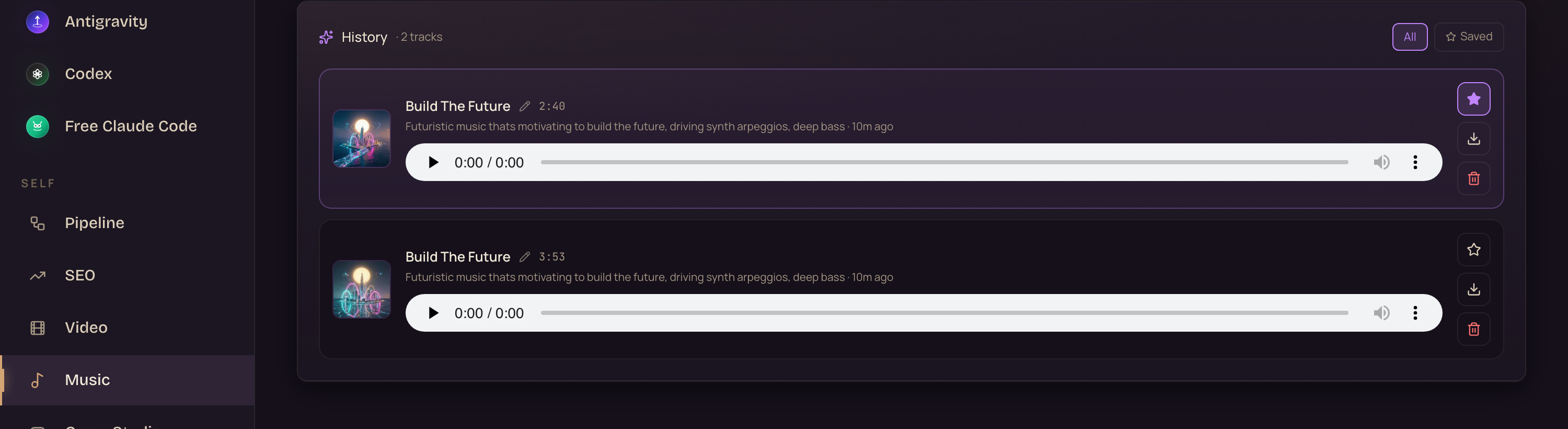
Hit play to preview. Tap the star to save a favourite — then flip to the "Saved" view to see just your best ones. Rename it so you remember what it's for. Download it to drop into a video. Or bin the ones that missed.
Over a few weeks this becomes your own library of focus music — every track made for a mood you actually work in. "Deep focus." "Boss level." "Morning momentum." All yours, all on one screen, all on tap.
It saves to your own machine the moment it's made. Nothing expires. Nothing lives on someone else's site.
Your history is yours forever — play it, download it, build a whole library of your own soundtracks.
The three beliefs holding you back right now.
If you've read this far and still haven't made a track, three beliefs are in the way. Let me handle each one.
I'm not musical. I'd have no idea what to make.
You don't make the music — you describe a feeling and it makes the music. The tracks up top came from a sentence with zero music words in it. If you can say how you want to feel while you work, you can make a soundtrack for it. The vibe buttons even write the prompt for you.
There are already AI music sites. Why do I need this?
Because this one lives inside your operating system, next to your video agent and your whole crew — on your machine, in your history, sharing one memory. It's not another tab and another login. It's one more thing your own AI does for you, on tap, with everything else.
I'll set this kind of thing up later, when I have time.
Later is how the gap widens. The people building their own tools now, while it's this easy, are miles ahead when everyone catches up. You just heard music made from one sentence. Every small system you set up today compounds. Waiting only costs you the head start.
158 pages of members who already broke through these exact beliefs. Real businesses, real wins, documented.
Read the 158-page testimonials doc →Everything you just gained, in one glance.
You describe a feeling
Type the mood or tap a vibe — no music theory, ever.
It composes two takes
Two finished, mixed tracks from one sentence, in about 90 seconds.
You preview and save
Play any track, star the keepers, build your own library.
It's yours, on your machine
Saved forever, downloadable, no monthly fee, no licence worry.
It uses the vibe formula
Gritty + weightless word, a BPM, a scene, a feeling — it lands every time.
It lives in your OS
Right next to the video agent and the whole crew, one dashboard.
You build to your own sound
Deep focus, hustle, boss level — your soundtrack, on tap.
Or take the shortcut
The full OS, every prompt, and a 30-day roadmap inside the Boardroom.
Most people scroll for "close enough" music. With the Resonance Engine, you name the feeling and it composes it.
Name the feeling. Get the song.
The Goldie Resonance Engine™ · Hermes Music
Scroll for music. Or compose your own.
You've now heard what the music agent makes — two finished tracks from one sentence — and walked through every step: describe, generate, save, play.
You can build all of it yourself. The pieces are out there. It just takes time and a lot of broken builds to wire it together.
Or take the shortcut.
The music agent — and the whole OS — set up with you, step by step.
Grab the Agent OS inside the AI Profit Boardroom. It turns Claude, OpenClaw, Hermes, and the rest into one system with shared memory and one dashboard — including the music studio you just heard, right next to the video agent.
Your agents understand your business. They build real things — videos, thumbnails, games, and now music. And every new feature I add to the OS makes your whole system more powerful automatically.
- The full Agent OS zip file — the music agent and every panel in this guide, ready to run.
- Every prompt + the Obsidian memory setup — including the vibe prompts behind these tracks.
- A 30-day roadmap for installing and running the whole system.
- Coaching calls every week — we set it up live, together.
- Daily tutorials + a prompt library built around the OS.
- 3,500+ members building with this right now. A member map to find operators near you.
- 158 pages of real testimonials — see the wins before you decide.
Stop scrolling for music. Start composing it. I'll see you in the next one.
Built for operators · used in 38 countries








