The Goldie Self-Driving Board™ + Hermes.
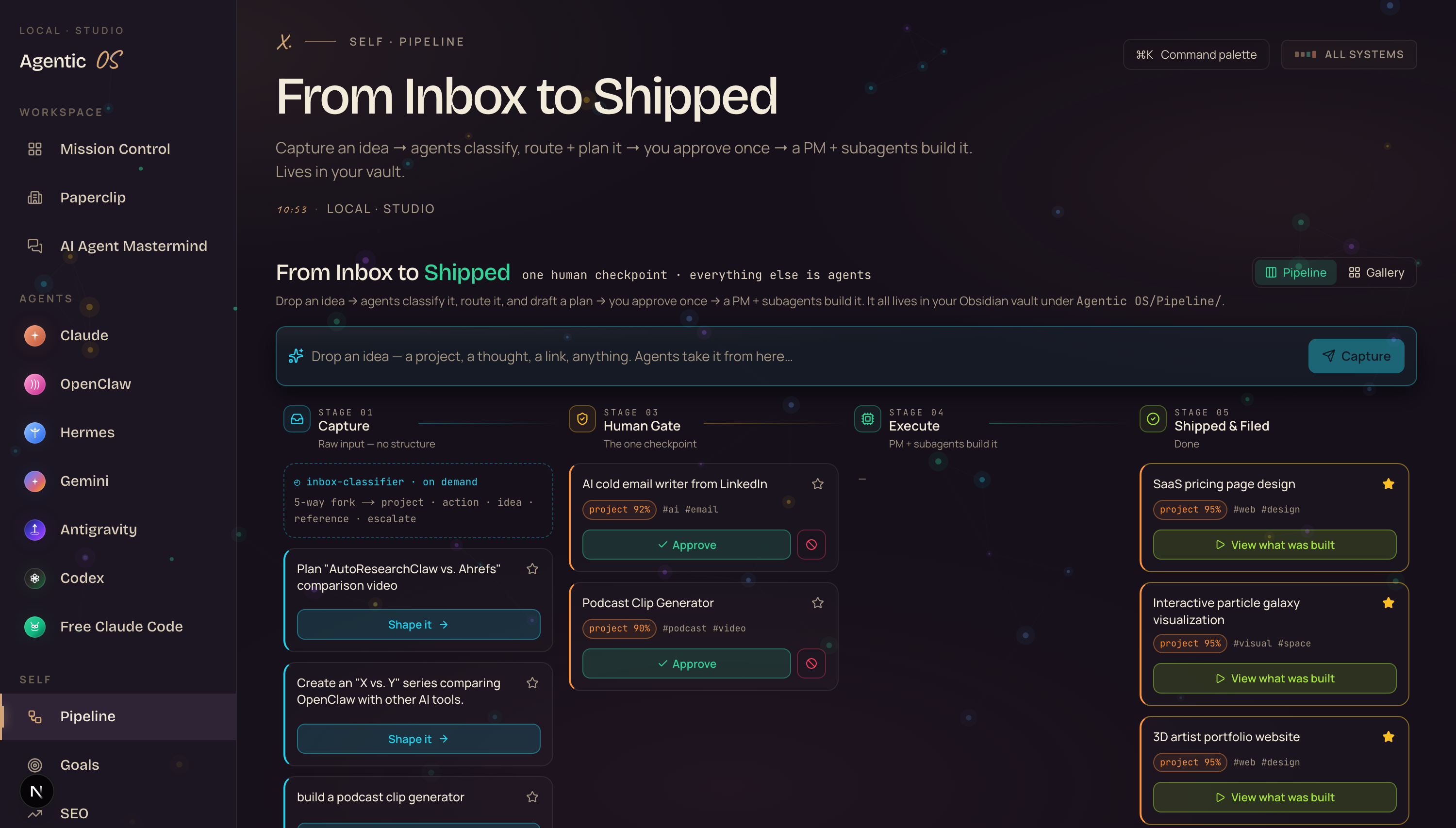
The new Hermes Kanban update changes what a board even is. The old Kanban was a to-do list you still had to do yourself — drag cards, write tickets, do the work. The new one runs itself. You drop an idea. Agents classify it, route it, and plan it. You approve once. Then a project manager and a team of subagents actually build the thing — and it ships into a gallery you can preview live.
I was you. Then I gave the board to the agents.
Before
I had a Kanban with a hundred cards on it.
Every idea I had, I wrote it on a card.
Then I dragged the card across the board myself.
Then I still had to do the actual work on every single one.
The board didn't help me. It just reminded me how much I hadn't done.
Then I turned my project manager agent into the board itself.
After
Now I drop an idea in one box and walk away.
My agents read it, decide what it is, and write the plan.
I look at it once, tap approve, and go make coffee.
By the time I'm back, the thing is built — and I can click it and watch it run.
You can have this too. Same board. Same agents. Same path.
Commit to transitioning today. Not tomorrow.
You just saw the board. Real ideas in. Real builds out.
The next ten minutes show exactly how it works, step by step.
So here's the deal.
Promise yourself one thing right now. You're going to finish this guide and capture one real idea into a board like this before you sleep tonight. Just one. Because the moment you stop dragging cards and start approving builds, the whole way you work changes.
The people sitting still are still managing to-do lists. The people who make this transition today are the ones who, in six months, will be running a business that builds itself while they think.
Be one of those people.
Commit to the transition. Commit to taking action today. This changes everything about how you ship.
A Kanban used to be a list of things you still had to do.
Now it's a list of things the agents already did. Here's the exact contrast.
- You create the card and write the ticket yourself
- You guess which column it belongs in
- You drag it from To-Do to Doing to Done by hand
- You still do 100% of the actual work
- You mark it done and feel busy, not finished
- The board is a guilt list — it tracks work, it never does it
- You drop a raw idea — no ticket, no structure
- Agents read it and decide what it is
- Agents write the plan and move the card for you
- A PM + subagents build the real deliverable
- It ships into a gallery you preview live
- The board does the work — you just say yes or no
It runs on a flat coding plan, not pay-per-token. The build brain costs $0 extra on top of the plan you already have.
No surprise bill at the end of the month. You can run it all day.
The Goldie Self-Driving Board™.
Five floors. An idea rides the elevator from the top to the bottom — and you only step in once.
Capture
Drop any raw idea into one box — a project, a thought, a link. No ticket. No structure. You GET to be messy; the agents clean it up.
Classify
The project-manager brain reads the idea, decides what it is, and routes it. You GET a sorted board without sorting anything.
Gate
The one human checkpoint. You approve or reject the plan. You GET full control over what gets built — in one tap.
Execute
A PM agent spins up subagents and they build the real thing. You GET a finished deliverable, not a card that says "Doing".
Gallery
Every build lands in a grid you can preview live. You GET to click any one and watch it actually run.
Drop the idea. Walk away.
Let me start here, because this is the part that feels weird at first.
On a normal board, capturing an idea is work. You open a card. You write a title. You write a description. You pick a label. You drag it to a column.
On the Self-Driving Board, you type one line into the capture bar and hit enter. That's it. "A cold email writer that personalises from a LinkedIn profile." Done. You don't tell it what kind of thing that is. You don't plan it. You don't file it.
The agents take it from there. Your job was to have the idea. Their job is everything after.
If you can type a sentence and press enter, you can run this. That's the whole capture step.
Members who'd never touched a Kanban are dropping ideas into it on day one.
The project manager reads your mind for you.
Next big one. This is the brain.
The second you capture an idea, a project-manager agent picks it up. It reads what you wrote. It decides what it actually is — a project to build, a quick action, an idea to park, or a reference to save. Then it writes a proper plan: what it is, the approach, the first milestones, and which subagents should build it.
On the old board, that's the part you did in your head at 11pm. Now it's done in about twenty seconds, and the card moves itself into the right column.
Picture it like this. You say "a habit tracker app." The PM comes back with a real plan — the stack, the screens, the features, the build order. You didn't write a word of it.
The members who get the most out of this are the ones who stopped trying to plan everything themselves and let the PM do the first draft.
— the pattern across the BoardroomThe one button that keeps you in charge.
Here's the part that makes this safe to actually use.
Everything is agents — except one step. Before anything gets built, the plan stops at the Human Gate and waits for you. You read it. You tap Approve or Reject. That's the only decision you have to make.
This is the difference between an agent that goes rogue and an agent you trust. Nothing ships without your yes. But you're not doing the work — you're just steering it.
One tap. The card slides into Execute and the build starts. Reject it, and it's gone. You're the editor, not the worker.
Same — that's exactly why there's one gate. The agents do everything, but nothing gets built until you approve the plan.
You get the speed of full automation with the safety of a human yes.
A card that says "Done" vs a thing you can actually click.
This is the floor that breaks people's brains.
On a normal board, "Done" means you finished the work. On this board, "Done" means the agents finished it. The moment you approve, a project-manager agent spins up the right subagents — and they build the real deliverable. Not a description of it. The actual working thing.
Drop "a habit tracker app" and you don't get a card that says habit tracker. You get Pulse — a real dashboard with streaks, a completion chart, and habits you can tick off. Built. Working. Yours.
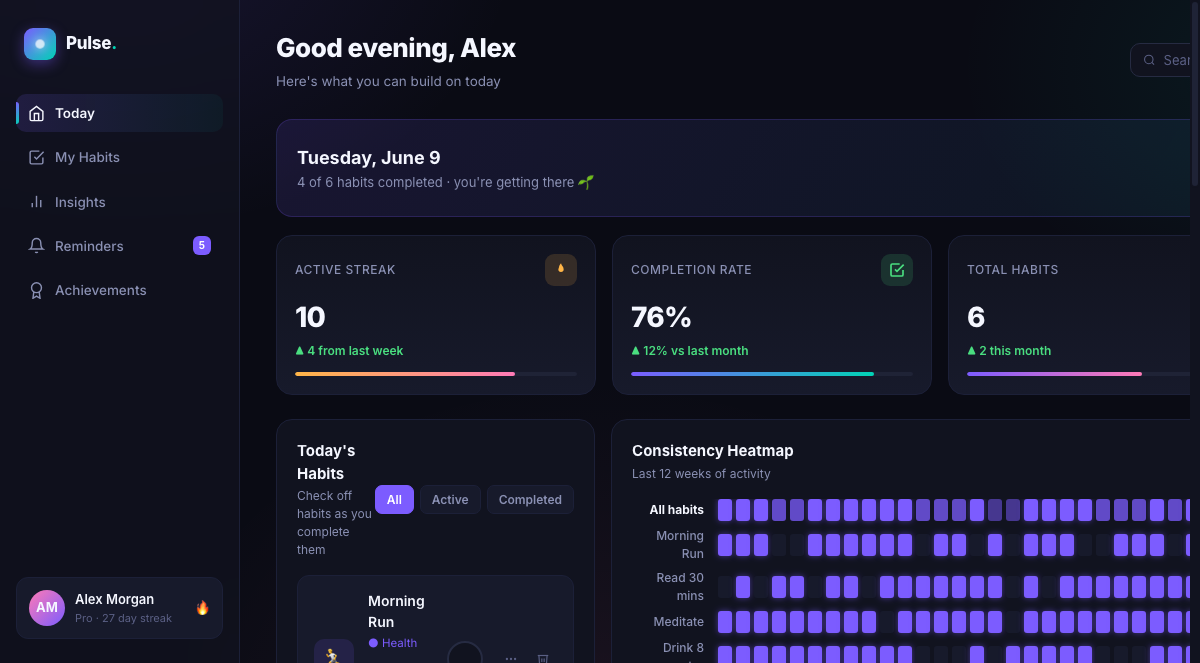
And it checks its own work. Every build gets loaded and tested — it clicks its own buttons, checks nothing's blank, and fixes its own mistakes before it ever reaches you. So the thing in the gallery isn't a half-built mockup. It runs.
That used to be true. Now the board load-tests every build, catches dead buttons and empty screens, and patches them itself before you see it.
You get something that works on the first look — not a project you have to debug.
See everything you've shipped — and preview it live.
Last floor. This is the payoff.
Every build the board ships lands in a Gallery tab — a clean grid of everything you've made. Tap any tile and the real build loads right there, live. A pricing page. A galaxy with 25,000 stars. A 3D portfolio. You're not looking at a screenshot. You're looking at the running thing.
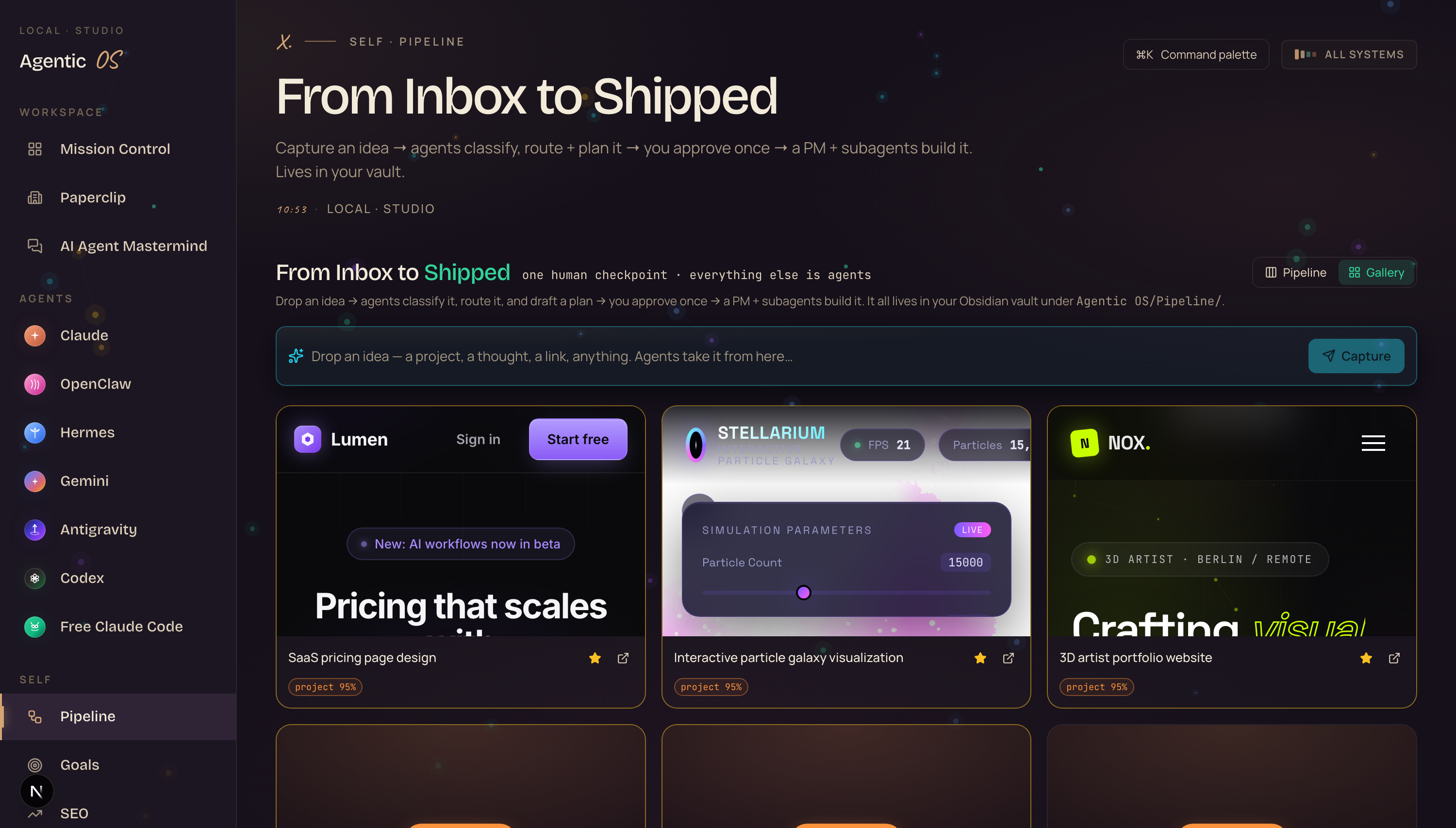
And it stays fast. The previews only load when you click, so opening the board never lags — even with a hundred builds in there. Star your best work and it floats to the top, ready to show off.
This is the part members screenshot and send me — "I can finally see everything my agents built in one place, and click any of it."
— the most-shared momentGet the Agent Operating System inside the AI Profit Boardroom.
If you want the Self-Driving Board — the capture bar, the project-manager brain, the human gate, the self-checking builds, the live gallery — it's all inside the Agent OS I built.
It connects OpenClaw, Claude, and Hermes into one dashboard. Your agents share one memory. They know your goals. They know your business. So when you drop an idea, the board already has full context on what you're building and why.
- The full Agent OS zip file — the board, the pipeline, the gallery
- Every prompt and the Obsidian memory setup so your agents know your business
- Coaching calls every week where we set it up together step by step
- A 30-day roadmap for going from idea to shipped build
- Daily tutorials + a member map to connect with other builders
2,200+ business owners in there right now, building with agents instead of dragging cards. Someone's online 24/7.
Get the Agent OS → Inside the AI Profit Boardroom · aiprofitboardroom.comlink in the description ↓
The quiet upgrades that make it actually trustworthy.
A few things changed under the hood that you won't see, but you'll feel.
It runs on a flat coding plan. The project-manager brain and the builds both run on one plan — no per-token charge stacking up. $0 extra to run all day.
It checks its own builds. Every deliverable gets loaded, clicked, and inspected for dead buttons, blank screens, and errors — then fixed automatically before it reaches you.
It never overwrites a good build with a broken one. If a fix comes back worse, it rolls back to the last working version. Your good work is safe.
It all lives in your Obsidian vault. Every idea, plan, and build is a real file under Agentic OS/Pipeline. You own it. It's not locked in someone's cloud.
So — should you switch from a normal Kanban? If your board is a guilt list you keep avoiding, yes. The people who figure out agent-run workflows now, while the tools are moving this fast, are going to be miles ahead when everything settles. Every idea you capture, every build you ship, every workflow you wire up — it all compounds.
158 pages of members who already made this shift — real businesses, real builds, real wins.
Read the 158-page testimonials doc →What you just got.
Drop one line. The agents turn it into a real plan.
The PM brain reads every idea and routes it for you.
Approve once — a PM and subagents build the real thing.
The board tests and fixes its own work before you see it.
Every one sits in a live gallery you can click and preview.
Flat coding plan. $0 extra. It all lives in your vault.
A Kanban tracks the work.
The Self-Driving Board does it for you.
Make your board build for you, every day.
If you want a board that actually ships work instead of just tracking it, grab the Agent Operating System inside the AI Profit Boardroom.
It turns OpenClaw, Claude, and Hermes into one system with shared memory, shared context, and one dashboard you control. Your agents understand your business. They remember everything. And every new update — like this Self-Driving Board — makes the whole system more powerful automatically.
- I built it in one session — you get the zip file and every prompt
- The Obsidian memory setup so your agents know your business cold
- Coaching calls where we wire it up together, step by step
- 2,200+ members, daily tutorials, a 30-day roadmap, a member map
Read 158 pages of member wins →
Capture one idea today. Approve it. Watch it build. I'll see you in the next one.








