Meet Hermes Jarvis.
It's a talking AI butler that lives on my Mac. I tap the glowing core and just talk. It briefs me on my whole day from my notes. It builds little apps when I ask. It opens things, remembers things, and pulls my life up on a screen. Iron Man had Jarvis. Now I do too.
It's already running on this Mac. Click straight into it:
One core. Six powers.
Here's the whole thing on one map. Tap the glowing core in the middle and any of these six things happen — just by talking, or by clicking a button.
See it for real — click any shot to open it
These aren't mock-ups. Every one is a real screenshot of Jarvis running on my Mac. Click any card and it opens the live thing.
I was you. Then I built a butler.
Before
Every morning started in a fog.
I'd open my notes and not know what mattered.
I had a thousand little ideas saved and forgot most of them.
I kept asking my AI the same stuff over and over because it forgot my world every time.
And I had to type everything. No hands free. No quick answer while making coffee.
Then I gave my Mac a voice.
After
Now I tap one glowing core and say "brief me."
It reads my notes and tells me what to focus on today — out loud.
I say "build me a little app" and it builds it while I watch.
It remembers what I tell it and pulls my stuff up on screen when I ask.
You can have this too. Same core. Same path.
Real people. Real wins. Inside the Boardroom right now.
Here's what's happening for the operators already building this stack — agency owners, ecom founders, creators, solo builders. Different businesses. Same lift.

Commit to building this today. Not someday.
You've seen the map. Six powers. One core.
The next few minutes show exactly how each one works.
So here's the deal.
Promise yourself one thing right now. You'll finish this guide AND set up one piece of it before you sleep tonight. Just one. Because the moment your computer can talk back and brief you, your whole morning changes.
The people sitting still are getting passed. The people building today are the ones who look back in six months and say "that was the moment."
Be one of those people.
Commit to the transition. Take action today. This changes how you work.
The six powers of Hermes Jarvis.
Six simple layers. Each one is a thing your butler does for you. Stack them and you've got a real right-hand that runs on your own machine.
The Talk
You stop typing. Tap the core (or say "Jarvis") and just speak. It talks back in a real voice. Hands free while you make coffee.
The Brief ★ the new one
You stop guessing what to do. It reads your notes and tells you what matters today — and what happened this week.
The Build
You stop hunting for tools. Say "build me a snake game" and it builds a real, working app on your Mac and shows it running.
The Wall
You stop digging through folders. Say "show me my builds" and it paints them onto a glowing screen. Go full-screen for the whole wall.
The Memory
You stop repeating yourself. Say "remember that…" and it saves it to your notes. Ask later and it pulls it right back.
The Hands
You stop clicking around. Say "open YouTube" and it opens. Ask for a bigger job and it switches to full agent mode and does it.
Your morning, before and after.
Same notes. Same to-dos. Totally different start to the day.
- Open your notes app and scroll
- Try to remember what you decided yesterday
- Dig for your open to-dos across 5 files
- Re-explain your whole world to the AI again
- Check the news in another tab
- Still not sure what to do first
- Tap the core. Say "brief me."
- It reads your day to you out loud
- Your open to-dos, pulled into one list
- It already knows your world — no re-explaining
- Top AI headlines, built in
- It tells you the top 3 things to focus on
I built it this week and I run it every morning.
The brief you'll see below is pulled live from my real notes — open tasks, ideas, the lot. It's the first thing I open.
Tap the core. Talk. That's it.
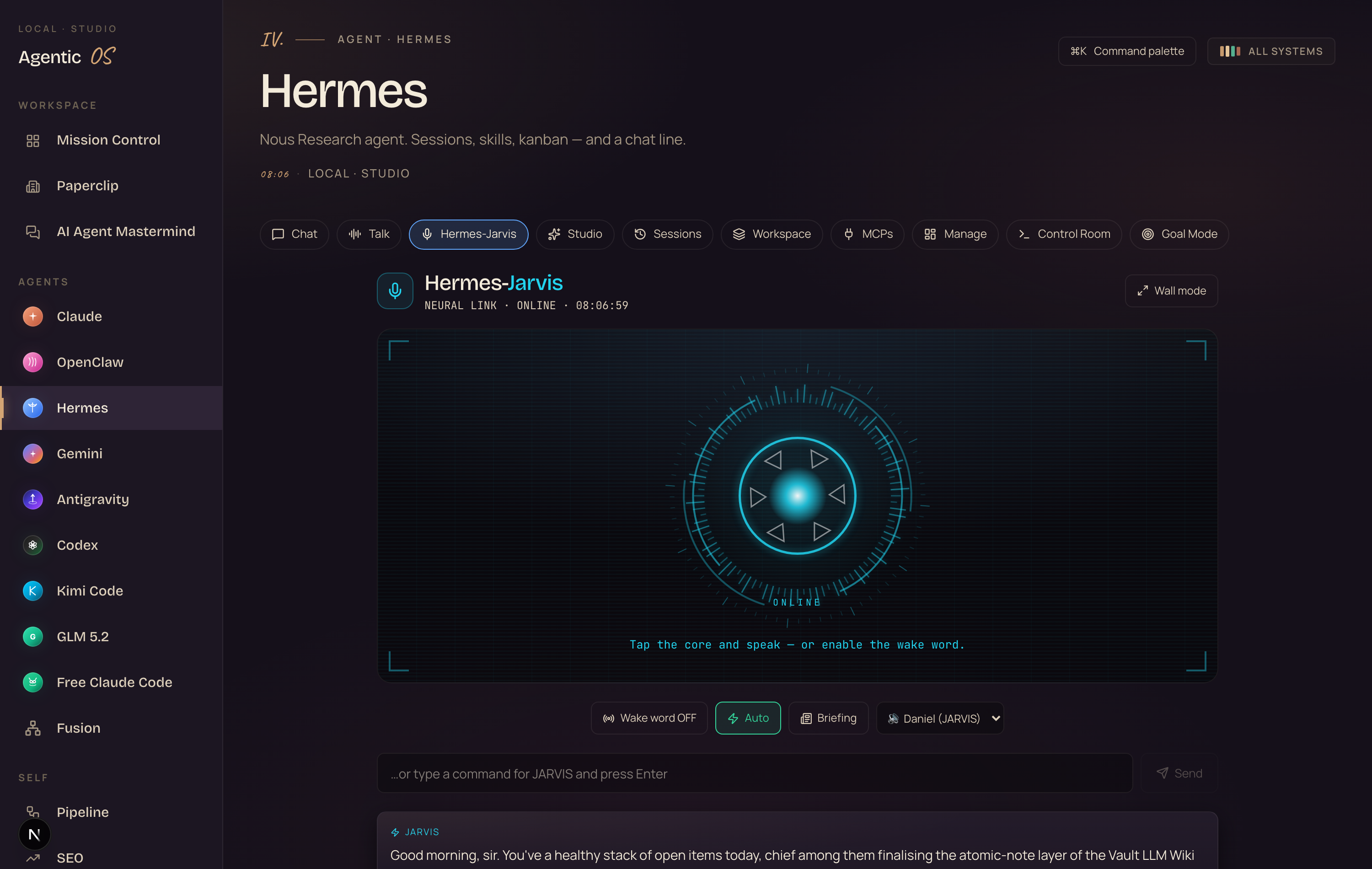
There's a glowing arc reactor in the middle of the screen.
Tap it and start talking. It listens, thinks, and answers out loud in a real voice.
Don't want to tap? Turn on the wake word and just say "Jarvis" from across the room — hands free.
You also get two simple modes. Auto for fast answers and quick jobs. Agent when you want it to roll up its sleeves and do real work on your Mac.
 1
2
3
4
5
6
7
⤢ click to open
1
2
3
4
5
6
7
⤢ click to open
- 1The tabs — Chat, Talk, Studio… "Hermes-Jarvis" is the voice one you're on.
- 2The arc reactor — tap it and talk; it answers out loud.
- 3Wake word — flip it on to say "Jarvis" hands-free.
- 4Auto / Agent — fast answers, or full agent for real work.
- 5Briefing — your daily & weekly brief, one tap.
- 6Voice — pick who reads it back to you.
- 7Type instead — a command box; press Enter.
There's nothing to learn. You tap a circle and talk like you'd talk to a person.
If you can ask Siri the weather, you can run this.
"Brief me." Your whole day, read out loud.
This is the new one. The one I'm most excited about.
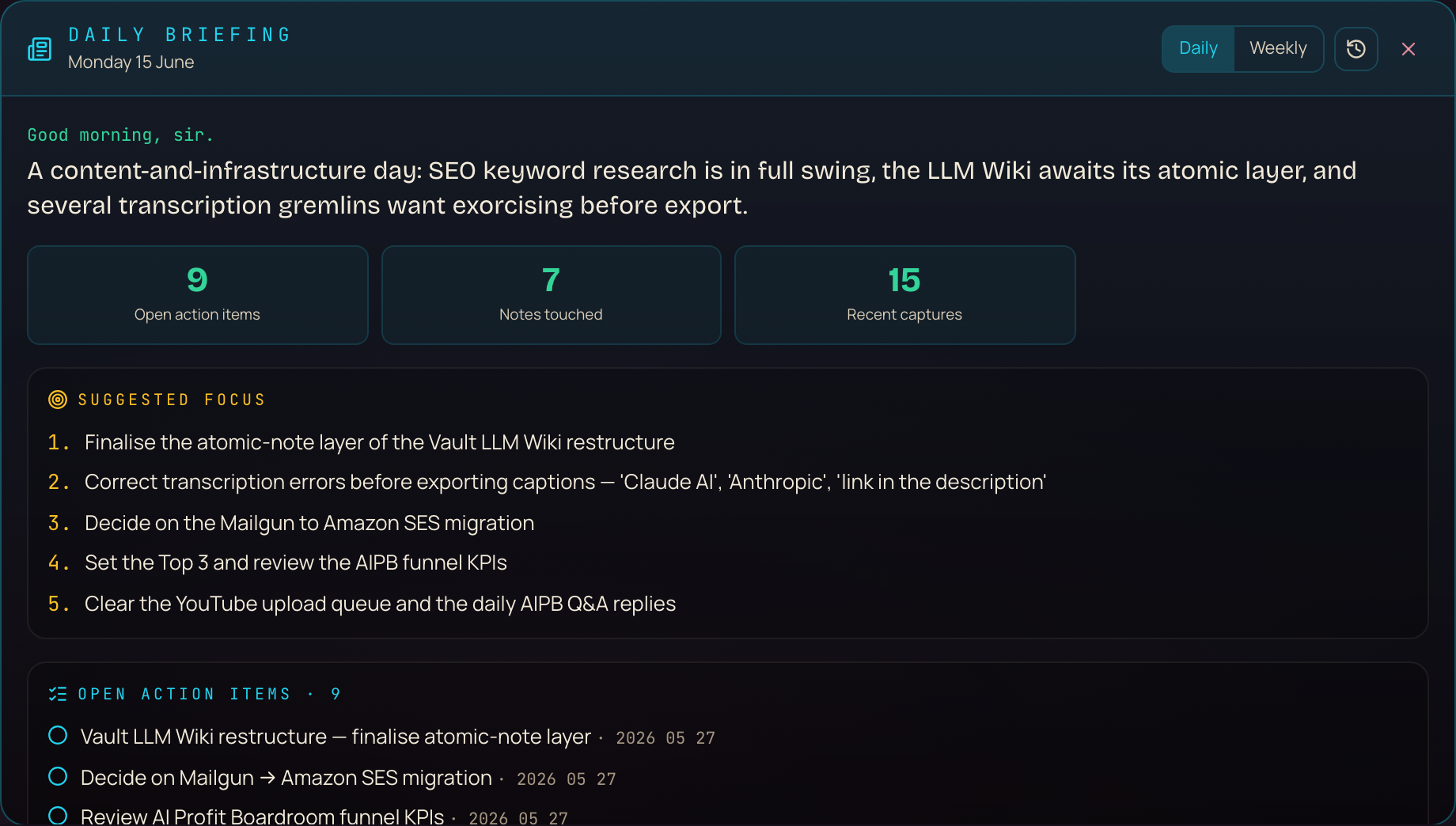
Say "brief me" — or tap the Briefing button — and it reads your own notes and tells you what's going on.
Not money talk. Not a finance report. Just: what you've been working on, what's on your mind, what to focus on, and a few news headlines.
 1
2
3
4
5
6
⤢ click to open
1
2
3
4
5
6
⤢ click to open
- 1Daily / Weekly — flip the range; weekly adds wins + an activity chart.
- 2History — the clock opens every past brief.
- 3The headline — your day in one line, read out loud.
- 4Stat tiles — open items, notes, captures at a glance.
- 5Suggested focus — the top things to do, in order.
- 6Open action items — your real to-dos; click one to open it in Obsidian.
How the brief gets made — under the hood
It's not making things up. Every word starts from your real notes. Here's the path:
And it's not just today. Switch to Weekly and you get the bigger picture — what you finished, a little activity chart, and the themes of your week.
No. Every task, theme and capture comes straight from your real notes.
The AI only adds the voice on top — and it's told to never invent a task or a number.
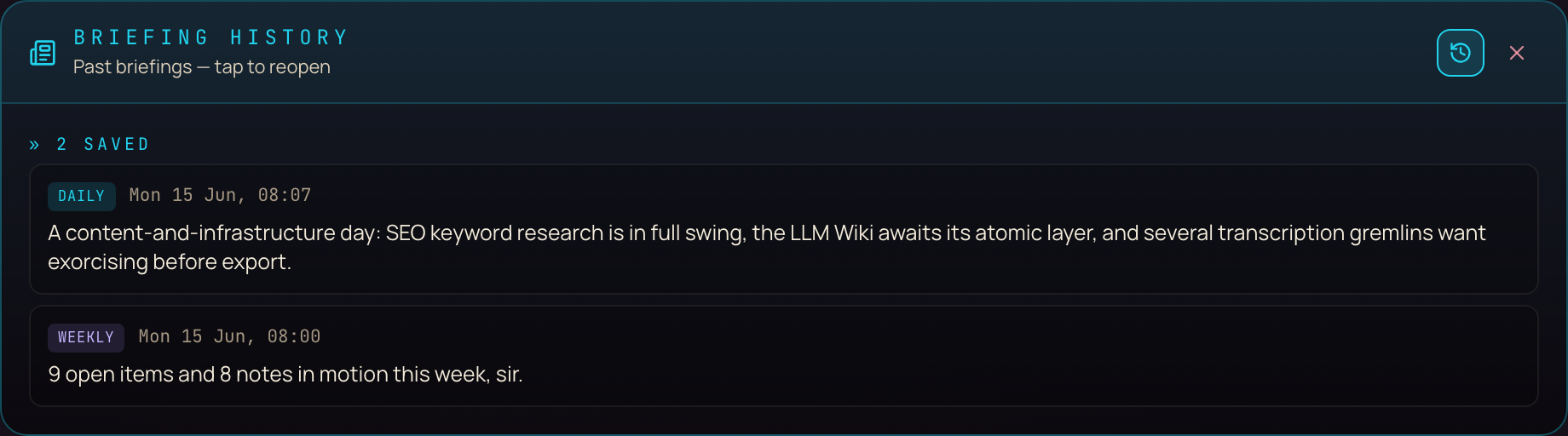
Pull up old briefings any time.
Every brief you make gets saved.
Tap the little clock and you see them all — daily and weekly — newest first, with the date and the headline.
Click any one to open the whole thing again, exactly as it was. Great for "wait, what was I focused on last Tuesday?"
It keeps one clean copy per day, so the list never turns into a mess.
 1
2
3
⤢ click to open
1
2
3
⤢ click to open
- 1Briefing history — opens from the little clock icon.
- 2Each saved brief — date, time, and headline; tap to reopen it whole.
- 3Daily & weekly tags — one clean copy per day, so it never clutters.
Nope. It saves one tidy entry per day per type.
Run today's brief twice and it just updates today's — it never doubles up.
Want the butler, not just the tour?
If you want Jarvis, the briefing, and the rest — built and wired for you — that's the Agent Operating System inside the AI Profit Boardroom.
It connects OpenClaw, Claude, and Hermes into one dashboard. Your agents share one memory. They know your goals. They know your business. So when you say "brief me," it already has your whole world.
"Build me a game." Then watch it appear.
Say "build me a snake game" or "make me a galaxy I can spin."
Jarvis builds a real, working app right on your Mac — then shows it running, live, inside the screen.
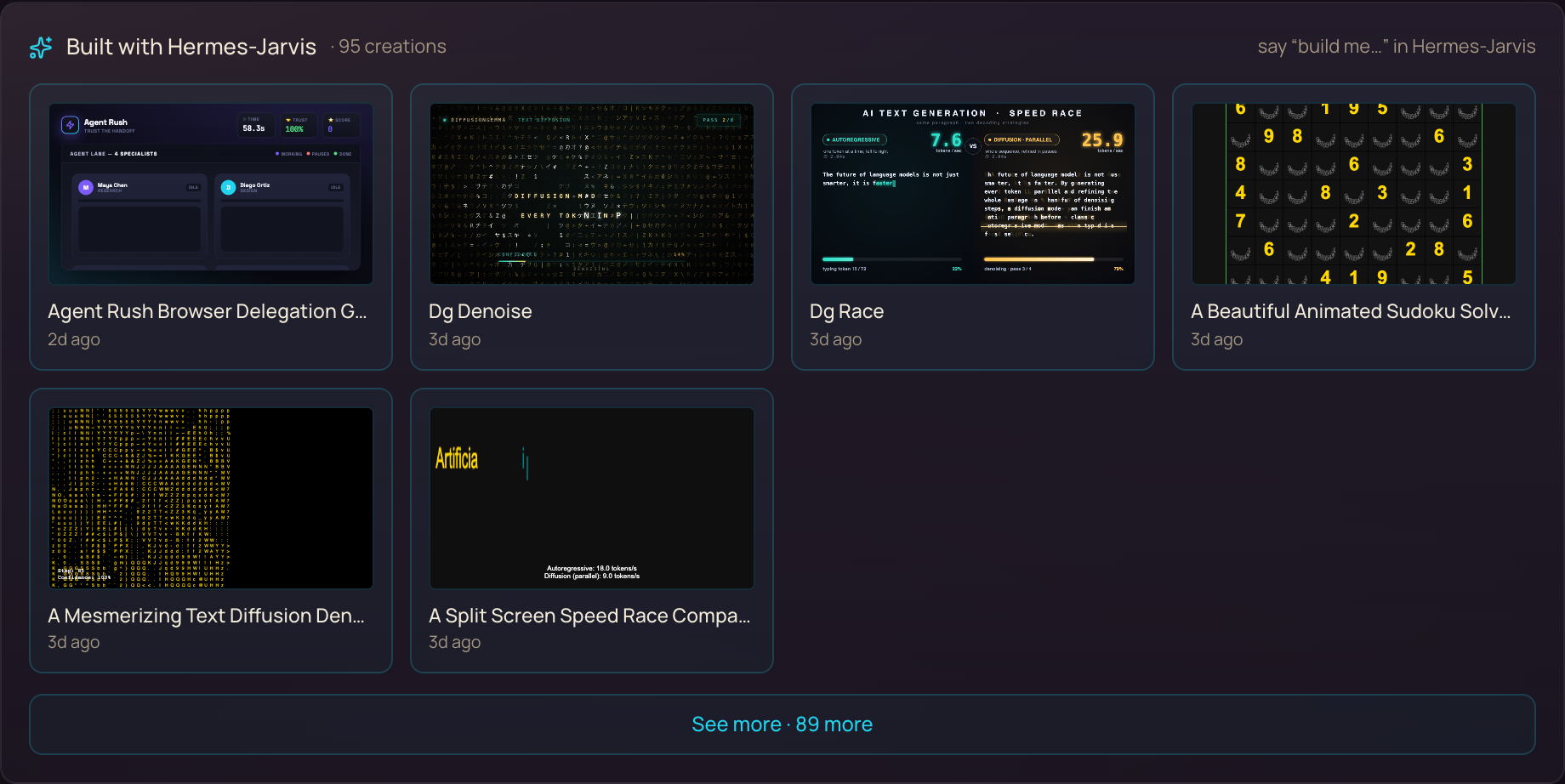
Everything it builds gets saved to a little gallery, so you can come back and play with any of it later.
 1
2
3
4
⤢ click to open
1
2
3
4
⤢ click to open
- 195 creations — everything you've built just by talking.
- 2"say build me…" — how you make a new one.
- 3Each tile — a real, playable app; click to open it.
- 4See more — the full archive of everything made.
You don't write a line. You say what you want in plain words.
It writes the code and runs it for you.
"Show me my stuff." On the wall.
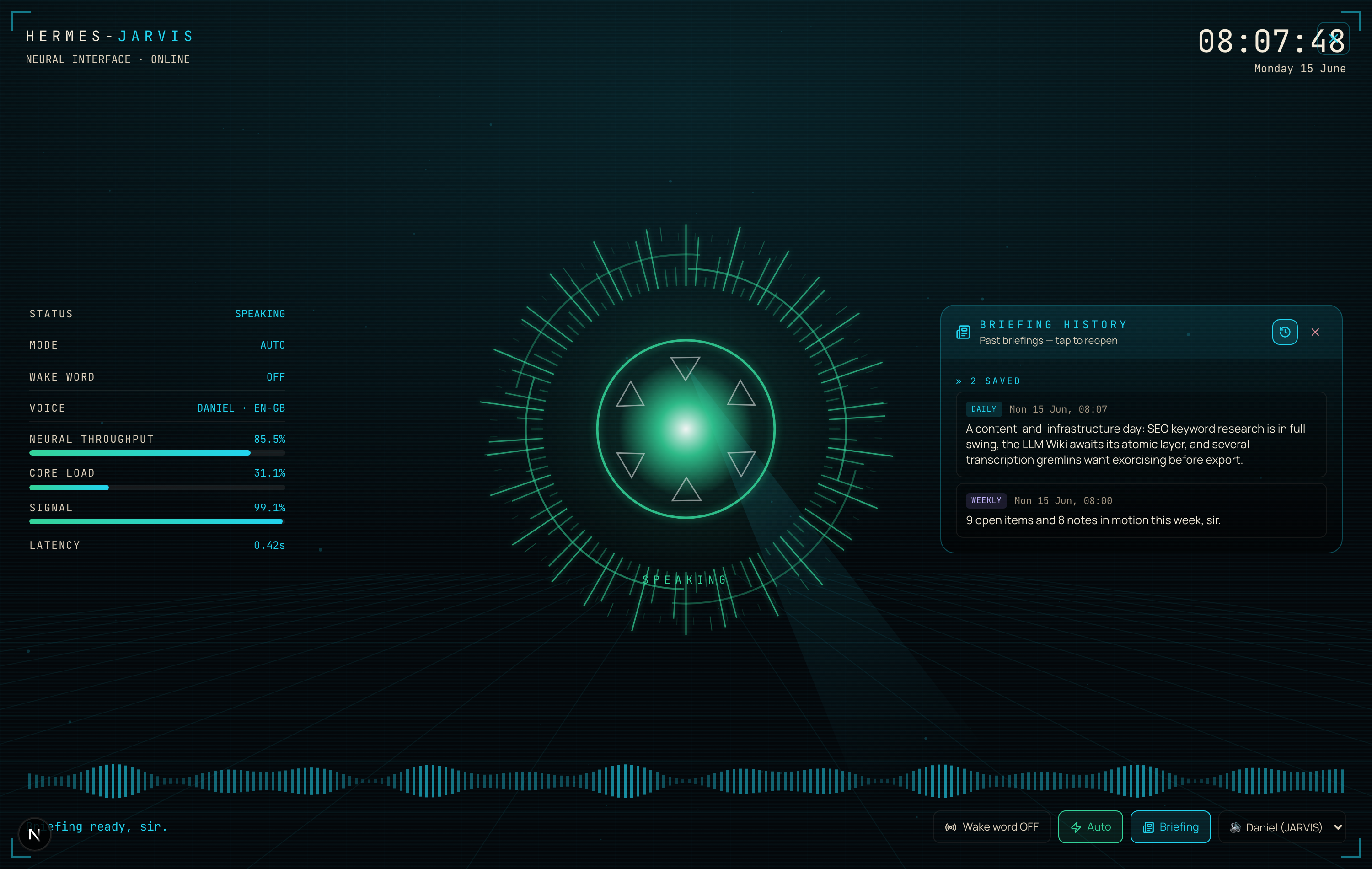
Say "show me my builds" and a glowing panel slides up with everything you've made.
Ask for your numbers, your team, or a system check — each one paints its own little screen.
Hit Wall mode and the whole thing goes full-screen, like a command centre. Perfect for a second monitor.
 1
2
3
4
5
6
⤢ click to open
1
2
3
4
5
6
⤢ click to open
- 1Live status — mode, wake word and voice up top.
- 2Telemetry — throughput, load and signal bars.
- 3The core — tap to talk from across the room.
- 4Side panel — your briefing or history, right there.
- 5Waveform — moves as Jarvis speaks.
- 6Controls — the same buttons, fullscreen.
"Remember that." It never forgets.
Say "remember that I want to film on Tuesdays" and it saves it straight to your notes.
Ask later — "what do you remember about filming?" — and it pulls it right back.
Same with your past. Ask "what did I work on yesterday?" and it reads your real notes and tells you.
This one writes to your Obsidian vault — your own notes.
So it remembers across days, not just for one chat.
"Open YouTube." Done.
Say "open YouTube" or "open Notes" and it opens it — fast.
Ask for something bigger — a real multi-step job — and it switches to full Agent mode and actually does the work on your Mac.
So it's not just a chat. It's a pair of hands.
How a command finds its way
Here's what happens the second you speak. Jarvis figures out what you meant and sends it down the right path:
The three things holding you back.
"A talking AI is a gimmick. I'll just type."
Typing is fine for one question. A butler that briefs you, builds for you, and remembers your world saves you an hour every morning. That's not a gimmick — that's a head start.
"This is only for coders."
You talk to it like a person. If you can ask a question out loud, you can run all six powers. Members who'd never opened a terminal are using it.
"I'll set this up later."
Six months from now, a computer that talks back and runs your day is normal. The people building it now are the ones who'll be way ahead when it is.
158 pages of members who already broke through these exact beliefs. Real businesses. Real wins. All documented.
Read the 158-page testimonials doc →How to start today.
Open the Jarvis tab
In your Agent OS, click into Hermes-Jarvis. You'll see the glowing core.
Tap it and say hello
Tap the core and talk. Let it answer out loud once so you feel it.
Say "brief me"
Watch it read your real notes and tell you what to focus on today.
Flip to Weekly
Tap the toggle to see your week — wins, themes, and the activity chart.
Try a build
Say "build me a starfield." Watch it appear, live, on screen.
Tap the clock
Open your briefing history and pull up an old one. Now it's a habit.
What you just got.
Tap the core and talk. It answers out loud.
"Brief me" reads your day from your own notes.
Old briefings are saved — pull any one up.
"Build me…" makes a real app and shows it.
"Remember that…" saves to your vault forever.
"Open…" opens it. Bigger jobs run on their own.
Iron Man had Jarvis. Now you do too — and it runs your whole morning before your coffee's cold.
Get your own Hermes Jarvis.
If you want your setup to actually save you time every day — not be another tool you check sometimes — grab the Agent Operating System inside the AI Profit Boardroom.
It turns OpenClaw, Claude, and Hermes into one system with shared memory, shared context, and one dashboard you control. Your agents understand your business. They remember everything. And every new feature — like the briefing — makes the whole thing stronger.
Read the 158-page testimonials doc →








