Your AI agent now has an animated pixel pet that reacts to everything it does — resting, thinking, done, or stuck — so you read its status in a single glance.
"Boba — a tiny otter sipping bubble tea while keeping you company in your coding agent." — that's the actual pet I installed for this guide, out of nearly three thousand.
— the petdex gallery, the pet I selected for the screenshots below
This is the magic. The pet isn't decoration — it's a status light with a personality. As your agent moves through its work, the pet swaps pose to match. You stop reading spinners and log lines. You just look at the little guy and know. These are the five real poses, straight from my dashboard:





Yes — the crying one means a run failed. You'll never miss it again.
Thinking it? "It's a cute toy. What's the actual point?"
The point is peripheral awareness. You don't watch your agent every second — you glance over while doing something else. A spinner tells you nothing; it spins whether the job's flying or dead. A pet that waves when it's done and cries when it failed tells you the one thing you needed, without reading a word. Cute is just the delivery.
Before — I'd fire off a job and tab away to do something else.
Then the doubt: is it still going? Did it crash? Is it stuck waiting on me?
So I'd tab back. Read the spinner. Read the logs. Nothing useful.
Tab away. Tab back. Read again. Half my attention living in a terminal.
The spinner spins exactly the same whether the job's flying or dead.
Then my agent got a face.
After — now there's a little otter in the corner of my dashboard.
It sips its tea when nothing's happening. It perks up when it's thinking.
It waves when it's done. It cries when something broke.
I don't read anything. I glance, I know, I get back to work.
A status light I actually look at — because it's alive.
This is the rare upgrade that's pure upside. It costs nothing, it can't break anything, and it makes a tool you stare at all day feel alive.
The whole thing is one command. By the end of this guide you'll have picked a pet and watched it react to your own agent.
So promise yourself one small thing: you finish this guide, you run the one command, and your agent has a sidekick before you close the laptop tonight. The little wins are what make this stuff stick — and a tool you enjoy opening is a tool you actually use.
Two minutes. One command. Your agent gets a face. Let's go.
A pet sounds like a gimmick until you live with it. Here's what actually makes it useful.
The pose isn't random — it's wired to what your agent is really doing. Idle, thinking, done, failed, waiting. The picture always matches reality.
No reading spinners or scrolling logs. Your eye catches the pose from across the room. Done waves, failed cries — you know before you've read a single word.
Otters, dragons, cats, robots — a whole gallery called the petdex. Pick the one that's yours. The agent you enjoy looking at is the one you actually use.
The same pet shows up in the command line, the desktop app, and — because I wired it in — the Agent OS dashboard. One companion, every surface.
It's a sprite. It can't touch your code, your data, or your agent's work. Worst case you turn it off with one command. There's no downside to try it.
Thinking it? "Won't a moving thing on screen just distract me?"
It sits quietly in a corner and bobs gently — you stop noticing it until the pose changes. That's the whole design: invisible when nothing's new, impossible to miss the moment something is. And if it's ever too much, hermes pets off and it's gone.
Here's the real shift. The old way, your agent's status was a wall of text that told you nothing fast. The new way, it's a face you read in a heartbeat.
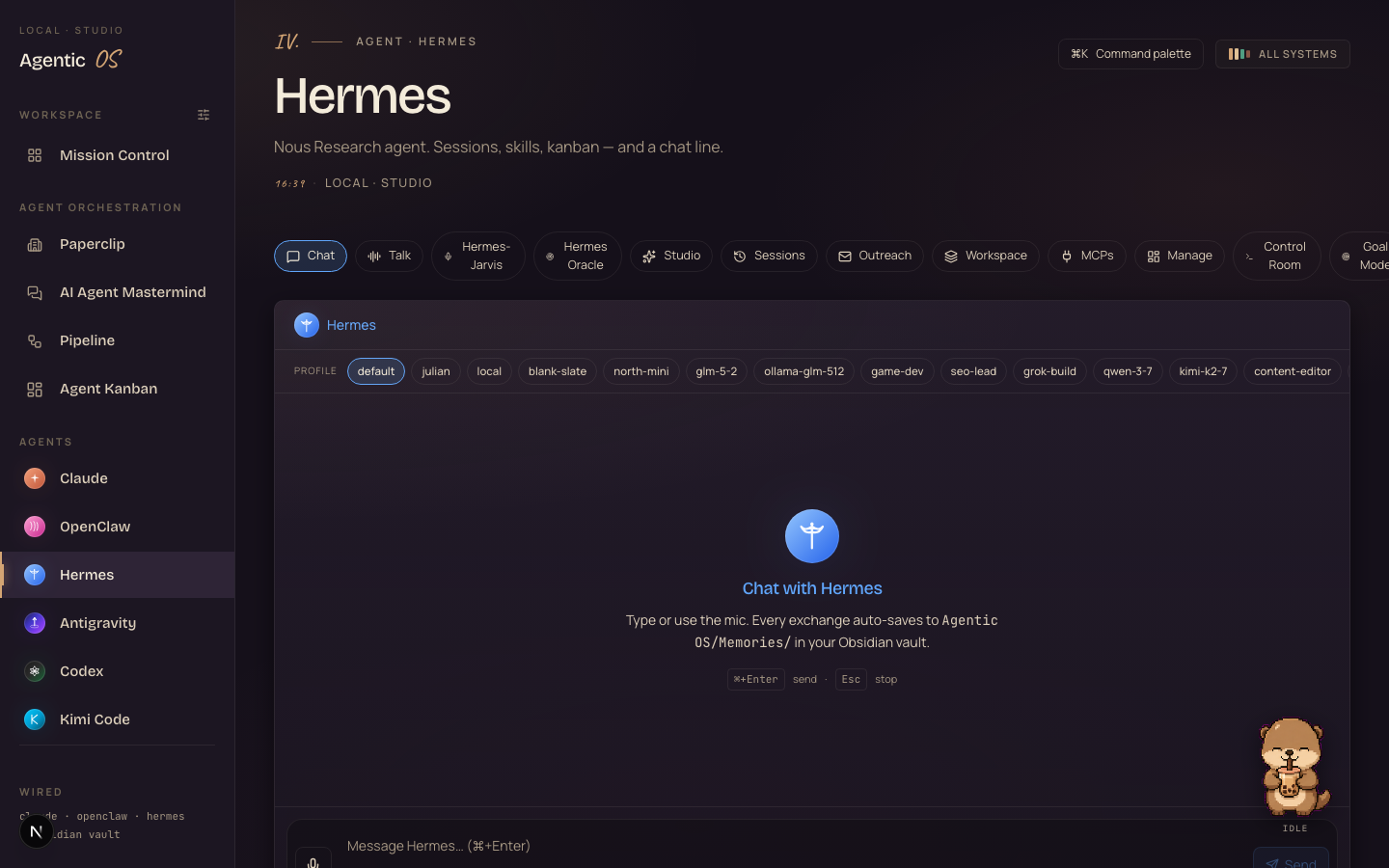
I didn't just install it in the command line. I wired the pet straight into the Hermes tab of my Agent OS, driven by the live chat state — so when the agent's thinking, the otter's thinking; when the reply lands, it waves. This is a real screenshot, not a mockup:

Thinking it? "Does it work outside Hermes' own apps?"
The pet ships with Hermes — command line, the TUI, the desktop app, all built in. Getting it into a custom screen like my Agent OS dashboard took a small bit of wiring (the screenshot above is the result). If you run it the normal way, it just appears — no wiring needed.
The pet is the fun part. The real prize is the Agent OS underneath it — one dashboard where Hermes, Claude, GLM and more share one memory, one team, one screen. I show founders how to build it, step by step.
link in the description ↗
Run hermes update so you've got the pet engine. (Mine pulled it in along with the latest build.)
Run hermes pets list to see the petdex — nearly 3,000 of them. Search it: hermes pets list otter, or dragon, or cat.
One command adopts it and makes it active: hermes pets install boba --select. Swap boba for any slug you liked.
Open a chat with your agent. The pet sits in the corner and changes pose as the agent works — idle, thinking, done.
Resize it with hermes pets scale, swap pets any time, or turn it off with hermes pets off. Nothing's permanent.
hermes pets off removes it instantly if it's not for you.Wrong: "A pet is a pointless gimmick."
Right: It's a status light you actually look at. A spinner tells you nothing; a pet that waves when it's done and cries when it failed tells you the one thing you needed — without reading a word.
Wrong: "Anything on screen that moves will distract me."
Right: It's quiet until the pose changes. That's the design — invisible when nothing's new, impossible to miss when something is. And one command turns it off if you ever want.
Wrong: "Little touches like this don't matter."
Right: The tool you enjoy opening is the tool you actually use every day. Making your agent feel alive isn't fluff — it's what turns a thing you tolerate into a thing you reach for.
3,600+ founders are building agents like this inside the Boardroom right now. Their wins — real businesses, real results — are documented here.
Read the 158-page member wins →You've seen it react to my own agent — idle, thinking, done. If you want your whole Agent OS set up like mine, with Hermes wired in step by step, it's all inside the AI Profit Boardroom.
I'll see you inside ↗








