Codex + Agent OS — automate anything.
OpenAI just dropped Codex Thursday. Locked-Mac control. Appshots. Goal Mode in the app, IDE, and CLI. I wired Codex CLI directly into Agent OS — four tabs, your past 63 sessions, autonomous goal runs, and inline preview of anything Codex builds. This is the read-along.

"Codex Thursday launches: Codex can now use apps on your Mac from your phone, even when your Mac is locked and the screen is off. Goal Mode lets you set a goal that it can work towards for hours or even days."
— OpenAI, May 22 2026Codex Thursday — what just shipped
OpenAI dropped four updates yesterday. Each one nudges Codex from "helpful coding assistant" closer to "autonomous workforce sitting on your Mac." Stack them together and the result is something new.
Locked-Mac control
Codex can use apps on your Mac from your phone — even when your Mac is locked and the screen is off. Persistent agent infrastructure, finally.
Appshots
Bring context from your screen straight into the Codex app. Snapshot any app's state, hand it to Codex, ask it to act on what it sees.
Goal Mode
Available in the app, IDE extension, and CLI. Set a goal. Walk away. Codex works towards it for hours or days. This is the killer feature.
Advanced annotation
Directly adjust the way web pages look while leaving feedback. Visual editing as agent input.
The headline is Goal Mode. Always-on context, persistent execution, hands-off operation for hours or days. That's a different category of tool than "chat with a coding model."
Why standalone Codex still leaves money on the table
OpenAI built an incredible agent. But the way it ships, you still have to open a separate app to use it. Five tabs across your screen. No memory of what your other agents (Hermes, Antigravity, Claude, OpenClaw) are doing. No shared workspace. No preview of what it built without context-switching to a browser or file manager.
Goal Mode is the killer feature — but if your goals live inside one app, your sessions inside another, your workspace files inside Finder, and your other agents in five more tabs, you're not running a system. You're juggling.
"OpenAI built the engine. Agent OS is the vehicle that lets you actually drive it."
Wire Codex into Agent OS
I built Codex into Agent OS as a first-class sibling — sitting in the sidebar next to Hermes, Antigravity, Claude, Gemini, OpenClaw, and Free Claude Code. Same Mission Control. Same memory layer. Same preview window.
Under the hood, it's codex exec --json for streaming chat and codex exec --full-auto --json for Goal Mode, against your default Codex profile. Same auth as your terminal. Same model. Same sessions. Just wrapped in a workspace your eyes can actually use.
The integration gives you four tabs:
Chat — streaming, multi-turn
Single-shot chat with multi-turn memory. Every send packs prior conversation into the next prompt. Same auth + model as your terminal Codex.
Goal Mode — hours-or-days autonomous
Hand Codex a long-horizon objective. It runs --full-auto in a dedicated scratch dir until the goal is met or you stop it. Each goal gets its own working directory so artefacts don't collide.
Sessions — your 63 past runs, surfaced
Lists every past Codex session pulled live from ~/.codex/session_index.jsonl. Newest first. Click to see the thread name, session ID, and timestamp.
Workspace — preview anything Codex builds
Lists projects from ~/codex-scratch/. Click any project to see its files. HTML pages render live in an iframe. Images preview inline. Videos play. PDFs embed. Same flow as the Antigravity workspace.
One agent in. Four tabs of leverage out.
— this is the playChat — single-shot, multi-turn memory
The Chat tab is where most quick Codex work happens. Behind the scenes it's codex exec --json streaming each turn back to Mission Control, with prior conversation packed into every new prompt so Codex doesn't lose the thread.
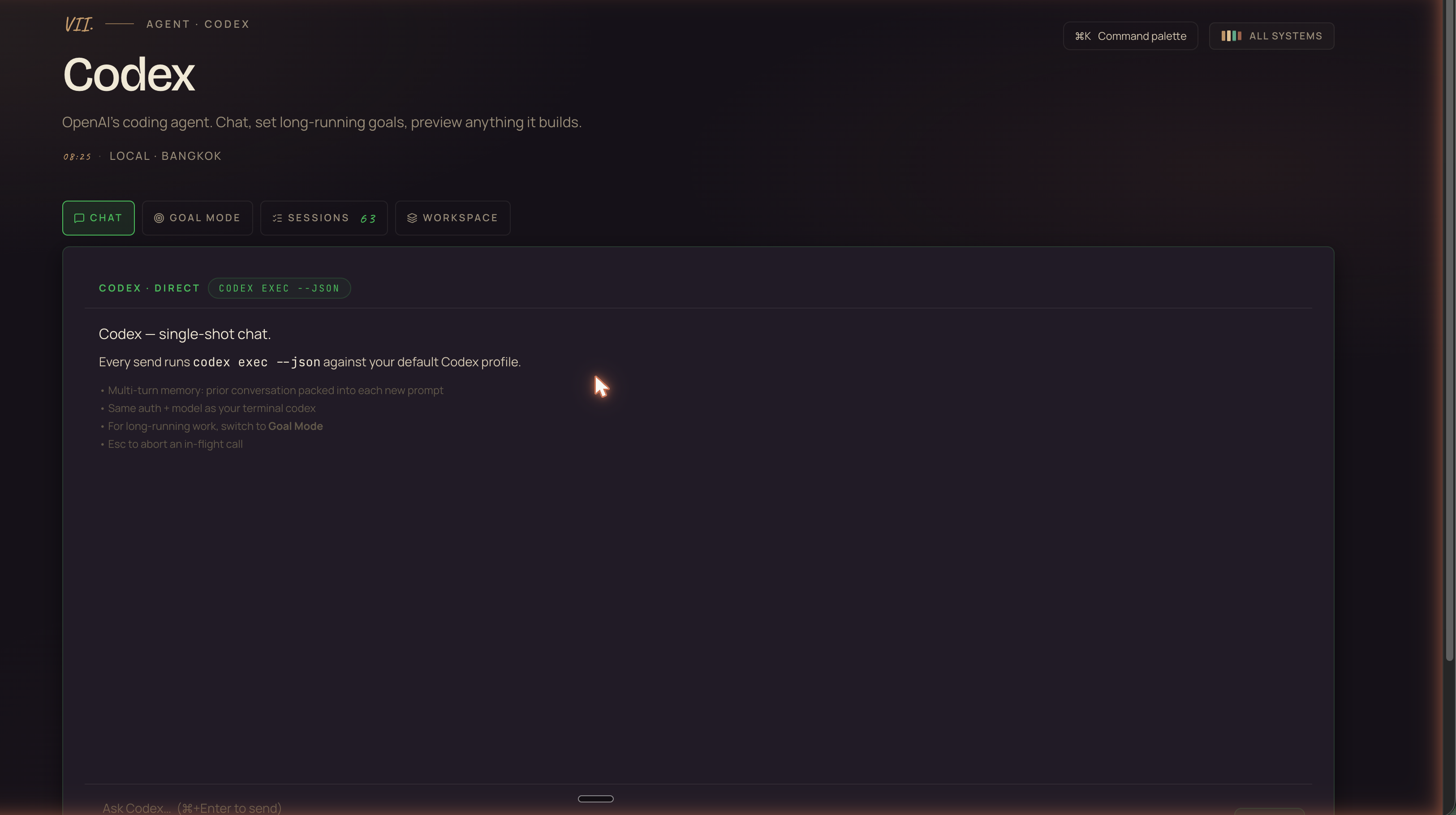
CODEX · DIRECT · codex exec --json. Multi-turn memory, same auth + model as your terminal codex, Esc to abort an in-flight call.For long-running work, switch to Goal Mode. For one-shot questions or fast iteration on a small task, this is where you live.
Goal Mode — the hands-off engine
This is the centerpiece. The thing OpenAI shipped that nobody else has shipped. The reason this whole guide exists.
You hand Codex a long-horizon objective. Something like "Build a single-file HTML landing page for an AI cookbook subscription, generate the imagery, write the copy, optimise the meta, and save it ready to ship." You click Launch. You close your laptop.
Codex runs codex exec --full-auto --json in a dedicated working directory under ~/codex-scratch/<id>/ so artefacts from different goals never collide. It works. It iterates. It checks. It writes files. It keeps going.
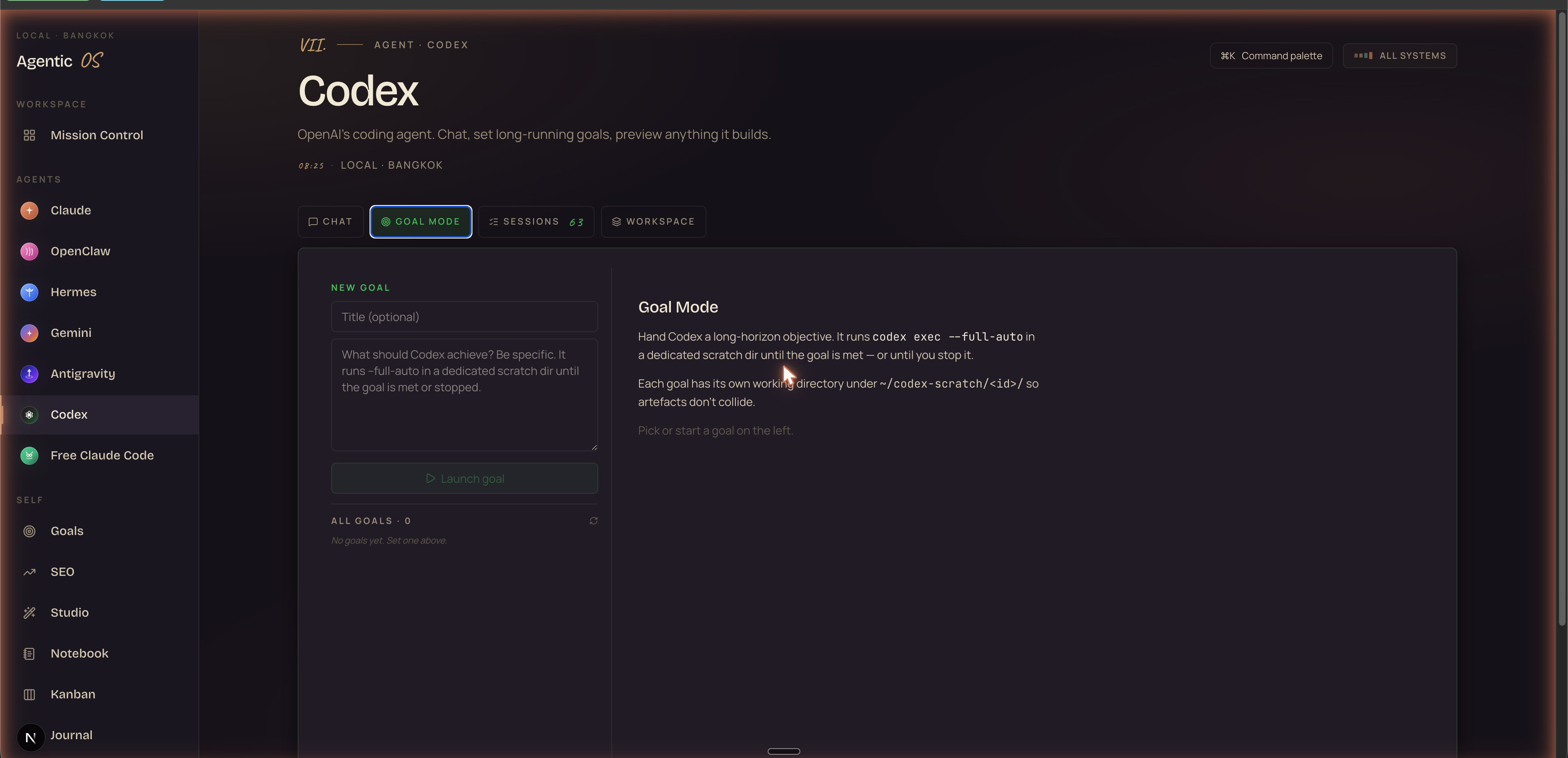
codex exec --full-auto --json in its own scratch dir.Goals persist to ~/.agentic-os/codex-goals.json so they survive reloads and dev-server restarts. Status surfaces as queued, running, completed, failed, or stopped. You can have multiple goals running in parallel — each isolated in its own scratch dir, each tracked independently.
"Codex Thursday gave us Goal Mode. Agent OS gave us a place to actually use it."

Sessions — your past 63 runs, surfaced
Codex stores every session on disk. The CLI does this automatically. But the CLI doesn't give you a good way to browse them — and you certainly can't see them next to your other agents.
Agent OS reads ~/.codex/session_index.jsonl and lists every past session newest-first. Thread name. Session ID (mono). Relative timestamp.
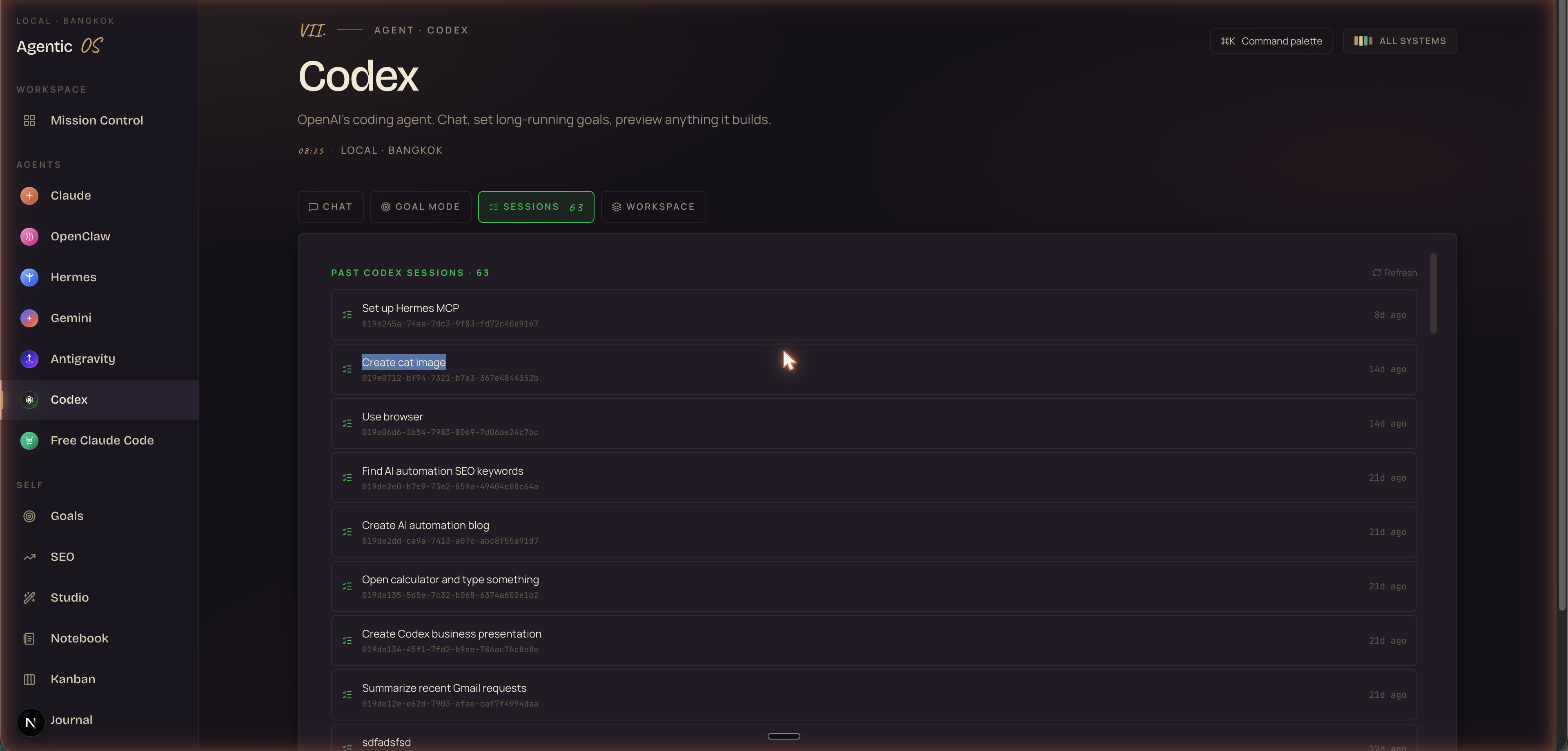
Why this matters: every past session is a template. Every successful workflow is a record. If you nailed "find AI automation SEO keywords" three weeks ago, you can re-open it, see what worked, fork it for a new niche. Compounding institutional memory — but only because you can actually see it.

The full Codex + Agent OS setup
Four tabs, the Goal Mode runner, the past-session browser, the workspace preview, the sidebar alongside Hermes / Antigravity / Claude / Gemini / OpenClaw / Free Claude Code. Plus the prompts, the SOPs, and the video walkthrough. Inside the AI Profit Boardroom.
Get Agent OS in AIPB →Workspace — preview anything Codex builds
This is the tab that closes the loop. You launch a Goal in Tab II. Codex spends an hour building a landing page, generating images, writing copy. Where does the finished work go?
Anywhere standalone Codex puts it, you'd have to dig through Finder, open files manually, switch between apps. With Agent OS: it appears in the Workspace tab.
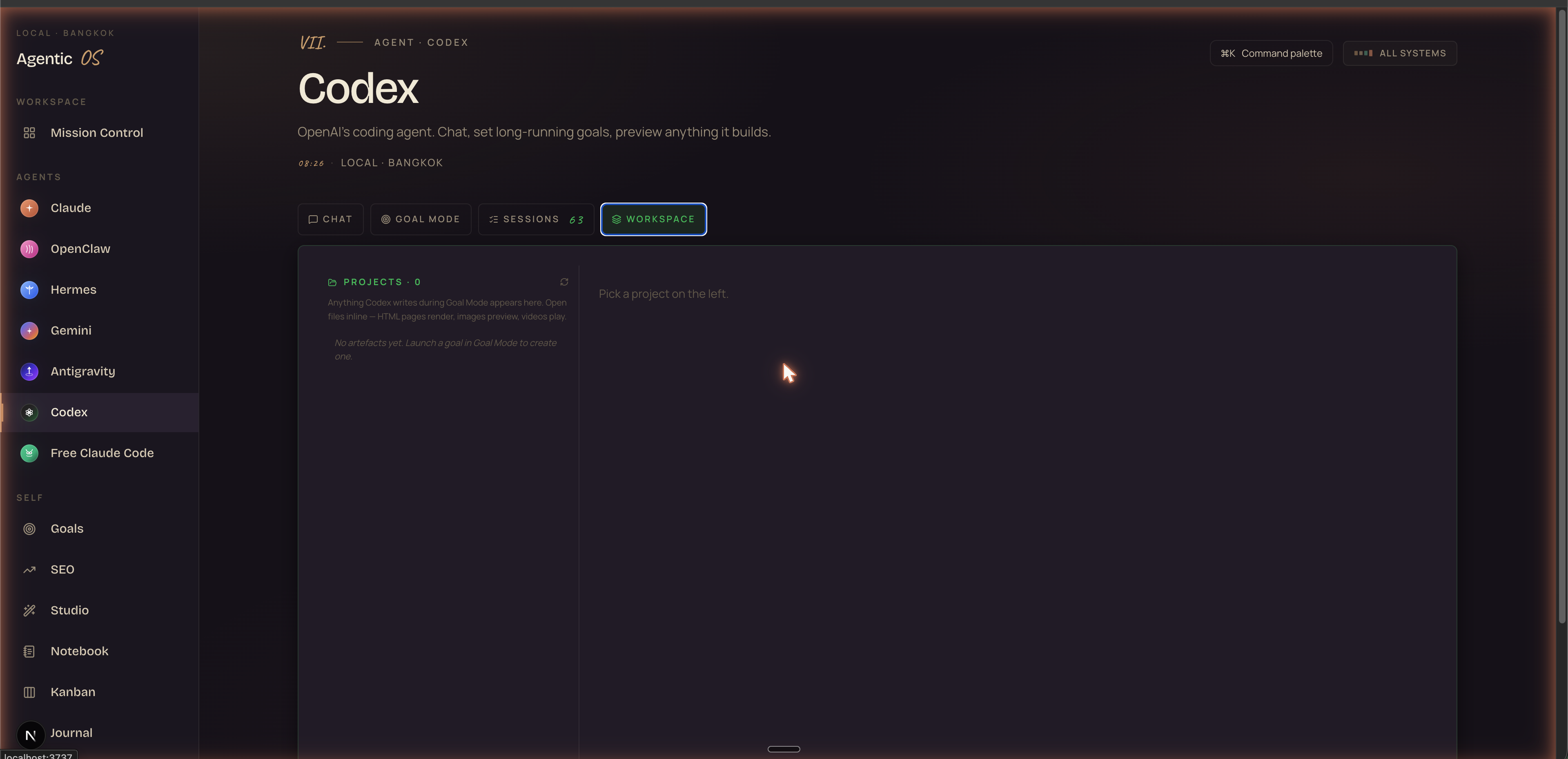
~/codex-scratch/ on the left. Pick one, see its files. HTML renders in an iframe. Images preview inline. Videos play. PDFs embed.Same pattern as the Antigravity workspace. Same preview/source toggle. Same path-based serving so the iframe just works. The result: you launch a goal, walk away, come back, click the project, see the thing. No context-switching. No file-hunting.

Where Codex sits in the agent stack
Codex isn't alone in Agent OS. It joins a roster of agents, each with its own strengths:
- Claude — reasoning, long-form planning, anything that needs depth.
- OpenClaw — local-first always-on AI assistant, lives across WhatsApp, Slack, Discord.
- Hermes — Nous Research agent, tool calls, kanban, plugins, skills.
- Gemini — long context, multi-million-token jobs, fast multimodal.
- Antigravity — see The Goldie Gravity Grid → — Google's agent-first deployment platform.
- Codex — autonomous Goal Mode, locked-Mac control, OpenAI's hands-off engine.
- Free Claude Code — the OSS sovereign-stack route. See Free Claude Code + The Sovereign Stack →
Each pulls from the same Obsidian memory layer. Each has its own workspace, its own session history, its own goal queue. You stop juggling tools. You start orchestrating fleets.
3 things I actually have Codex doing right now
Straight from my Sessions tab — these aren't hypotheticals. They're live goals running on my machine this week.
- Set up Hermes MCP — Goal: wire a new MCP server between Hermes and Obsidian. Codex bootstrapped the config, ran the install commands, tested the connection, and reported back. Two hours, no babysitting.
- Find AI automation SEO keywords — Goal: pull keyword volumes for "AI automation" cluster, deduplicate, score by difficulty, output a CSV. Walked away, came back to 142 keywords ranked and ready to draft against.
- Summarize recent Gmail requests — Goal: skim last 7 days of inbox, surface anything requiring a response, draft replies for the urgent ones. Standing weekly automation. Saves an hour every Monday.
None of these were "write some code." All of them were achieve this outcome. That's the Goal Mode unlock.
Three beliefs holding you back
The Codex updates land differently depending on which beliefs you hold. Three I see most often:
Still not sure agentic systems pay off? Read 258 unfiltered member wins from the AI Profit Boardroom →
"Codex is for developers. I'm not a developer."
Goal Mode is for anyone with goals. Codex doesn't care whether the goal is "ship a Next.js app" or "find 50 podcast prospects in my niche, draft personalised outreach, save the list as CSV." The output is whatever the goal asks for.
"I'll just use Codex standalone — why do I need Agent OS too?"
You can. And you'll spend half your day tab-switching, losing sessions, forgetting where files are, and not seeing your other agents. Or you can put Codex next to Hermes, Antigravity, Claude, OpenClaw, and Gemini in one Mission Control and orchestrate fleets.
"Hands-off agents are dangerous — I want to watch every step."
Each Codex goal runs in its own scratch dir. Nothing collides with your real work. The full log streams live. You can stop a goal at any moment. Hands-off doesn't mean trustless — it means scoped.
30-day roadmap
Don't try to automate everything at once. Build the muscle. Start small, expand as you trust it.
~/.codex/ for session history and ~/codex-scratch/ for workspace.The Goldie Goal Engine™ — recap
Codex Thursday gave us four launches, and the biggest one is Goal Mode. Locked-Mac control + Appshots + Goal Mode + Annotation together make Codex a different category of tool — not "chat with code" but "autonomous worker that finishes outcomes."
But OpenAI shipped the engine, not the vehicle. Standalone, you're still juggling tabs and losing sessions. Wired into Agent OS — four tabs, the past 63 sessions, the workspace preview, the sidebar next to every other agent you run — Codex becomes the Goal Engine: hands-off, persistent, compounding.
One agent in. Four tabs of leverage out.
The Goal Engine, files included.
Inside the AI Profit Boardroom: the full Agent OS with Codex wired in, the Hermes + Antigravity + Claude integrations, the prompts, the SOPs, the 30-day roadmap, the video walkthrough, and the zip of files you can drop in.
Join the AI Profit Boardroom →