The Compounding Vault™ + claude-obsidian v2.
claude-obsidian just dropped a huge free update — and it gives Claude a perfect memory.
Drop a file in a folder, and you're done. Your AI reads it, connects it, and remembers it forever.
Ask it anything about your business, and it answers from your own notes.
No more repeating yourself. No more starting from scratch every morning.
Your Claude is about to get a hundred times more useful — no matter who you are.
And the one setting most people miss changes everything — stick with me to the end.

A librarian that lives inside Claude.
claude-obsidian is a free, open-source plugin for Claude Code.
It gives Claude one job it never had before: keeping a real knowledge base.
Not chat history. Not a notes app. A living wiki of plain Markdown files on your computer.
You drop sources into an inbox folder. Claude reads them, links them, files them, and remembers where every fact came from.
Obsidian — the famous free notes app — becomes the beautiful window onto it. The graph below is a claude-obsidian vault the moment it's born:
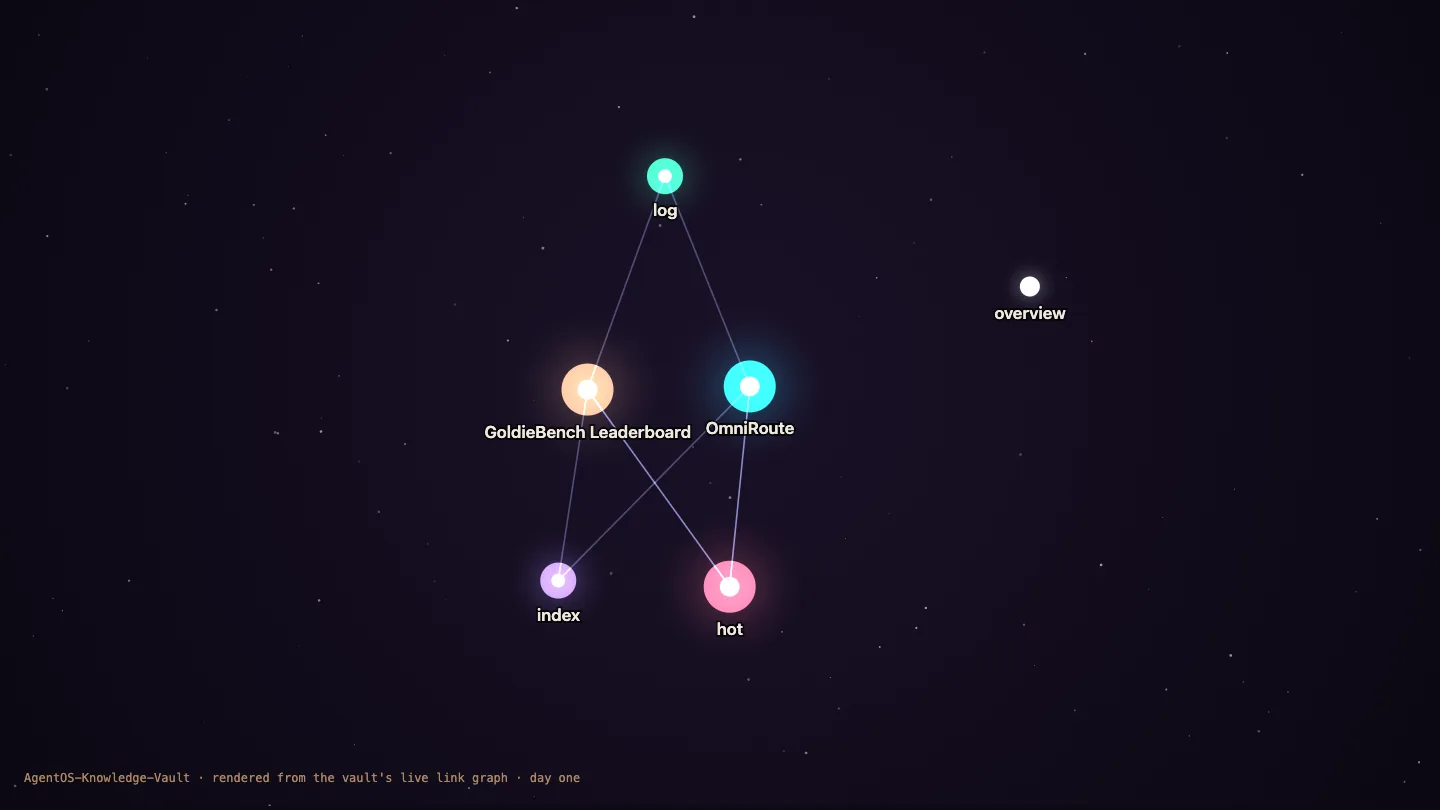
And because everything is plain Markdown, you own all of it. Delete the tool tomorrow — every note still opens.
My AI kept forgetting my own business.
Every session started the same way.
Re-explaining what GoldieBench is. How my router is wired. Which model won last week.
The knowledge existed — scattered across chats, notes and dashboards — but nothing connected it.
And when AI answered from memory, I couldn't tell the real claims from the confident inventions.
Then I gave Claude a vault it has to cite.
Now I drop a document into a folder — and it becomes linked pages on its own.
When I ask a question, the answer points back into my own notes.
And when the vault doesn't know something, it says so — instead of making it up.
You can have this too. The install takes ten minutes.
Real people. Real wins. Building second brains right now.
Members inside the Boardroom run knowledge systems like this across agencies, ecom stores and content businesses.
Every win is collected in one doc — read the 158-page member wins doc →
The Goldfish Problem — why your AI notes die.
Here's what nobody tells you about using AI every day.
You're generating more knowledge than any human in history — and keeping almost none of it.
That brilliant answer from last Tuesday? Buried in a chat you'll never scroll back to.
The research you did last month? Sitting in a note with no source, no links, no idea if it's still true.
Every morning your AI wakes up a goldfish. Every morning you re-teach it your own business.
And the worst part — when it does "remember", you can't tell whether it's remembering or inventing.
Your notes don't need another app. They need a system that keeps sources, connects ideas, and tells the truth about what it knows.
That system is the Compounding Vault™.
The Compounding Vault™
Three layers. Each one feeds the next.
Layer 1 · The Vault
A normal folder of Markdown with an inbox. Yours, local, portable. Obsidian renders it as a living graph.
Layer 2 · The Librarian
claude-obsidian's 15 skills — capture, connect, answer, clean. One provenance rule under all of them: every claim keeps its source.
Layer 3 · The Cockpit
The Agent OS. The plugin rides every Claude session, and the Memory Galaxy shows your whole brain as stars.
Why the old way of AI notes does not work.
You are the librarian.
- Copy-paste AI answers into random notes.
- Re-explain your business to AI every single morning.
- Search four apps to find one fact.
- Trust answers you can't check — or re-research them.
- Notes pile up with no links and no sources.
- Three months later: a folder you're scared to open.
The vault is the librarian.
- Drop sources in one inbox folder.
- Claude reads, links and files them on its own.
- Every claim keeps a pointer to its original source.
- Ask once — get an answer with citations into your notes.
- The vault flags what's unverified instead of bluffing.
- Three months later: a knowledge galaxy that answers for you.
Same effort. One system remembers, one forgets. And the gap compounds every week.
Up and running in three moves.
Move 1 — install the plugin. One clone, one install, and every Claude session on your machine gains the 15 skills.
git clone https://github.com/AgriciDaniel/claude-obsidian.git
claude plugin marketplace add ./claude-obsidian
claude plugin install claude-obsidian@agricidaniel-claude-obsidian
Move 2 — create your vault. Here's the part I love: it refuses to write a single file until it shows you its exact plan and you approve the plan's fingerprint. No surprises, ever.
Move 3 — start the loop. Drop a file in inbox/, then:
/claude-obsidian:wiki-ingest     # inbox → linked, cited pages
/claude-obsidian:wiki-query      # ask your vault anything
That's the whole daily rhythm. Everything else in v2 is power on top of this loop — and that's what we cover next.

Every new v2 power, one by one.
This release isn't a patch. It's a refoundation — reliability and evidence, rebuilt from the floor.
Here's what each new skill does and the exact workflow you'd use it in.
The front door
Checks your vault's health and routes you to the right workflow. Never guess which command you need — start here.
The librarian
Turns inbox files into linked pages. Keeps a byte-perfect copy of every original, and marks single-source facts as provisional until confirmed. It even scans sources for hidden prompt-injection before trusting them.
The honest oracle
Answers questions from vault evidence only, with links into your own notes. When the vault doesn't know, it names the gap instead of inventing — the exact opposite of AI bluffing.
The scribe
Saves ONE insight from a conversation — scoped, titled, filed. Never an automatic transcript dump. Your vault stays curated, not flooded.
The janitor
Finds dead links, orphan pages, stale indexes and missing metadata — then fixes them through the same safe transaction system. Weekly hygiene in one command.
The scout
Bounded web research that asks permission before touching the network, then merges findings into the vault as a separate, reviewable step. Research without silent uploads.
The mapmaker
Builds Obsidian Canvas boards from your wiki — visual maps of a topic, a project, a client. Your knowledge as a whiteboard, generated for you.
The finder
Serious search under the hood: keyword ranking plus optional smart reranking. It's what makes queries land on the right note in a 1,000-page vault.
The historian
Rolls weeks of vault activity into traceable summaries — what came in, what changed, what got confirmed. Your knowledge base writes its own changelog.
And the one most people will miss — /claude-obsidian:wiki-mode.
This is the setting I teased at the start. v2 lets the vault file new notes using the methodology YOU already think in:
Under all of it sits v2's biggest invisible upgrade: the transaction engine. Parallel agents can work on your vault at once — but only drafts come back. One orchestrator applies one change, backups journaled, conflicts detected, and a failed apply restores everything. Your knowledge base can't be half-written.
Six ways this changes your week.
Business brain
Ingest your offers, SOPs and client notes once. Every future Claude session knows your business cold.
Research that sticks
Every report and article you read becomes linked pages — findable and cited months later.
Content vault
Transcripts of your videos become a searchable idea bank. Ask "what have I said about X?" and get receipts.
Competitor intel
Drop competitor pages and launch notes in the inbox. Query the landscape before every campaign.
Course companion
Everything you're learning, filed in the methodology you think in — LYT, PARA or Zettelkasten.
Team handover
The vault is plain files — hand a new hire the folder and they inherit the whole brain, sources included.
If you want this in one place.
Everything in this guide is part of my Agent OS — the vault pattern, the Memory Galaxy, the agents that use it. Inside the AI Profit Boardroom you get it pre-wired, plus the people to help when something doesn't work first try.
- The Compounding Vault™ pattern — vault, plugin and memory stack pre-configured
- The complete Agent OS — every CLI and agent in one dashboard
- 5 live coaching calls a week — get unblocked by people on your exact setup
- 1,000+ prebuilt agents and the token-efficiency playbooks
- 4,000+ members in 38 countries — someone's online whenever you're stuck
The three beliefs holding you back.
You can build this for free.
Everything here is open source. The repo is public, the license is MIT, Obsidian is free, and this guide gives you the whole install.
Clone it, initialize a vault, start dropping sources tonight. You'll have a working second brain by the weekend.
Or take the shortcut: inside the Boardroom the whole pattern is pre-wired into the Agent OS, with live calls when you get stuck. Thirty minutes instead of a weekend.
Eight steps to set this up. Once.
Install the plugin
Clone the repo, add it as a marketplace, install. Two minutes, and every Claude session gains the skills.
Initialize a fresh vault
Run the init, read the plan it prints, approve the fingerprint. Keep it separate from any existing vault for week one.
Open it in Obsidian
Point Obsidian at the new folder. Watch the graph view — it's about to get interesting.
Pick your filing mode
Generic by default — or switch to LYT, PARA or Zettelkasten with /wiki-mode if that's how your brain works.
Drop your first three sources
One business doc, one piece of research, one transcript. Into inbox/, then run /wiki-ingest.
Ask your first question
/wiki-query something you half-remember. Watch the answer come back with links into your own notes.
Make the drop a habit
Anything worth keeping goes in the inbox. End of day, one ingest. That's the compounding engine.
Lint on Fridays
/wiki-lint once a week keeps the graph clean — dead links fixed, orphans adopted, indexes fresh.
Thirty days to a brain that answers back.
Week 1 — Foundation
Days 1–7Goal: working vault, first ten sources ingested, first cited answer.
Week 2 — Your business
Days 8–14Goal: offers, SOPs, client notes and voice docs in. Claude answers business questions from YOUR files.
Week 3 — The workflows
Days 15–21Goal: canvas maps for your top project, research runs with consented autoresearch, first Friday lint done.
Week 4 — Compounding
Days 22–30Goal: daily drop habit locked in, monthly fold rollup, and the graph view starts looking like a galaxy.
Everything you just learned, in one glance.
The problem
AI notes die — no links, no sources, re-taught daily.
The framework
The Compounding Vault™: Vault → Librarian → Cockpit.
The loop
Capture → Ground → Connect → Use. Daily drop, weekly lint.
The safety
Plan → approve → apply. One recoverable transaction, always.
The honesty
Claims stay provisional until confirmed; gaps get named.
The modes
Generic, LYT, PARA, Zettelkasten — your brain's filing system.
The 15 skills
Ingest, query, save, lint, canvas, research, retrieve, fold, mode…
The destination
A knowledge galaxy in your Agent OS that answers with receipts.
Build it free. Or take the shortcut.
The free path is real — repo, vault, ten minutes. And if you want it pre-wired with people to call when it fights back, the Boardroom is the shortcut.
- The Compounding Vault™ pre-configured inside the Agent OS
- 5 live coaching calls a week + a community that's already built this
- 258 documented member wins — read all of them here