First, watch what the video agent actually produces
Real avatar, real voice, synced captions, on-topic b-roll, branded end card — and the agent composed the whole thing: avatar → HyperFrames composition → captions → render. The onion-shot you'll see cut in is the exact self-correction feature this guide is about.
The agent used to be blind to its own animation. Now it isn't.
Before, the video agent could render a composition — but it couldn't see how the thing moved. If motion was robotic or off, you had to eyeball the MP4 and describe the fix. HyperFrames' new keyframes command changes that: it hands the agent a machine-readable map of every animation and an "onion-shot" image of the motion path — so the agent can look at its own movement and correct it, in one command.
The same keyframe thinking that lives inside professional editing tools — anticipation, easing, arcs, settle — now readable and fixable as code. Your agent speaks it natively.
Same move, A → B. One is dead. One is alive.
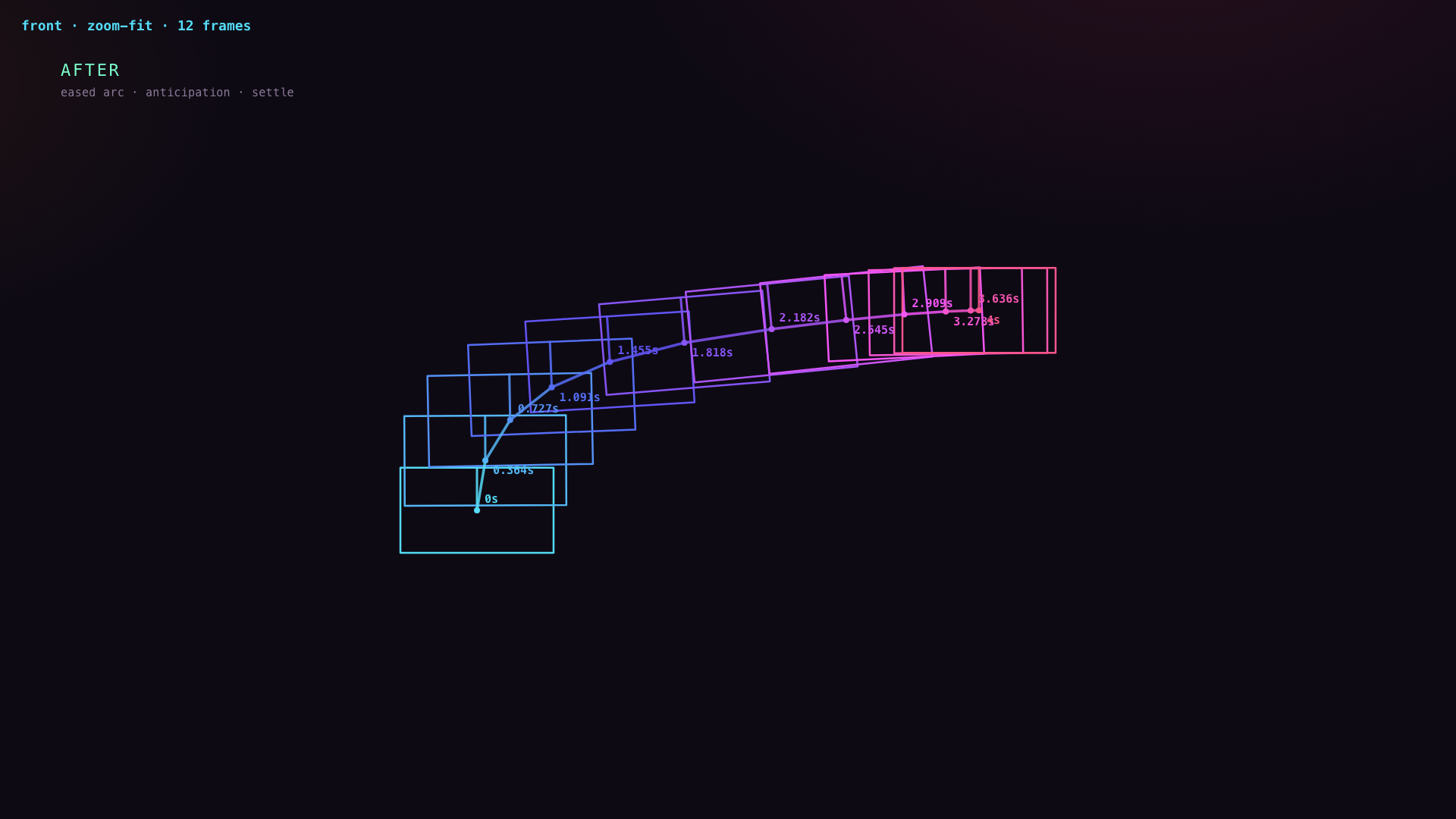
Here's the idea stripped to a single moving card so the difference is unmistakable. In Before it slides in a straight line at constant speed — the classic amateur move. In After, the exact same journey is refined into real motion: an eased arc with anticipation and a settle. Then look at what the agent sees when it inspects each one.
what the agent sees
The onion-shot: the motion, ghosted across time
Run keyframes --shot and the agent gets this — the element sampled at equal time-steps, plotted at its real position with the motion path drawn. You don't need to play the video to know if the motion is good. You can read it.

The self-correcting motion loop
Inside your Agent OS video agent (the Video tab → any project), there's now an Inspect motion button next to Render. Here's the loop it unlocks:
- Render — the agent builds the composition to MP4, exactly as before. Nothing about your existing pipeline changed.
- Inspect motion — one click runs hyperframes keyframes. The agent gets back a JSON timeline of every tween (target, timing, easing, path) and an onion-shot PNG of the motion.
- See the problem — evenly-spaced ghosts on a straight line? That's robotic. A hard corner or a teleport? That's a bug. The agent reads it directly — no guessing from a played-back video.
- Fix the keyframes — change the eases, bend the path, add anticipation and a settle. All in code, all deterministic.
- Re-render — and inspect again to confirm. The onion-shot is the receipt.
Do it yourself in 30 seconds
In the Agent OS, open Video, pick any rendered project, and hit Inspect motion. Or from a terminal, on any HyperFrames project:
# the agent's-eye view: machine-readable motion timeline
hyperframes keyframes ./my-video --json

# the human view: onion-skin of one element's motion path
hyperframes keyframes ./my-video --shot motion.png --selector "#card"
Under the hood the video agent is now on HyperFrames 0.7.31 (render pipeline verified unchanged), with a new /api/video/hyperframes/keyframes endpoint powering the Inspect-motion panel.
This is what "agentic video" actually means
Not just generating a clip — an agent that can look at its own craft and improve it. That's the whole game. It's all inside the Agent Operating System.
Get the Agent OS in the AI Profit Boardroom →