The Goldie Babel Engine™ + Gemini 3.5 Live Translate.
I built a real-time voice translator straight into my Agent OS.
You talk. It hears any language. It speaks the translation back out loud — live, in the other person's tongue.
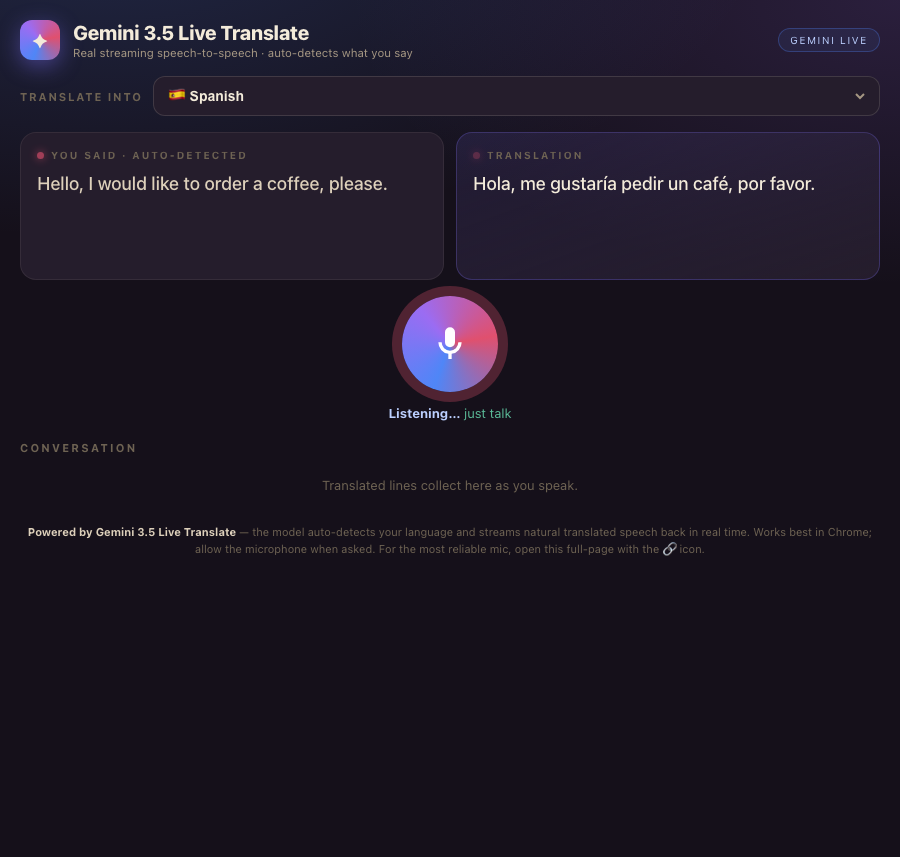
Here's the thing I actually built. Open it.
This isn't a mock-up. It's a real app, running inside my Agent OS right now.
I spoke into it. It heard me, translated me, and spoke back — in Spanish, French, whatever I picked. These are real screenshots from real runs.
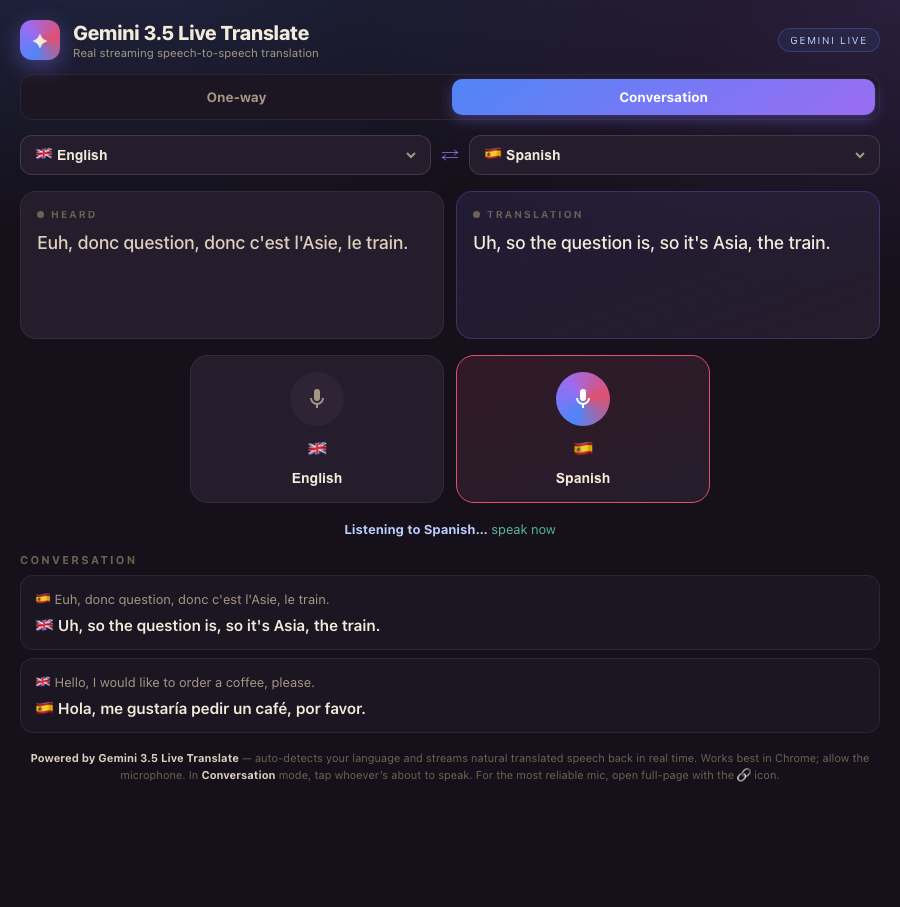
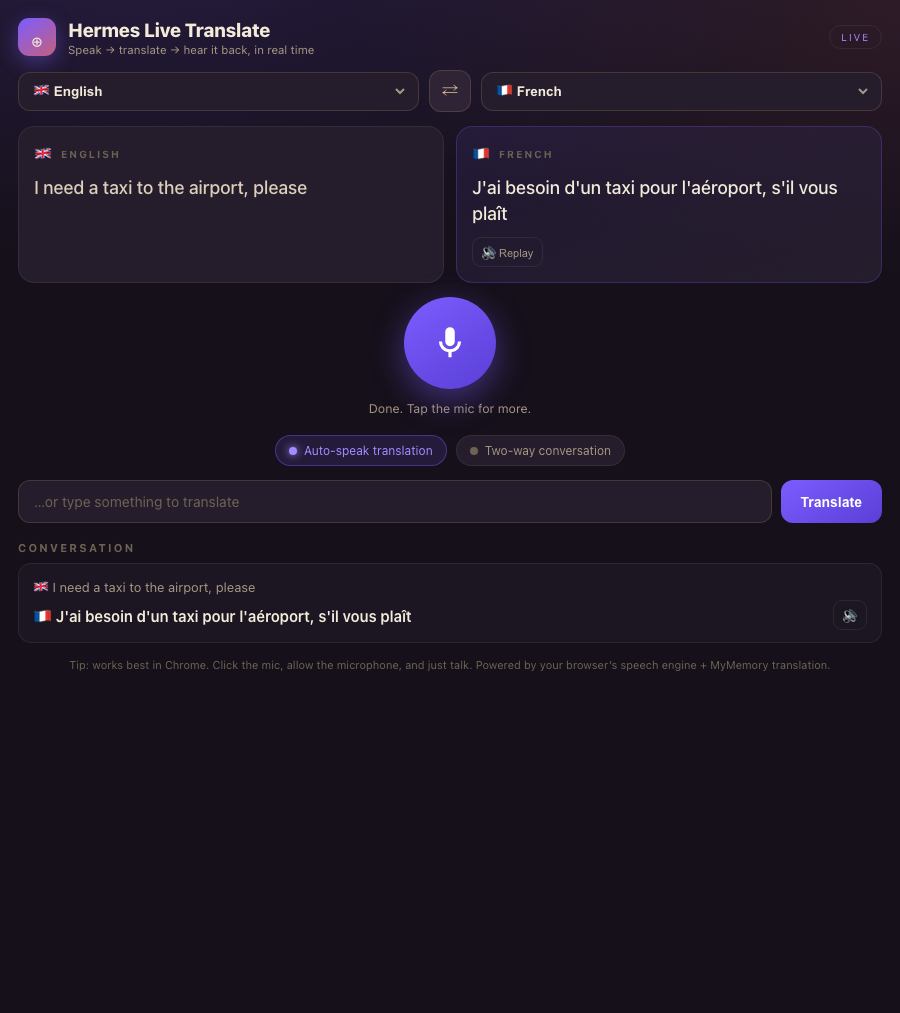
No tabs. No typing. No "wait, let me copy that."
You talk like normal. It hears the language on its own, and the other person hears their language come out of your computer — while you're still mid-sentence. And it lives in the same place all your other agents live.
I was you. Then I built the Babel Engine.
Before
I work with people all over the world. Members in 38 countries. Clients who don't speak English.
And every time, the language wall went up.
I'd open Google Translate in another tab. Type my sentence. Copy theirs. Paste it back. Wait.
By the time I had the translation, the moment was gone. It felt robotic. It felt slow. It killed the conversation.
Then I wired Gemini's new Live Translate into my Agent OS.
After
Now I just talk.
It hears whatever language I speak — I don't even pick one.
It speaks the translation back out loud, in their language, in real time.
Two people. Two languages. One screen. A real back-and-forth conversation.
You can have this too. Same tools. Same path.
The Goldie Babel Engine™.
Five parts turn "speak into a mic" into "the whole world understands you." Here's what each one gives you.
The Ear
It hears any language on its own — 70+ of them — and works out what you're speaking. You never set an input language. You just talk.
The Bridge
It translates as you speak, not after you finish. The meaning crosses over in real time, so the conversation never stalls.
The Voice
It speaks the translation out loud in natural speech. The other person hears it — they don't have to read your screen.
The Exchange
Two-way mode. Tap whoever's about to talk and it flips direction instantly. A real back-and-forth between two languages.
The Vault
It lives inside your Agent OS, next to every other agent. The conversation gets logged. Your data stays on your machine, yours.
The old way was slow and dead. The new way is live.
- Open Google Translate in another tab
- Type your sentence in
- Copy their reply, paste it back
- Pick the language by hand every time
- Read a wall of text off your screen
- The moment's gone before you answer
- Open the translator in your OS
- Just talk — any language
- It auto-detects what you said
- It speaks the translation out loud
- Two-way mode for a real conversation
- Every line logged in your vault
You don't build it from scratch. The Agent OS is already built.
You drop a file in the workspace and open it. If you can paste one thing and click 'open', you can run this. Members who'd never opened a terminal are doing it.
What it looks like when you actually use it.
One-way mode — pick the language you want to hear. Tap the mic. Talk. It hears you, translates, and speaks it back out loud. You order the coffee in English, the waiter hears perfect Spanish.
Conversation mode — pick the two languages, like English and Spanish. Tap whoever's about to talk. They speak, the other person hears their own language. Tap the other button, they reply. A real conversation, both ways, on one screen.
It lives in your OS — right next to Claude, Hermes, your pipeline, your memory. Every line of the chat gets saved. Nothing leaves your machine that doesn't have to.
Sales calls with someone who speaks another language. A supplier overseas. A team member who's stronger in their own tongue. A trip where you don't speak a word.
The engine doesn't care what you sell. If you ever talk to someone who doesn't share your language, this is for you.
Want the Agent OS this is built inside?
The translator is one tool. The real power is the operating system it lives in.
- A full Agent OS that connects Claude, Hermes, and your other agents into one dashboard
- Your agents share one memory — they know your goals, your business, your voice
- The full zip file, every prompt, and the Obsidian memory setup
- Four coaching calls a week with people building real tools like this in production
- A 30-day roadmap, daily tutorials, and a member map to find builders near you
- A room of 2,200+ founders — a society of equals, everyone brings problems and answers
How to run it yourself — start to finish.
Open your Agent OS. Go to the Claude → Workspace tab.
Open the Translator project, then the live translate file. It loads right in the page.
Pick a target language. Tap the mic. Allow the microphone when it asks.
Talk. Watch it hear you, translate you, and speak it back out loud.
For a real chat, hit Conversation, pick two languages, and tap whoever's speaking.
Every line gets logged in your vault. Scroll back any time.
The three things holding people back.
"Translation tools are good enough already. I'll just keep using the free web one."
The free web one makes you type and read. This one lets you talk and listen — live, both ways. Once you've had a real spoken conversation across two languages, the typing version feels broken.
"I'd need to be a developer to build tools into my own system."
The system's already built. You add tools to it like dropping a file in a folder. The hard part is done — you just use it.
"I'll wait until all this AI stuff settles down."
It's not settling. The people who build with these tools now, while they're moving fast, are the ones way ahead when everyone else catches on. Every tool you build compounds.
158 pages of members who already broke through these exact beliefs and built real things. Their stories are documented here.
Read the 158-page testimonials doc →What you walk away with.
You stopped typing. Just talk — it hears any of 70+ languages on its own.
You stopped waiting. It translates while you speak, not after.
They stopped reading. It speaks the translation out loud in their language.
You can have a real chat. Two-way mode flips direction with one tap.
You own it. It lives in your OS, logs every line, stays on your machine.
You can build more. If you can build this, you can build the next tool too.
Build your own Agent OS — and tools like this live inside it.
The translator took one session. With the OS already in your hands, your next tool is just as fast.
- The full Agent OS zip — Claude, Hermes, and your agents in one dashboard with shared memory
- Every prompt and the Obsidian memory setup that makes your agents know your business
- Coaching calls where we set it up together, step by step
- 2,200+ members, daily tutorials, a 30-day roadmap, and a member map
- Every new AI update — like Gemini Live Translate — makes the whole system more powerful
Talk once. The whole world understands you. That's the Babel Engine.








